Create a Custom Validator
Overview
This page describes how to implement a custom validator for use in document types within Bloomreach Content.
When to Use
Create a custom validator when the built-in validators do not meet your validation requirements for fields, compound fields, or entire document types.
Note: Validation is available only for document types with workflow enabled (
hippostdpubwf:document).
Validator Scope
Validators can be applied at different levels. The following table summarizes each scope, what it validates, where violations are reported, and how to configure it:
| Validator Scope | Validates | Reports | Configured |
|---|---|---|---|
| field | Value of a single field | Below the field | Per field |
| compound | Values of multiple fields in a compound | Above the compound | Per field or compound type |
| document | Values of multiple fields in a document | Above the document (field highlighting not supported) | Per document type |
Implementation Steps
1. Create the Validator Class
Implement a class that extends org.onehippo.cms.services.validation.api.Validator.
The following example shows a field-scoped RegExpValidator:
public class RegExpValidator implements Validator<String> { private static final String PATTERN_KEY = "regexp.pattern"; private final Pattern pattern; public RegExpValidator(final Node config) { try { pattern = Pattern.compile(config.getProperty(PATTERN_KEY).getString()); } catch (RepositoryException e) { throw new ValidationContextException("Cannot read required property '" + PATTERN_KEY + "'", e); } } public Optional<Violation> validate(final ValidationContext context, final String value) { if (pattern.matcher(value).find()) { return Optional.empty(); } return Optional.of(context.createViolation()); } }
Your validator class must implement:
- A public constructor: The constructor must be public to allow instantiation via reflection. It can have no parameters or a single
javax.jcr.Nodeparameter for validator-specific configuration. - The
validatemethod: This method performs validation and returns a violation if the value is invalid. The value type should match the JCR property type (String,Date,Long, etc.). For compound fields and documents, the value is ajavax.jcr.Node. TheValidationContextparameter provides access to:- JCR name (e.g., "myproject:title")
- JCR type (e.g., "String" or "myproject:mycompound")
- Field type (e.g., "Text")
- User locale (e.g., "en")
- User time zone (e.g., "Europe/Amsterdam")
- Parent node
- Document node
Note: The
validatemethod must be thread-safe.
2. Register the Validator
Add a new hipposys:moduleconfig node to the validation service configuration at /hippo:configuration/hippo:modules/validation/hippo:moduleconfig.
Use your project namespace in the validator name to distinguish it from built-in validators.
Example configuration for an email validator:
/hippo:configuration/hippo:modules/validation/hippo:moduleconfig/myproject:email: jcr:primaryType: hipposys:moduleconfig hipposys:className: org.onehippo.cms.services.validation.validator.RegExpValidator regexp.pattern: ^[a-zA-Z0-9._%+-]+@[a-zA-Z0-9.-]+\.[a-zA-Z]{2,6}$
3. Assign the Validator to a Field or Document Type
To assign a validator at the field level, locate the field node in your document type definition at /hippo:namespaces/[namespace]/[documenttype]/hipposysedit:nodetype/hipposysedit:nodetype/[fieldname].
Add the validator node name (from your configuration) to the multi-valued hipposysedit:validators property.
Example for an 'Email' field in the 'author' document type:
/hippo:namespaces/myproject/author/hipposysedit:nodetype/hipposysedit:nodetype/email: jcr:primaryType: hipposysedit:field hipposysedit:mandatory: false hipposysedit:multiple: false hipposysedit:ordered: false hipposysedit:path: myproject:email hipposysedit:primary: false hipposysedit:type: String hipposysedit:validators: [myproject:email]
To assign a validator at the document type level, add the validator node name to the hipposysedit:validators property of the document type node at /hippo:namespaces/[namespace]/[documenttype]/hipposysedit:nodetype/hipposysedit:nodetype.
4. Configure Validation Messages
Validation messages are stored as repository resource bundles at /hippo:configuration/hippo:translations/hippo:cms/validators/.
For each supported language, add a translation property with the same name as your validator configuration. Use clear, imperative sentences for messages.
Example:
/en: jcr:primaryType: hipposys:resourcebundle myproject:email: Enter a valid email address escaped: 'Do not use these characters: < > & '' "' image-references: Select an image non-empty: Enter a value
To define multiple violation messages for a validator, use the format <validator-name>#<subKey>:
/en: jcr:primaryType: hipposys:resourcebundle myproject:customvalidator: Custom validation message myproject:customvalidator#alternate: Alternate validation message
Within your validator class, use context.createViolation() to access the default violation message, or context.createViolation(String subKey) for alternate messages.
Verification
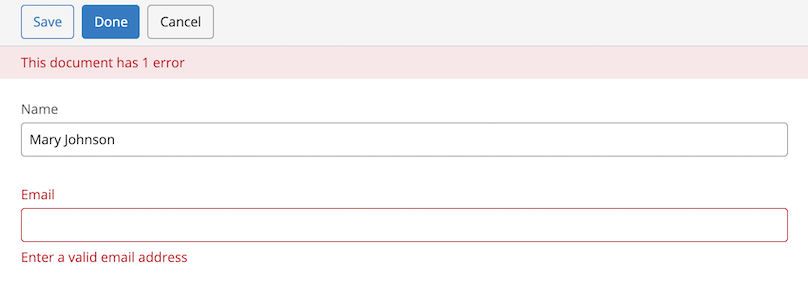
After configuration, verify that your custom validator works as expected. When a validation error occurs, the document editor displays the corresponding message.
Troubleshooting
Symptom:
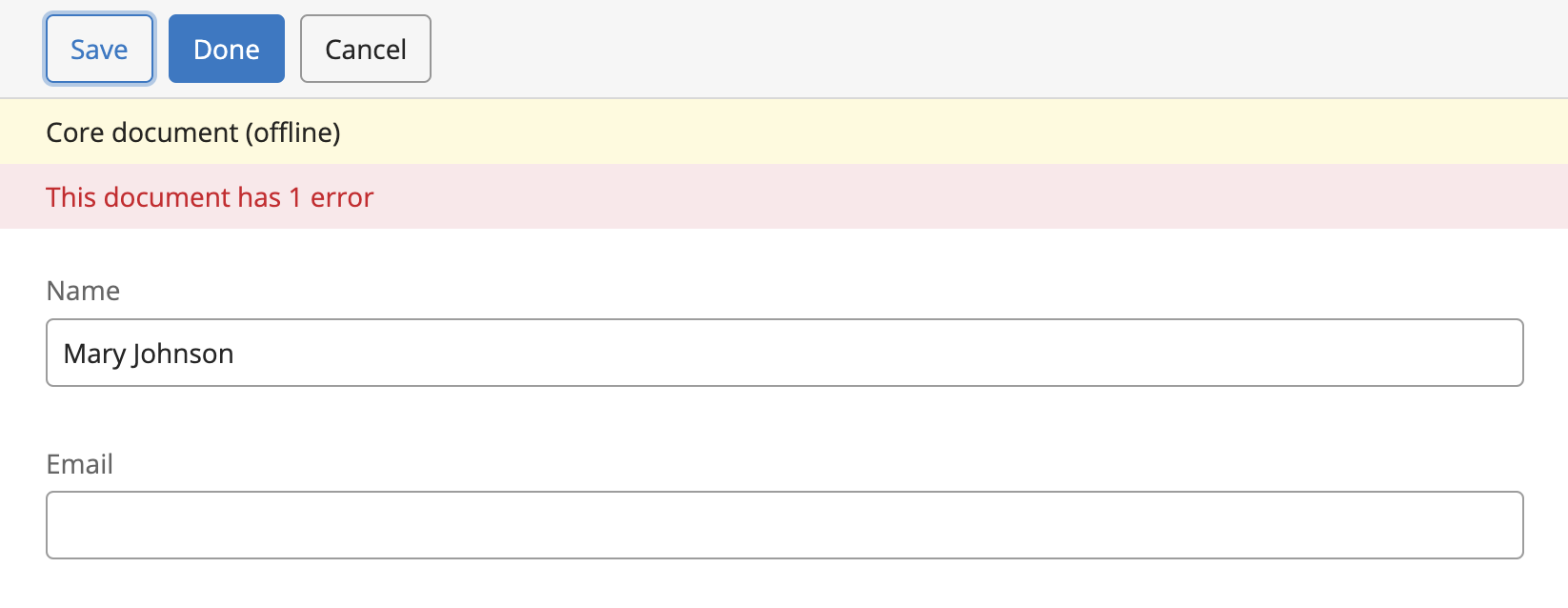
The document editor displays "This document has 1 error," but no validation error message appears below the affected field.
Cause:
The frontend:references and frontend:services properties of the document type editor template's _default_ node are missing the "validator.id" value. This value is typically added by the document type editor, but it may be missing due to manual YAML editing, upgrades, or customizations.
Resolution:
Add "validator.id" to both the frontend:references and frontend:services properties of the _default_ node in the editor template.
Example for the "author" document type in the "myproject" project:
/hippo:namespaces/myproject/author/editor:templates/_default_: jcr:primaryType: frontend:plugincluster frontend:properties: [mode] frontend:references: [wicket.model, model.compareTo, engine, validator.id] frontend:services: [wicket.id, validator.id]