Hints for Document Type Fields
Overview
You can provide hints for individual fields in a document type. When a hint is configured, the field label in the Document Editor displays an information icon. Hovering over this icon shows a tooltip with the hint text. Use hints to explain the field’s purpose, usage, or limitations.
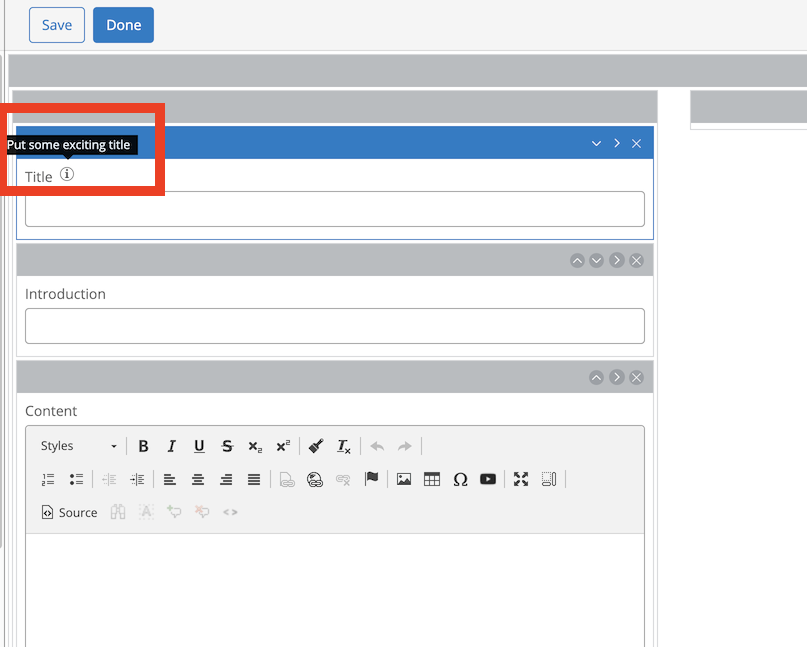
Configuring Hints
To add a hint to a field:
-
Open the CMS Document Type Editor.
-
Select the document type you want to modify.
-
Enter Edit mode.
-
Select the field where you want to add a hint.
-
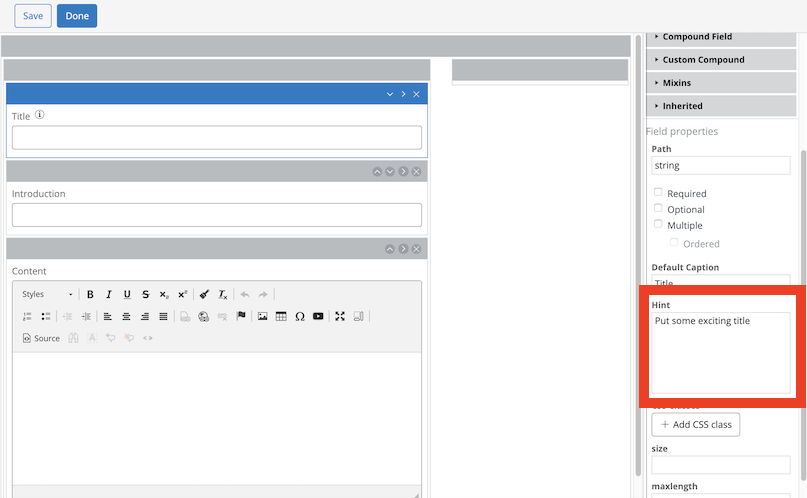
In the right-hand column, locate the Hint text area.
-
Enter your hint text.
-
Save and commit your changes.
The hint icon appears in the Document Editor after you save and commit.
Internationalization
You can localize hint text for multiple languages. To configure translations, use the CMS console as described in Add Internationalization (i18n) to Document Types.
Supporting Hints in Custom Editor Fields
Hints are available for all standard document field types. If you create custom field types, you can add hint support using the provided Wicket panel.
To display a hint in your custom field plug-in:
- In your HTML snippet, add the following at the desired location:
<wicket:container wicket:id="hint-panel"/>
- In your Java class, add:
import org.hippoecm.frontend.editor.plugins.fieldhint.FieldHint; [...] add(new FieldHint("hint-panel", helper.getHintModel(this)));
The FieldHint panel manages hint display in the Document Editor. This example assumes your custom editor extends AbstractFieldPlugin, which provides a helper object with utility functions. If your editor does not extend this class, refer to the following method to load translations:
org.hippoecm.frontend.editor.plugins.field.FieldPluginHelper#getHintModel
Internationalization for custom field hints follows the same process described in Add Internationalization (i18n) to Document Types.
Currently, you cannot specify hints for custom field types through the Document Type Editor UI. To implement this functionality, review the implementation for standard field types:
org.hippoecm.frontend.editor.plugins.field.FieldPluginEditor.html
org.hippoecm.frontend.editor.plugins.field.FieldPluginEditor.java
Look for references to hint-editor in these files.