Essentials Plugin Development
Overview
Essentials plugins extend the functionality of the Essentials Dashboard in Bloomreach Content. You can use these plugins to add features or tools that simplify project setup and development.
Essentials plugins fall into two categories:
- Features: Install additional functionality into a project during development.
- Tools: Provide configuration options or utilities within the Essentials Dashboard. Tools do not modify the project directly but assist with configuration or development tasks.
Plugin Authors
Bloomreach develops Essentials plugins to facilitate the installation and configuration of Bloomreach Content and its extensions. These plugins help developers implement best practices and streamline project setup.
Third-party developers can also create Essentials plugins using the Essentials Plugin SDK. This documentation explains how to use the Plugin SDK to build custom plugins.
Info: The Essentials Plugin SDK API is stable starting from CMS version 12.2. In earlier versions, the API was in Beta and may not be stable.
Plugin Architecture
An Essentials plugin consists of several components. The following diagram illustrates the structure of an Essentials plugin:
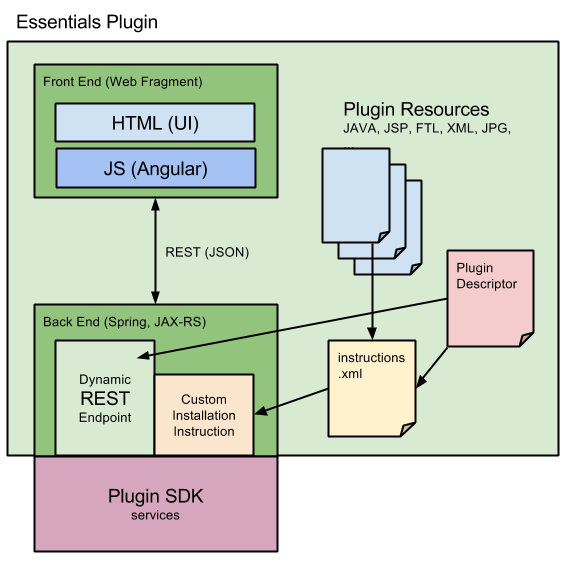
Diagram: The diagram divides an Essentials plugin into a front end, back end, plugin resources, a plugin descriptor, and the Plugin SDK services layer. The front end is a web fragment with HTML (UI) and AngularJS, which communicates with the back end through REST (JSON). The back end uses Spring and JAX-RS to provide dynamic REST endpoints and custom installation instructions, both built on the Plugin SDK services. Plugin resources include an instructions.xml file. The plugin descriptor references both the instructions.xml and the back end, defining how the plugin appears in the dashboard and how installation or usage instructions are linked.
Plugin Descriptor
The Plugin Descriptor defines how the Essentials Dashboard presents the plugin and how it handles installation or usage instructions. Every Essentials plugin requires a plugin descriptor. For built-in plugins, the descriptor is packaged as a resource within the plugin JAR.
Plugin Front End
A plugin can add a panel to the Essentials Dashboard using an HTML fragment and an AngularJS controller. After packaging the plugin in the Essentials WAR, the dashboard displays the plugin UI to users. If the plugin provides REST resources, the AngularJS controller communicates with them.
Plugin Back End
The back end of an Essentials plugin can implement custom installation instructions and REST resources. REST resources are dynamically mounted as endpoints to process requests from the front end.
During plugin installation, Essentials executes a set of installation instructions. Plugins can use built-in instructions for tasks such as copying files, adding Maven dependencies, or importing nodes and properties into the JCR repository. Plugins may also define custom instructions. All installation instructions are specified in an XML file referenced by the plugin descriptor's packageFile property.
Plugin JAR
The front end and back end are packaged together in a plugin JAR. Typically, you deploy the JAR to a Maven repository accessible to your local Maven installation. To make the plugin front end available in the Essentials Dashboard, package the resources as a Servlet 3.0 web fragment.