Hst Component Configuration
HST Components follow a composite structure that implements the HMVC (Hierarchical Model–View–Controller) pattern. The component hierarchy typically mirrors the structure of the rendered webpage. Each HstComponent requires at least a Java class (controller) and a renderer (view). If you do not configure a component class name, HST uses a built-in default class.
Each Hst Component's rendered output is passed to its parent component's renderer using the hst:include tag. The root component writes directly to the HTTP response. For example, consider a news page with the following structure:
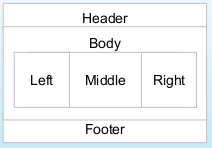
Diagram: The diagram displays a page layout with four main regions: Header at the top, Body in the center, and Footer at the bottom. The Body contains three horizontal sections: Left, Middle, and Right. The nested boxes indicate parent-child relationships, with Body containing the three inner sections, while Header and Footer are separate top-level regions.
The corresponding component hierarchy is:
/news:
  /header:
  /body:
    /left:
    /middle:
    /right:
  /footer:
Below are example JSP templates for this structure:
layout.jsp
<html> <head> </head> <body> <hst:include ref="header"/> <hst:include ref="body"/> <hst:include ref="footer"/> </body> </html>
body.jsp
<div id="body"> <div id="left"> <hst:include ref="left"/> </div> <div class="middle"> <hst:include ref="content"/> </div> <div id ="right"> <hst:include ref="right"/> </div> </div>
For Freemarker templates, the structure is similar:
layout.ftl
<html> <head> </head> <body> <@hst.include ref="header"/> <@hst.include ref="body"/> <@hst.include ref="footer"/> </body> </html>
body.ftl
<div id="body"> <div id="left"> <@hst.include ref="left"/> </div> <div class="middle"> <@hst.include ref="content"/> </div> <div id ="right"> <@hst.include ref="right"/> </div> </div>
Each region—left, middle, right, footer, and header—requires an associated renderer. For example, the output from the left component is inserted into body.jsp at the <hst:include ref="left"/> location. You can mix Freemarker and JSP renderers within a single page. For example, the left component can use a Freemarker script, and its output is included in body.jsp.
Component Repository Configuration
Component configurations are stored in the repository under hst:abstractpages, hst:pages, and hst:components. There is no technical difference between hst:pages and hst:components; the distinction is for organizational clarity. Typically, a SiteMapItem references a root component under hst:pages using the hst:componentconfigurationid property. Do not reference components under hst:abstractpages with hst:componentconfigurationid.
To support reuse and inheritance, component configuration allows extension through the hst:referencecomponent property. This enables you to define shared components, such as headers or footers, and extend them for specific pages. When one component (X) references another (Y), the configuration merges as follows:
- Properties explicitly set on X override those on Y. For the multi-valued properties
hst:parameternamesandhst:parametervalues, names and values present in Y but not in X are added to X. - Child nodes (and their descendants) from Y that do not exist in X are appended to X.
- Child nodes present in both X and Y are merged recursively using the same rules.
- Multiple levels of referencing are supported. If Y references Z, Z is merged into Y before Y is merged into X.
Each component can have an hst:template property, which may be inherited from another component. This property references the renderer for the component, typically a JSP or Freemarker script. Renderers can reside on the file system, classpath, or in the repository. For example, a component may have hst:template = overview.main.content.
This requires a template node named overview.main.content under /hst:hst/hst:configurations/{myproject}/hst:templates. The template node must have either:
- An
hst:renderpathproperty specifying the script location (classpath or Web Files), or - An
hst:scriptproperty containing the Freemarker script.
If you use the hst:script property, the template node name must end with .ftl (e.g., news.main.content.ftl).
The following example illustrates how these configurations work together. Suppose a news sitemap item is matched.
The sitemap item has these properties:
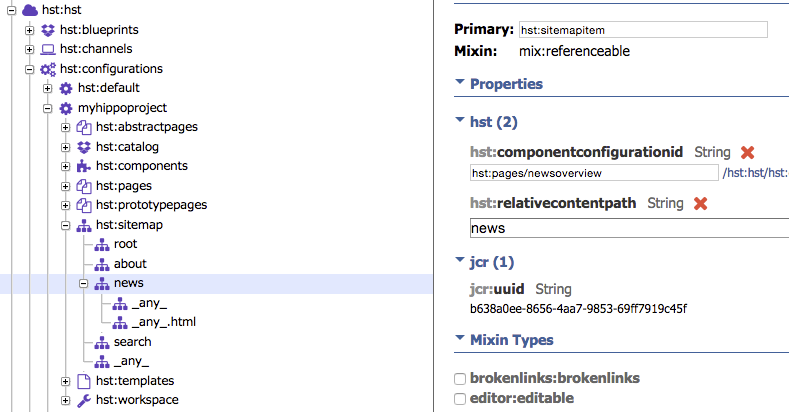
hst:relativecontentpathspecifies the path relative to/hst:hst/hst:sites/myproject/hst:content.hst:componentconfigurationidis set tohst:pages/newsoverview, which is the root component for the news overview page.
Expanding the hst:pages node and selecting newsoverview shows:

The hst:referencecomponent property indicates that this page extends hst:pages/overview, which itself extends hst:abstractpages/base. The following image shows this inheritance structure:
The overview page has a child node main, which contains a content node. The content node points to the standard page, which also has children. Each child node triggers rendering. The nodes involved in rendering the HTML page are: header, main, leftmenu, right, and content.
For example, the configuration for overview/main/content is:
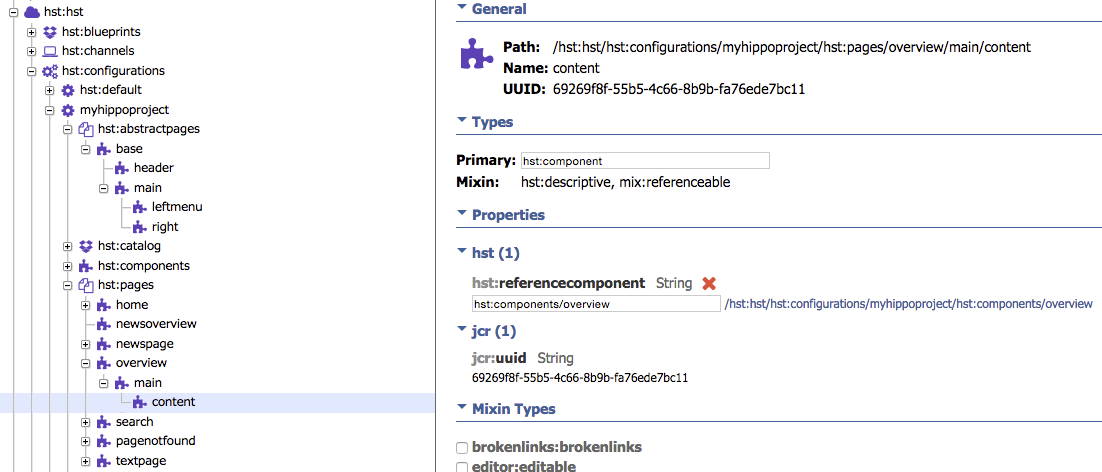
Here, hst:referencecomponent points to hst:components/overview, which has these properties:
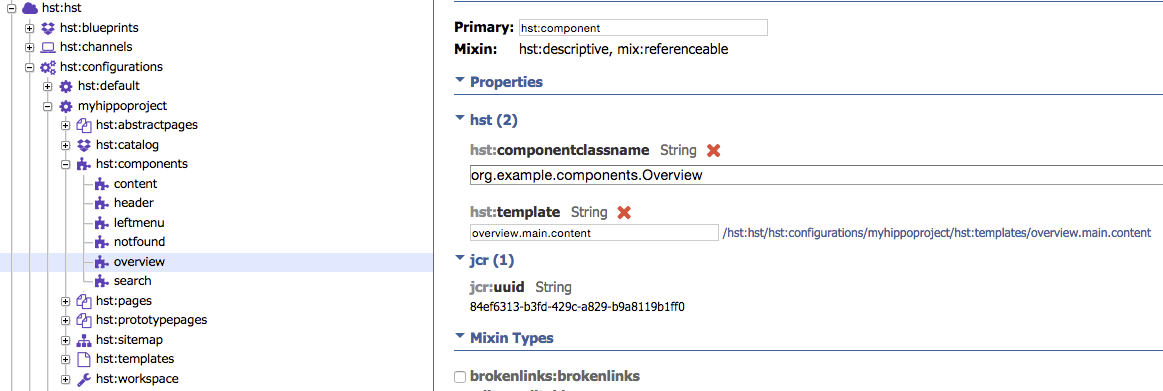
The overview component's hst:componentclassname property specifies the Java class that implements the component's business logic. The hst:template property refers to the template name relative to hst:templates. The template node overview.main.content has the following properties:
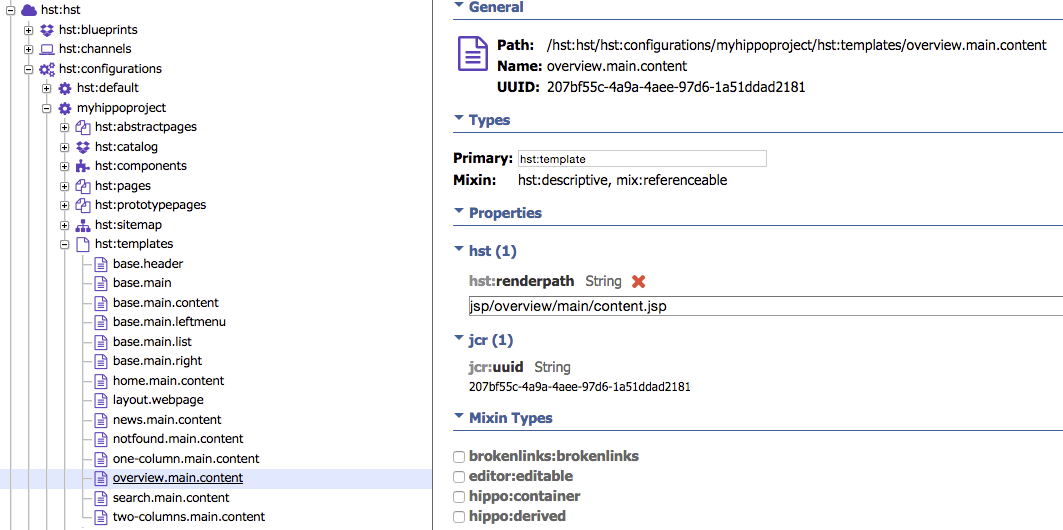
The hst:renderpath property specifies the JSP used to render the overview page: jsp/overview/main/content.jsp. This JSP renders the center column of the news overview page. The header, left, and right columns are rendered similarly. You can locate the relevant JSP by following the reference hierarchy.
You may also use a Freemarker template. All JSP files are located in:
myproject/site/webapp/src/main/webapp/WEB-INF/jsp
For maintainability, name template nodes to reflect their location in the page hierarchy. Structure JSP files in the same way. For example, the component at hst:pages/overview/main/content should be rendered by the template hst:templates/overview.main.content, which refers to the JSP file WEB-INF/jsp/overview/main/content.jsp. This naming convention makes it easier to locate the JSP associated with each node in the hierarchy.
Troubleshooting: Warning "POSSIBLE WASTE DETECTED"
During page rendering, you may see a log message similar to:
POSSIBLE WASTE DETECTED in request 'Request{ method='GET', scheme='http', host='localhost:8080', requestURI='/site/', queryString='null'}' : Component '/hst:hst/hst:configurations/gettingstarted/hst:workspace/hst:containers/homepage/main' gets rendered but never adds anything to the response. Its renderer 'classpath:vbox.ftl' is never flushed to a parent component. This might be waste you are not aware of. If it is on purpose, for example because the component does only some processing that does not involve direct response contribution, you can mark the component with 'hst:suppresswastemessage = true'.
Cause
This warning indicates that an HstComponent had its #doBeforeRender method and renderer (JSP or Freemarker) invoked, but its output was not included in any parent response. As a result, it does not contribute to the final HTTP response.
Resolution
If this behavior is intentional (for example, the component performs processing without rendering output, or short-circuits rendering by throwing an exception), suppress the warning by adding the following property to the component's configuration node:
hst:suppresswastemessage: true
In most cases, this warning indicates unnecessary processing. To resolve:
- Check if the component should be included in the parent renderer using an
<hst:include>tag. - Remove the component configuration if it is not needed.
- Adjust the component tree inheritance if required.
Investigate the component's role to ensure efficient rendering and avoid unnecessary resource usage.