Gallery Picker Plugin Configuration
Default Configuration
The Gallery Picker plugin is included in the default Bloomreach Content project generated by the Maven archetype. If you created your project following the Get Started Trail, no additional installation is required.
Info: For details about the Imagelink field type provided by the Gallery Picker plugin, see the Document Type Editor documentation.
Restrict Allowed Image Set Types
When your project defines multiple image set types, you can control which types the Gallery Picker allows authors to select.
To restrict allowed image set types:
- Open the Document Type Editor.
- Select the Imagelink field.
- In the properties panel, locate the nodetypes property.
- For each image set type you want to allow, click Add and enter its JCR node type (for example,
myproject:imagetype).
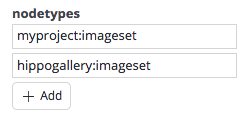
If you leave the nodetypes property empty, the picker will allow all image set types.
Disable Image Upload
By default, the Gallery Picker dialog allows authors to upload images from their local system directly into the content repository and insert them into documents.
To disable this upload option:
- Open the Console.
- Navigate to the node
/hippo:namespaces/hippogallerypicker/imagelink/editor:templates/_default_/root. - Set the boolean property
enable.uploadtofalse:
/hippo:namespaces/hippogallerypicker/imagelink/editor:templates/_default_/root: jcr:primaryType: frontend:plugin enable.upload: false
Enable Upload of SVG Images with Embedded JavaScript
By default, the Gallery Picker dialog blocks uploads of SVG images that contain embedded JavaScript.
To allow uploading SVG images with embedded JavaScript:
- Open the Console or update your project bootstrap configuration.
- Set the boolean property
svg.scripts.enabledtotrueon the node/hippo:namespaces/hippogallerypicker/imagelink/editor:templates/_default_/root.
This change enables the upload of SVG images containing JavaScript.