Dashboard Document Wizard Plugin
Overview
The Dashboard Document Wizard plugin is an add-on for Bloomreach Content. It enables authors to create new documents directly from the Dashboard without navigating through the documents section. When an author clicks a shortcut link, a dialog appears for entering document details. After submitting the form, the plugin creates the document in the appropriate folder.
Folder Selection Methods
The plugin supports two methods for determining the folder where the new document is created:
-
Date-Based Folders:
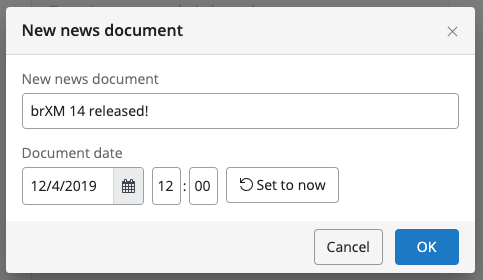
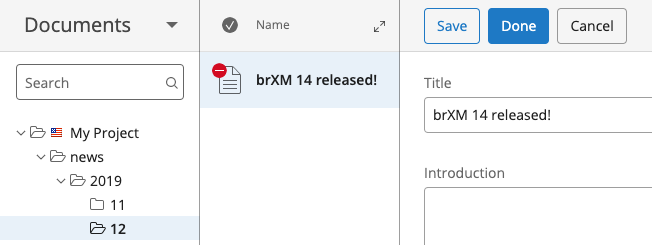
When the shortcut uses aclassificationTypeofdate, the wizard prompts the author to select a date. The document is then placed in a folder structure organized by year and month (/yyyy/mm). For example, a document with the date December 16, 2019, is created in/2019/12. -
List-Based Folders:
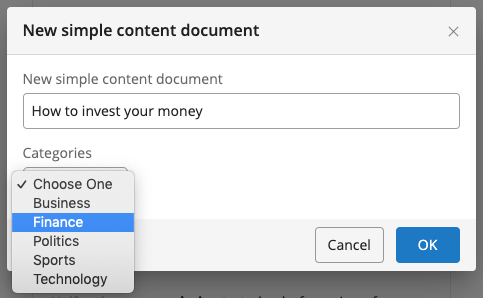
When the shortcut uses aclassificationTypeoflist, the wizard displays a dropdown list of folder names. The list values are defined by aValueListconfigured through the Selections Plugin. The document is created in the folder corresponding to the selected value.
Screenshots
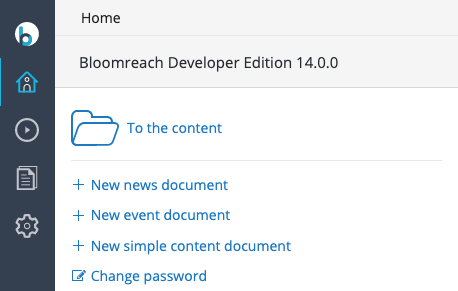
CMS Dashboard with Three Shortcuts
Document Wizard with Date-Based Folders
When the shortcut uses classificationType: date, the wizard displays a date field.
The document is created in a folder structure based on the selected date (yyyy/mm).
Document Wizard with Folder Names from a Value List
When the shortcut uses classificationType: list (see configuration section), the wizard displays a dropdown populated with values from the configured list.
The document is created in the folder corresponding to the selected list value.
Source Code and Demo
View the source code and demo on GitHub:
https://github.com/bloomreach/brxm/tree/brxm-14.7.3/dashboard-document-wizard