Custom Validation Rules
Overview
Enterprise Forms supports custom Java-based validation rules for fields, groups, and pages, in addition to regular-expression-based validation rules. You can implement custom validation by creating a Java class and registering it in the repository. Form authors can then select these rules from the validation rules dropdown in the form field properties panel.
Rule Development
Custom validation rule classes must be available on the classpath of the site application and implement the com.onehippo.cms7.eforms.hst.validation.rules.ValidationRule interface:
public interface ValidationRule { boolean validate(Map<String, String[]> fieldValuesMap); RuleType getType(); ErrorMessage getMessage(final String name, final String label, final String value); ErrorMessage getMessage(String name, String label, String value, Locale locale); String getRuleLabel(); }
To simplify implementation, extend the abstract base class com.onehippo.cms7.eforms.hst.validation.rules.BaseRule. This requires you to implement the following methods:
boolean validate(Map<String, String[]> fieldValuesMap)
This method validates the form input. The fieldValuesMap parameter contains the field names and values within the rule's scope. For a field validation rule, it contains only one field value. For a group or page rule, it includes all field values in the group or page.
RuleType getType()
Return one of the validation rule types defined in com.onehippo.cms7.eforms.hst.validation.rules.RuleType. Use one of the following:
RuleType.CUSTOM_FIELD_VALIDATION_RULERuleType.CUSTOM_GROUP_VALIDATION_RULERuleType.CUSTOM_PAGE_VALIDATION_RULE
protected String getResourceBundleBaseName()
Custom rules should provide their own resource bundle for localized messages. Return the fully qualified class name of the validation rule. You can provide resource bundles as Java resource bundles or, starting from Enterprise Forms 3.0.1, as Repository resource bundles. Repository resource bundles are loaded first. If none are found, the system falls back to Java resource bundles.
public ErrorMessage getMessage(String name, String label, String value)
Return a com.onehippo.cms7.eforms.hst.model.ErrorMessage for the validation error.
Enterprise Forms includes an example custom field validation rule, com.onehippo.cms7.eforms.hst.validation.rules.LuhnRule, which implements the Luhn Algorithm for validating credit card numbers:
public class LuhnRule extends BaseRule { public static final String MESSAGE_KEY = "validation.message.luhn"; @Override public boolean validate(Map<String, String[]> fieldValuesMap) { if (fieldValuesMap.isEmpty()) { return true; } // assuming one item String[] values = fieldValuesMap.values().iterator().next(); if (ArrayUtils.isEmpty(values)) { return true; } for (String value : values) { if (StringUtils.isBlank(value)) { continue; } int sum = 0; boolean alternate = false; for (int i = value.length() - 1; i >= 0; i--) { try { int n = Integer.parseInt(value.substring(i, i + 1)); if (alternate) { n *= 2; if (n > 9) { n = (n % 10) + 1; } } sum += n; alternate = !alternate; } catch (NumberFormatException e) { return false; } } if (!(sum % 10 == 0)) { return false; } } return true; } @Override public RuleType getType() { return RuleType.CUSTOM_FIELD_VALIDATION_RULE; } @Override protected String getResourceBundleBaseName() { return getClass().getCanonicalName(); } @Override public ErrorMessage getMessage(String name, String label, String value) { return new ErrorMessage(MESSAGE_KEY, name, label, "Field " + label + " is invalid"); } }
The Enterprise Forms demo also provides examples for page and group validation rules:
- Page validation rule:
com.onehippo.cms7.eforms.demo.validationrules.NoEmptyFieldsOnPageRule - Group validation rule:
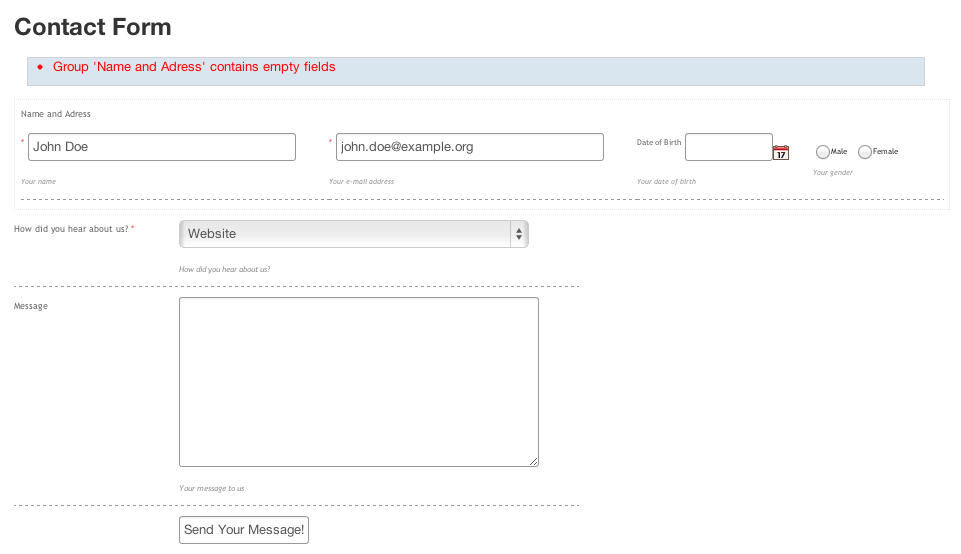
com.onehippo.cms7.eforms.demo.validationrules.NoEmptyFieldsInGroupRule
Rule Configuration
Configure custom validation rules in the repository under /hippo:configuration/hippo:modules/eforms/hippo:moduleconfig/eforms:validationrules. This is the same location used for regular-expression-based rules.
For each custom validation rule, create a uniquely named node of type hipposys:moduleconfig with the following properties:
eforms:validationruleclass: Fully qualified class name of the validation rule.eforms:validationrulelabel: Human-readable label for the rule.eforms:validationruleforpage(boolean): Required and must betruefor page validation rules (getType()returnsRuleType.CUSTOM_PAGE_VALIDATION_RULE). Optional and must befalsefor field and group validation rules.eforms:validationruleforgroup(boolean): Required and must betruefor group validation rules (getType()returnsRuleType.CUSTOM_GROUP_VALIDATION_RULE). Optional and must befalsefor field and page validation rules.
The Enterprise Forms demo includes configuration for all three example rules.
Example: Luhn Algorithm field validation rule
/luhn: jcr:primaryType: hipposys:moduleconfig eforms:validationruleclass: com.onehippo.cms7.eforms.hst.validation.rules.LuhnRule eforms:validationrulelabel: Luhn Algorithm
Example: No empty field in group validation rule
/noemptyfieldsingroup: jcr:primaryType: hipposys:moduleconfig eforms:validationruleclass: com.onehippo.cms7.eforms.demo.validationrules.NoEmptyFieldsInGroupRule eforms:validationruleforgroup: true eforms:validationrulelabel: No empty fields in group
Example: No empty field in page validation rule
/noemptyfieldsonpage: jcr:primaryType: hipposys:moduleconfig eforms:validationruleclass: com.onehippo.cms7.eforms.demo.validationrules.NoEmptyFieldsOnPageRule eforms:validationruleforpage: true eforms:validationrulelabel: No empty fields in page
Rule Selection
To assign a custom validation rule to a form item (field, group, or page):
- Select the item in the form editor.
- In the properties panel, choose the rule from the "Validation Rule" dropdown.
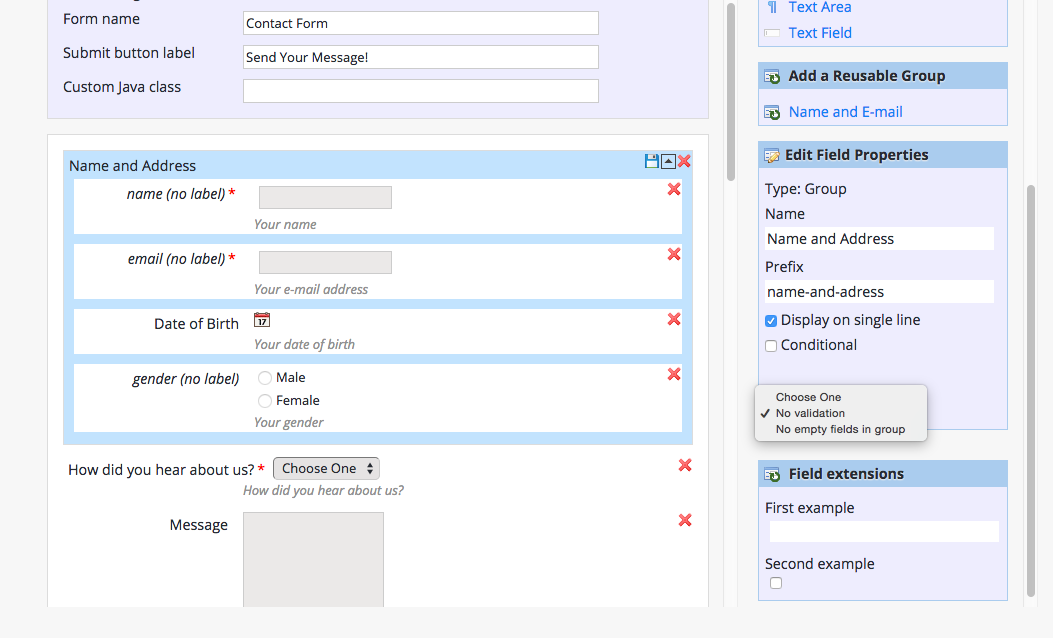
After configuring the rule, save and publish the form. To verify the rule is active, submit the form in the site application with invalid values. The validation error should appear as configured.