Form Introduction Behavior
HST Behavior class = com.onehippo.cms7.eforms.hst.behaviors.FormIntroBehaviorCMS Plugin class = com.onehippo.cms7.eforms.cms.extensions.FormIntroductionPlugin
Overview
The Form Introduction behavior adds an introduction text field to the form editor in Bloomreach Content. The introduction text is stored in the form document and made available during form rendering.

When to Use
Use the Form Introduction behavior when you want to display introductory text at the top of a form. This text can provide context or instructions for users completing the form.
CMS Configuration
To enable the Form Introduction plugin in the form editor:
-
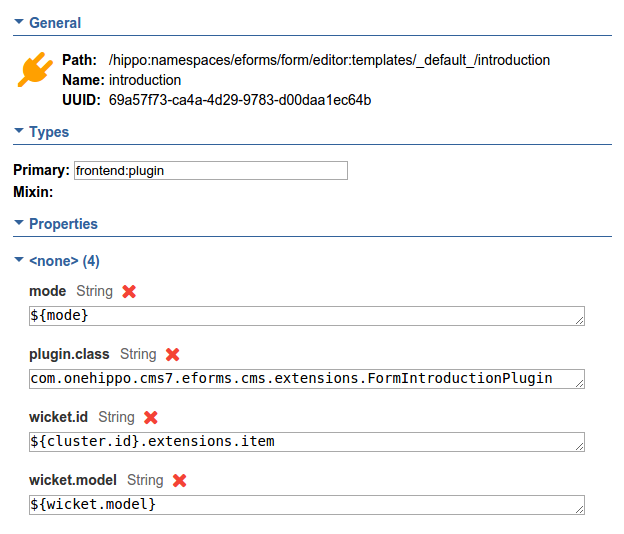
In the JCR repository, navigate to
/hippo:namespaces/eforms/form/editor:templates/_default_. -
Add a new node of type
frontend:plugin. -
Set the following properties on the new node:
plugin.class = com.onehippo.cms7.eforms.cms.extensions.FormIntroductionPluginmode = ${mode}wicket.id = ${cluster.id}.extensions.itemwicket.model = ${wicket.model}
Note:
You can add the plugin to a custom form template instead of the default eforms:form template if needed.
HST Configuration
To activate the Form Introduction behavior in your form component:
-
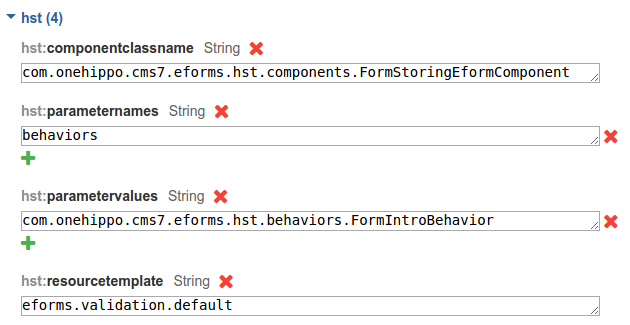
Open the HST component configuration for your form.
-
Add the following parameter:
behaviors = com.onehippo.cms7.eforms.hst.behaviors.FormIntroBehavior
Request Attributes
The Form Introduction behavior implements DoBeforeRenderBehavior and sets the following request attribute:
formIntro(String): Contains the value of the introduction text area defined in the form document.
Demo
You can view an example implementation in the Enterprise Forms demo: