Enable LDAP Authentication and Synchronization
Info: This feature requires a standard or premium Bloomreach Content license. Contact Bloomreach for licensing details.
Overview
This page describes how to enable authentication through LDAP and synchronize LDAP users and groups to the Hippo Repository.
LDAP Add-on Overview
Bloomreach Content provides an LDAP add-on that allows you to authenticate users against one or more LDAP servers and synchronize user and group data into the repository. Synchronization is one-way: changes are not pushed back to the LDAP server.
The add-on supports both standard (ldap://) and secure (ldaps://) connections.
LDAP Security Provider
The LDAP add-on implements a security provider within the repository. A security provider authenticates users and manages synchronization between the repository and external authorities.
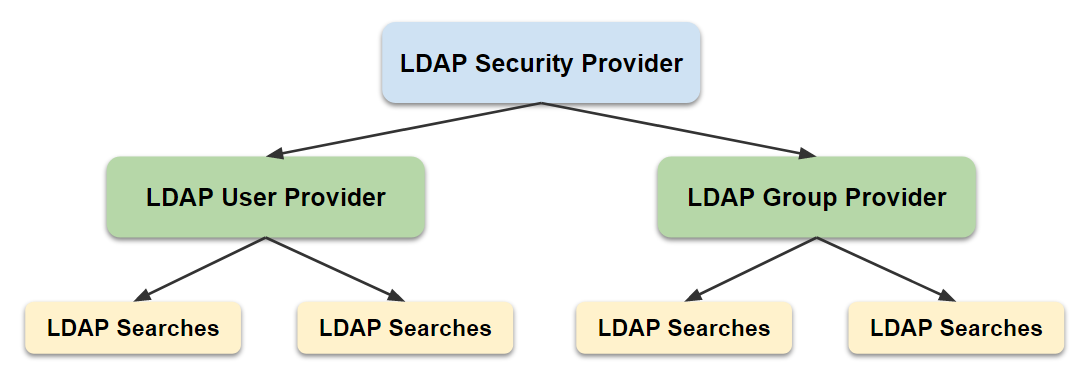
Diagram: The diagram shows an LDAP Security Provider at the top, branching into an LDAP User Provider and an LDAP Group Provider. Each provider connects to multiple LDAP Searches, indicating that both users and groups can be synchronized using different search definitions.
Key components:
- The security provider node stores general LDAP connection details.
- The user manager specifies which users and attributes to synchronize.
- The group manager specifies which groups and attributes to synchronize.
Configuring the security provider does not grant access rights. You must configure access in security domains.
Login Process
The login and synchronization process follows these steps:
- Credentials are always validated against the LDAP server. The repository does not cache credentials.
- User and group information is synchronized during login.
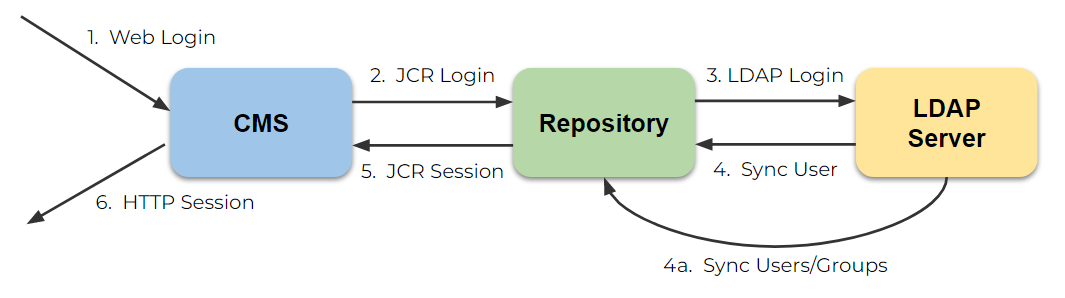
Diagram: The diagram illustrates the login and synchronization flow between the CMS, Repository, and LDAP Server. The user logs in to the CMS, which authenticates with the repository. The repository authenticates with the LDAP server, synchronizes user and group data, and returns a session to the CMS.
| Step | Description |
|---|---|
| 1. | User logs in to the CMS or site. |
| 2. | The CMS logs in to the repository using the provided credentials. |
| 3. | The repository authenticates with the LDAP server. |
| 4. | The repository synchronizes user and group information for that user. |
| 4a. | A background process periodically synchronizes all users and groups. |
| 5. | The repository returns an authenticated JCR session. |
| 6. | The CMS returns an authenticated HTTP session. |
Supported LDAP Servers
The following LDAP servers are supported:
- Microsoft Active Directory
- OpenLDAP
- Apache Directory Server
Configure the LDAP Add-on
The LDAP functionality is provided as a repository add-on. To include it in your Bloomreach Content implementation project, add the following dependency to cms-dependencies/pom.xml (or cms/pom.xml for version 12 and earlier):
<dependency> <groupId>com.onehippo.cms7</groupId> <artifactId>hippo-addon-ldap</artifactId> </dependency>
Example Configuration
You can download example configurations:
Import these examples using the console at /hippo:configuration/hippo:security:
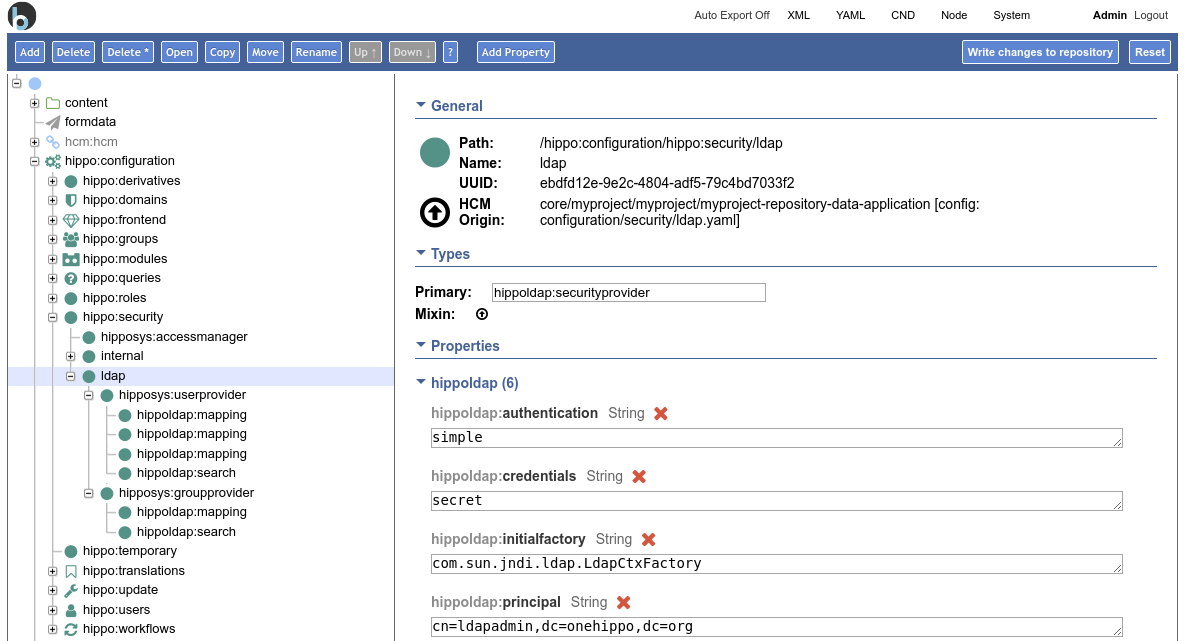
LDAP Security Provider Configuration
Each LDAP security provider node connects to a single LDAP server. To connect to multiple LDAP servers, add a separate LDAP security provider node for each server. The security provider node holds connection details such as server address and credentials.
Synchronization Behavior
The LDAP add-on synchronizes user and group information into the repository. Synchronization runs at repository startup and again only after the maximum cache age expires. Only fields explicitly mapped in the configuration are synchronized. Do not synchronize the password field; credentials are always checked against the LDAP server.
Node Type Definition
hippoldap:securityprovider
[hippoldap:securityprovider] > hipposys:securityprovider orderable - hippoldap:providerurl (string) mandatory - hippoldap:authentication (string) = 'simple' mandatory autocreated - hippoldap:initialfactory (string) = 'com.sun.jndi.ldap.LdapCtxFactory' mandatory autocreated - hippoldap:socketfactory (string) - hippoldap:connecttimeoutms (string) - hippoldap:searchbase (string) - hippoldap:principal (string) - hippoldap:credentials (string) - hippoldap:cachemaxage (long) - hippoldap:disabled (boolean) - hippoldap:cronexpression (string) - hippoldap:loginsynccacheminutes (long) - hippoldap:maxretrycountafterfailure (long) - hippoldap:retryintervalafterfailureseconds (long)
| Property | Description | Example |
|---|---|---|
providerurl | LDAP connection URL | ldap://myldap.example.com/, ldaps://localhost:636/ |
authentication | Authentication mechanism | simple |
initialfactory | Initial context factory | com.sun.jndi.ldap.LdapCtxFactory |
socketfactory | Socket factory class for LDAP connection. Must implement javax.net.SocketFactory and provide a getDefault() method. | javax.net.ssl.SSLSocketFactory (default) |
connecttimeoutms | Connection timeout in milliseconds | 1000 |
searchbase | Global search base for LDAP | dc=mycompany,dc=com |
principal | DN of the LDAP sync (read-only) user | cn=ldapadmin,dc=mycompany,dc=com |
credentials | Password for the LDAP sync user | supers3cr3t |
cachemaxage | Time in seconds between full synchronizations (overridden by cronexpression) | 86400 |
cronexpression | Cron expression for synchronization schedule (overrides cachemaxage) | 0 0 12 * * ? |
disabled | Controls whether LDAP synchronization runs | true |
loginsynccacheminutes | Duration in minutes to cache user attributes before resynchronizing on login. If unset, synchronization occurs on every login. | 30 |
maxretrycountafterfailure | Maximum number of retry attempts after connection failure | 5 |
retryintervalafterfailureseconds | Interval in seconds between retry attempts after failure | 300 |
Info:
hippoldap:maxretrycountafterfailureandhippoldap:retryintervalafterfailuresecondsare available from version 16.4.1 onward.
Configure LDAP Provider Credentials in Application Context
You can define LDAP provider connection parameters as a JNDI resource at the container level (for example, in Apache Tomcat).
Add the following entry to your project's conf/context.xml:
<Environment name="securityprovider/ldap" value="{'credentials':'secret', 'principal':'cn=ldapadmin,dc=onehippo,dc=org', 'authentication':'simple', 'providerurl':'ldap://127.0.0.1:389'}" type="java.lang.String"/>
This registers a JNDI environment resource at java/comp:env/securityprovider/ldap when the web application starts. The JSON string specifies the properties needed to connect to the LDAP provider.
You can configure providerurl, authentication, searchbase, principal, and credentials through the JNDI resource.
LDAP User Provider
The user provider specifies where to search for users in the LDAP server and which attributes to synchronize to the repository (such as first name, last name, and email address). The user provider can have multiple searches and mappings.
hippoldap:userprovider Node Type
[hippoldap:userprovider] > hipposys:userprovider + * (hippoldap:mapping) = hippoldap:mapping multiple + * (hippoldap:usersearch) = hippoldap:usersearch multiple - hippoldap:class (string) - hippoldap:saveInterval (long) - hippoldap:searchPageSize (long) - hippoldap:compareCaseSensitive (boolean) - hippoldap:compareUserIdBy (string) < 'LOWERCASE', 'UPPERCASE'
| Property | Description | Example |
|---|---|---|
class | Fully qualified class name for a custom user manager | org.example.CustomLdapUserManager |
saveInterval | Batch size before saving to the repository during synchronization | 250 |
searchPageSize | Page size for LDAP search results | 200 |
compareCaseSensitive | Whether userId comparison is case-sensitive | false |
compareUserIdBy | If not case-sensitive, transforms userId to LOWERCASE or UPPERCASE before comparison. Ignored if compareCaseSensitive is true. Defaults to LOWERCASE. | LOWERCASE |
Default values are provided for these properties. Change them only if you understand the impact.
If case sensitivity is disabled, users must enter their login name in the case specified by compareUserIdBy.
Mappings and search child nodes are described below.
LDAP User Searches
A user search defines where to look for users. Only users matching the search or filter can log in and will be synchronized.
hippoldap:usersearch Node Type
[hippoldap:usersearch] > nt:base - hippoldap:nameattribute (string) = 'uid' mandatory autocreated - hippoldap:basedn (string) mandatory - hippoldap:filter (string)
| Property | Description | Default | Example |
|---|---|---|---|
nameattribute | Attribute containing the username | uid | cn, uid, or on AD sAMAccountName |
basedn | LDAP search base | dc=mycompany,dc=com | |
filter | LDAP filter for search | (objectclass=posixAccount) | (&(objectCategory=Person)(uuid=*)) or (&(objectCategory=Person)(sAMAccountName=*)) |
LDAP User Mappings
User mappings specify which LDAP attributes are synchronized to the repository. Each mapping links a single LDAP attribute to a repository property. Mapped values are stored as strings.
hippoldap:mapping Node Type
[hippoldap:mapping] > nt:base - hippoldap:target (string) mandatory - hippoldap:multi (boolean) = 'false' mandatory autocreated - hippoldap:source (string) mandatory
| Property | Description | Default | Example |
|---|---|---|---|
source | LDAP attribute to synchronize | sn | |
target | Repository property name | lastname | |
multi | Whether this is a multi-valued property | false | true |
The multi property is reserved for future use and is not currently supported.
LDAP Group Provider
The group provider specifies where to search for groups in the LDAP server and which attributes to synchronize to the repository. The group provider can have multiple searches and mappings.
hippoldap:groupprovider Node Type
[hippoldap:groupprovider] > hipposys:groupprovider + * (hippoldap:groupsearch) = hippoldap:groupsearch multiple + * (hippoldap:mapping) = hippoldap:mapping multiple - hippoldap:class (string) - hippoldap:saveInterval (long) - hippoldap:searchPageSize (long) - hippoldap:compareCaseSensitive (boolean)
These properties function the same way as in the user provider.
LDAP Group Searches
A group search defines where to look for groups. Only groups matching the search or filter are synchronized.
hippoldap:groupsearch Node Type
[hippoldap:groupsearch] > hippoldap:usersearch - hippoldap:membernamematcher (string) - hippoldap:memberattribute (string) - hippoldap:lookupusernameattribute (string)
| Property | Description | Default | Example |
|---|---|---|---|
nameattribute | Attribute containing the group name (inherited) | cn | |
basedn | LDAP search base (inherited) | dc=mycompany,dc=com | |
filter | LDAP filter for search (inherited) | (objectclass=posixGroup) | (objectCategory=Group) |
membernamematcher | How to match group member names | <uid> | <dn> |
memberattribute | LDAP attribute containing group members | memberUid | member |
lookupusernameattribute | User attribute to match for the username | samAccountName |
membernamematcher options:
| Value | Description |
|---|---|
<uid> | Membership is matched by username (e.g., foobar) |
<dn> | Membership is matched by distinguished name (e.g., uid=foobar,ou=people,dc=onehippo,dc=org) |
For example, for a group defined as:
dn: cn=ldapadmins,ou=groups,dc=onehippo,dc=org
objectClass: groupOfUniqueNames
objectClass: top
cn: ldapadmins
uniqueMember: uid=foobar,ou=people,dc=onehippo,dc=org
Set memberattribute=uniqueMember and use <dn> for member matching. The member in this group has <dn> equal to uid=foobar,ou=people,dc=onehippo,dc=org. If using <uid>, only the username (foobar) is required.
Use lookupusernameattribute if the username is not available in the <dn>. For example, map your username to samAccountName. If samAccountName is not part of the <dn>, an additional lookup is needed to match users to group members.
LDAP Group Mappings
Group mappings define which group attributes are synchronized to the repository. Each mapping links a single LDAP attribute to a repository property. Only single-value properties are currently supported.
hippoldap:mapping Node Type
[hippoldap:mapping] > nt:base - hippoldap:target (string) mandatory - hippoldap:multi (boolean) = 'false' mandatory autocreated - hippoldap:source (string) mandatory
| Property | Description | Default | Example |
|---|---|---|---|
source | LDAP attribute to synchronize | description | |
target | Repository property name | description | |
multi | Whether this is a multi-valued property | false | false |
The multi property is reserved for future use and is not currently supported.
Additional Configuration Tips
Logging
To monitor LDAP synchronization and authentication, set the following classes to INFO or DEBUG log level:
org.hippoecm.repository.security.ldap.LdapSecurityProviderorg.hippoecm.repository.security.ldap.LdapUserManagerorg.hippoecm.repository.security.ldap.LdapGroupManager
Configure logging in your log4j2.xml file, or use the logging servlet at http://localhost:8080/cms/logging/.
Synchronize Only LDAP Users (Not Groups)
To synchronize only LDAP users, create a hipposys:groupprovider node without any searches or mappings in the group provider.
Disable User Creation in Bloomreach Content
To prevent user creation from the admin panel, set the user.creation.enabled property to false on the node /hippo:configuration/hippo:frontend/cms/cms-admin/users.
Repository Browser
The repository browser is stateless and logs in with each page request. You can refresh (F5) to check LDAP synchronization results. The repository browser is available at http://localhost:8080/cms/repository/. Use this with debug logging enabled to quickly verify and adjust your LDAP configuration.