Validation Rules
Overview
Bloomreach Content provides built-in validation rules for form input fields. Editors can select a standard validation rule from a dropdown menu for fields that support regular expression validation. This approach eliminates the need to manually enter complex regular expressions.
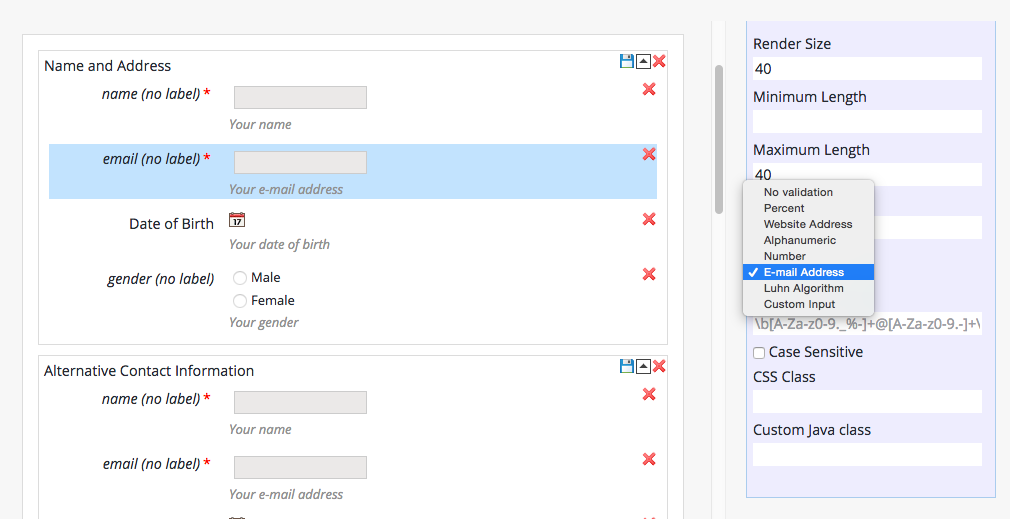
The system includes out-of-the-box validation rules for numbers, percentages, alphanumeric strings, email addresses, and website URLs. When you select one of these standard rules, the editor automatically applies the corresponding regular expression. The 'Validation RegEx' property field is disabled when a standard rule is selected.
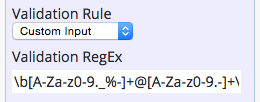
To use a custom validation pattern, select 'Custom Input' from the dropdown. This enables the 'Validation RegEx' property field, allowing you to enter a custom regular expression.
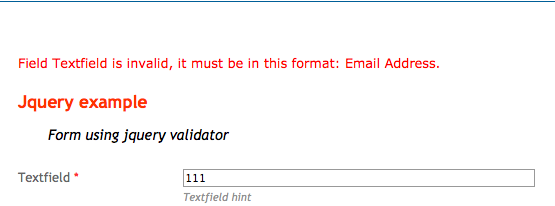
Validation rules enforce input checks at runtime. For example, if a field requires a valid email address, the form displays an error message when the input does not match the expected format.
Built-in Standard Validation Rules
Built-in validation rules are configured in the repository at /hippo:configuration/hippo:modules/eforms/hippo:moduleconfig/. The following configuration defines the default set of standard validation rules:
/hippo:configuration/hippo:modules/eforms/hippo:moduleconfig: /eforms:validationrules: jcr:primaryType: hipposys:moduleconfig /age18plus: jcr:primaryType: hipposys:moduleconfig eforms:validationruleclass: com.onehippo.cms7.eforms.demo.validationrules.AgeEighteenPlusRule eforms:validationrulelabel: Age 18+ /email: jcr:primaryType: hipposys:moduleconfig eforms:validationruleclass: com.onehippo.cms7.eforms.hst.validation.rules.EmailAddressRule eforms:validationrulelabel: E-Mail /luhn: jcr:primaryType: hipposys:moduleconfig eforms:validationruleclass: com.onehippo.cms7.eforms.hst.validation.rules.LuhnRule eforms:validationrulelabel: Luhn Algorithm /noemptyfieldsingroup: jcr:primaryType: hipposys:moduleconfig eforms:validationruleclass: com.onehippo.cms7.eforms.demo.validationrules.NoEmptyFieldsInGroupRule eforms:validationrulelabel: No empty fields in group /noemptyfieldsonpage: jcr:primaryType: hipposys:moduleconfig eforms:validationruleclass: com.onehippo.cms7.eforms.demo.validationrules.NoEmptyFieldsOnPageRule eforms:validationrulelabel: No empty fields in page /number.general: jcr:primaryType: hipposys:moduleconfig eforms:validationruleexpr: ^[-+]?\d+(\.\d+)?$ eforms:validationrulelabel: Number eforms:validcasesensitive: false /number.percent: jcr:primaryType: hipposys:moduleconfig eforms:validationruleexpr: ^-?[0-9]{0,2}(\.[0-9]{1,2})?$|^-?(100)(\.[0]{1,2})?$ eforms:validationrulelabel: Percent eforms:validcasesensitive: false /string.alphanumeric: jcr:primaryType: hipposys:moduleconfig eforms:validationruleexpr: ^[A-Za-z\d]+$ eforms:validationrulelabel: Alphanumeric eforms:validcasesensitive: false /website: jcr:primaryType: hipposys:moduleconfig eforms:validationruleexpr: (http|https):\/\/[\w\-_]+(\.[\w\-_]+)+([\w\-\.,@?^=%&:/~\+#]*[\w\-\@?^=%&/~\+#])? eforms:validationrulelabel: Website eforms:validcasesensitive: false
You can add custom validation rules under /hippo:configuration/hippo:modules/eforms/hippo:moduleconfig/eforms:validationrules/. Each validation rule node must have a unique name, a default label (eforms:validationrulelabel), and a regular expression (eforms:validationruleexpr).
For example, to add a validation rule for Dutch postcodes:
/dutch.postcode: jcr:primaryType: hipposys:moduleconfig eforms:validationruleexpr: ^\d{4}\s[A-Z]{2}$ eforms:validationrulelabel: Dutch Postcode
Validation Rule Label Localization
Validation rule labels are defined in the configuration node using the eforms:validationrulelabel property. To localize these labels, provide resource strings in the appropriate properties files.
For the CMS Form Editor, add custom resource strings to classpath:com/onehippo/cms7/eforms/cms/properties/panels/AbstractPropertiesPanel*.properties. Default entries include:
# classpath:com/onehippo/cms7/eforms/cms/properties/panels
#                                 /AbstractFieldPropertiesPanel*.properties
# ...
validation.rule.no.validation.label=No
validationvalidation.rule.none.label=None
validation.rule.number.general.label=Number
validation.rule.number.percent.label=Percent
validation.rule.string.alphanumeric.label=Alphanumeric
validation.rule.email.label=E-mail Address
validation.rule.website.label=Website Address
# ...
Resource keys follow the pattern validation.rule.${validationRuleId}.label. For a custom rule with the ID dutch.postcode, add:
# ...
validation.rule.dutch.postcode.label=Dutch Postcode
# ...
For form rendering templates on the HST side, add resource strings to classpath:com/onehippo/cms7/eforms/hst/messages/eforms*.properties:
# classpath:com/onehippo/cms7/eforms/hst/messages/eforms*.properties

# ...
validation.rule.number.general.label=Number
validation.rule.number.percent.label=Percent
validation.rule.string.alphanumeric.label=Alphanumeric
validation.rule.email.label=Email Address
validation.rule.website.label=Website Address
# ...
Specifying Different Validation Messages per Field Type
Default validation messages are defined in classpath:com/onehippo/cms7/eforms/hst/messages/eforms*.properties:
# classpath:com/onehippo/cms7/eforms/hst/messages/eforms*.properties
# ...
validation.message.required=Field {0} is required.
validation.message.maxlength=Field {0} is longer than {3} characters.
validation.message.minlength=Field {0} must be longer than {3} characters.
validation.message.dateformat=Field {0} is invalid date format, it must be in
                                                              this format: {3}.
validation.message.regexp=Field {0} is invalid, it must be in this format: {3}.
# ...
You can override these messages or specify different messages for each field type and validation rule. To do this, append the lowercase field class name to the message key. For example, to customize the regular expression validation message for a date field:
# ...
validation.message.regexp.datefield=Your custom error message for date fields
                       that use the regexp validator. Date field {0} is invalid,
                       it must be in this format: {3}.
# ...
Available field class names (from com.onehippo.cms7.eforms.cms.fields) include:
CheckBoxesFieldDateFieldDropDownFieldFieldSetTagFieldFileUploadFieldLikertFieldRadioGroupFieldSimpleTextFieldTextAreaFieldTextField
Using Validation Rule Information in Form Rendering Templates
You can access validation rule information in form rendering templates, such as eforms-default.jsp and eformsrenderfield.tag in the Enterprise Forms Demo project. When iterating over field info beans, use ${field.validationRuleId}, ${field.validationRuleLabel}, and ${field.regExp} to access the relevant properties.
The following example demonstrates handling a specific validation rule in a JSP template:
<form class="form" action="<hst:actionURL/>" method="post" name="${form.name}"> <c:forEach var="field" items="${form.fields}"> <c:choose> <!-- SNIP --> <c:when test="${field.textField}"> <div class="ef-field"> <c:choose> <c:when test="${field.validationRuleId eq 'dutch.postcode'}"> MAYBE YOU CAN PUT A MASK EDIT INPUT HERE. </c:when> <c:otherwise> YOU CAN PUT A TEXT INPUT HERE. </c:otherwise> </c:choose> </div> </c:when> <!-- SNIP --> </c:choose> </c:forEach> </form>
You can further customize the form rendering template to integrate advanced client-side validation engines, such as the jQuery validation plugin.