After Process Behavior
- HST Behavior class:
com.onehippo.cms7.eforms.hst.behaviors.AfterProcessBehavior - CMS Plugin class:
com.onehippo.cms7.eforms.cms.extensions.AfterProcessPlugin
Overview
The After Process behavior defines actions that occur after a form is processed in Bloomreach Content Enterprise Forms. This behavior allows you to configure confirmation options and post-submission actions.
Fields
The After Process behavior provides the following configuration fields:
| Field | Description |
|---|---|
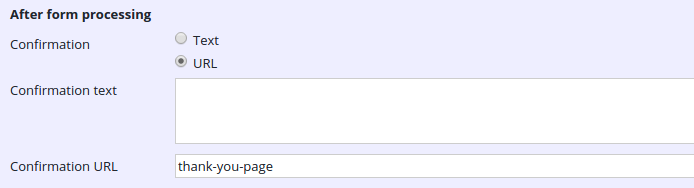
| Confirmation | Selects the action to take after form submission. Options are presented as radio buttons. |
| Confirmation text | Optional. Specifies the confirmation message displayed on the page after successful submission. This value is set as the request attribute afterProcessSuccessText. |
| Confirmation URL | Optional. Specifies a URL to redirect users to after form submission. Use a URL starting with http for external redirects, or provide an HST sitemap path for internal redirects. |
Example: After Process settings with Confirmation URL selected
CMS Configuration
To enable the After Process plugin in the form editor:
-
In the JCR, navigate to
/hippo:namespaces/your_namespace/your_form/editor:templates/_default_. -
Add a node of type
frontend:plugin. -
Set the following properties on the new node:
plugin.class = com.onehippo.cms7.eforms.cms.extensions.AfterProcessPluginmode = ${mode}wicket.id = ${cluster.id}.extensions.itemwicket.model = ${wicket.model}
This configuration registers the After Process behavior in the form editor.
HST Configuration
To add the After Process behavior to a form component:
-
Open the component configuration for your form.
-
Add the following value to the
behaviorsparameter:com.onehippo.cms7.eforms.hst.behaviors.AfterProcessBehavior
This step enables the behavior for the form on the site.
Demo
The Enterprise Forms demo includes a form configured with the After Process behavior.