Custom Search Filter
Info: This feature in Bloomreach Content requires a standard or premium license. Contact Bloomreach for details.
Overview
The Document search application enables searching across all fields of your document types. By default, Advanced Search provides filters for standard document metadata such as document type and location. You can extend Advanced Search by adding custom search plugins to filter on specific properties of your document types.
You can either configure the built-in generic property filter plugin for simple property-based filtering, or implement a custom filter plugin by extending the generic property filter or creating a new plugin.
Configuring the Generic Property Filter
The Generic Property Filter allows users to filter search results based on a property of type String or Long by entering a text value. For example, you can filter documents by their Title property:
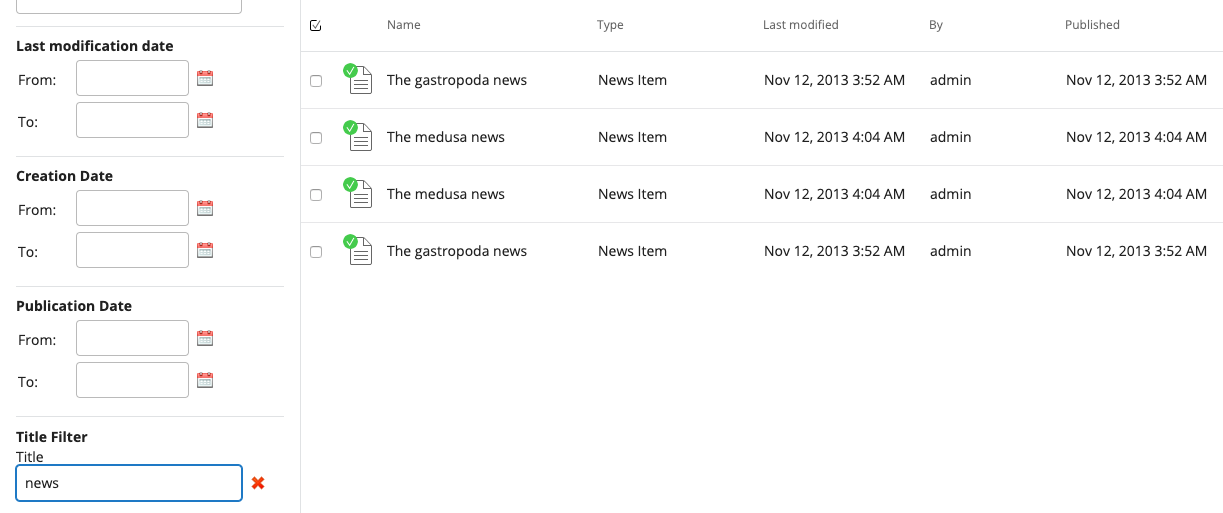
To configure this filter:
- Identify the property in your content model to filter on. For example, use the
myproject:titleproperty. - Add the following configuration under
/hippo:configuration/hippo:frontend/cms/cms-advanced-searchin the repository:
/hippo:configuration/hippo:frontend/cms/cms-advanced-search: /titlePropertyFilter: jcr:primaryType: frontend:plugin plugin.class: com.onehippo.cms7.search.frontend.filters.GenericPropertyFilterPlugin wicket.id: ${search.extensions} wicket.model: ${model.search} filterPropertyName: myproject:title filterPropertyType: text
You can configure the labels ("Title Filter" and "Title") displayed in the UI as resource bundle labels in the repository.
To set up these translations, use the following configuration. The GenericPropertyFilterPlugin uses the name of the configuration node (titlePropertyFilter) to resolve the property and title labels:
/hippo:configuration/hippo:translations/hippo:cms /advanced-search-filters: jcr:primaryType: hipposys:resourcebundles /en: jcr:primaryType: hipposys:resourcebundle titlePropertyFilter.propertyName: Title titlePropertyFilter.title: Title Filter /nl: jcr:primaryType: hipposys:resourcebundle titlePropertyFilter.propertyName: Titel titlePropertyFilter.title: Titelfilter
Extending the Generic Property Filter
The com.onehippo.cms7.search.frontend.filters.GenericPropertyFilterPlugin class provides a generic filter implementation. It allows users to enter a value that filters search results based on a specific document property.
Supported property types:
- String: Uses the
jcr:containsoperator to filter results. - Long: Uses the
Equalsoperator to filter results.
The following code shows how the filter determines which constraint to apply:
@Override public List<Constraint> getConstraints() { List<Constraint> constraints = new LinkedList<Constraint>(); if (StringUtils.isNotBlank(getFilterPropertyName()) && StringUtils.isNotBlank(getFilterPropertyValue())) { if (FILTER_PROPERTY_TYPE_INTEGER.equals(getFilterPropertyType())) { constraints.add(QueryUtils.integer(getFilterPropertyName()).isEqualTo(NumberUtils.toInt(getFilterPropertyValue()))); } else { constraints.add(QueryUtils.text(getFilterPropertyName()).contains(getFilterPropertyValue())); } } return constraints; }
To implement a filter for a different property type or to add more complex logic, extend the GenericPropertyFilterPlugin class and override the getConstraints() method as needed.
Implementing a Custom Search Filter
For advanced filtering—such as combining multiple properties or using a custom input component—implement a custom search filter plugin.
To create a custom constraint provider, implement the IConstraintProvider interface in your plugin class.
Example: MyDocumentsPlugin.java
package org.example; import java.util.LinkedList; import java.util.List; import com.onehippo.cms7.search.frontend.ISearchContext; import com.onehippo.cms7.search.frontend.constraints.IConstraintProvider; import com.onehippo.cms7.search.frontend.constraints.YesNoNeither; import org.apache.wicket.markup.html.form.Form; import org.apache.wicket.model.CompoundPropertyModel; import org.hippoecm.frontend.plugin.IPluginContext; import org.hippoecm.frontend.plugin.config.IPluginConfig; import org.hippoecm.frontend.service.render.RenderPlugin; import org.hippoecm.frontend.session.UserSession; import org.onehippo.cms7.services.search.query.QueryUtils; import org.onehippo.cms7.services.search.query.constraint.Constraint; import org.onehippo.cms7.services.search.query.constraint.TextConstraint; public class MyDocumentsPlugin extends RenderPlugin implements IConstraintProvider { private String authoredByMe; public MyDocumentsPlugin(final IPluginContext context, final IPluginConfig config) { super(context, config); Form form = new Form("form", new CompoundPropertyModel(this)); form.add(new YesNoNeither("authoredByMe") { @Override protected void onModelChanged() { super.onModelChanged(); updateSearchResults(); } }); add(form); } private void updateSearchResults() { ISearchContext searcher = getPluginContext().getService( ISearchContext.class.getName(), ISearchContext.class); searcher.updateSearchResults(); } @Override public List<Constraint> getConstraints() { List<Constraint> constraints = new LinkedList<Constraint>(); if (authoredByMe != null) { final TextConstraint iamTheUser = QueryUtils.text("hippostd:holder").isEqualTo( UserSession.get().getJcrSession().getUserID()); if ("yes".equals(authoredByMe)) { constraints.add(iamTheUser); } else { constraints.add(QueryUtils.not(iamTheUser)); } } return constraints; } @Override public void clearConstraints() { authoredByMe = null; redraw(); } }
The YesNoNeither component is provided by the advanced search plugin API. Use the ISearchContext service to trigger a search result update when the filter state changes.
The plugin implements the IConstraintProvider interface. The getConstraints() method is called when building a new query, and clearConstraints() is called to reset all constraints.
Example markup: MyDocumentsPlugin.html
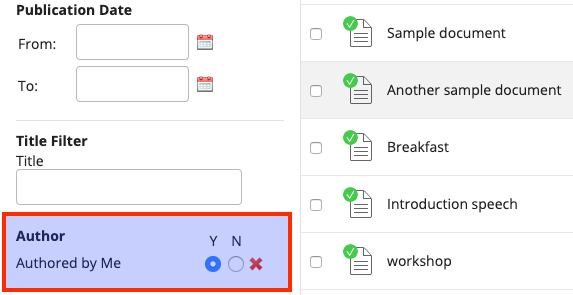
<html xmlns:wicket="http://wicket.apache.org/"> <wicket:panel> <div class="hippo-advanced-search-filter"> <form wicket:id="form"> <ul> <li class="filter"> <h3>Author</h3> <ul> <li style="clear: both; margin-top: -15px;"> <span class="hippo-advanced-search-radio"> <span class="hippo-advanced-search-select"> <wicket:message key="yes">Y</wicket:message> </span> <span class="hippo-advanced-search-select"> <wicket:message key="no">N</wicket:message> </span> <span class="hippo-advanced-search-reset"></span> </span> </li> <li style="clear: both;"> Authored by Me <span wicket:id="authoredByMe" class="hippo-advanced-search-radio"> <input type="radio" wicket:id="authoredByMe-yes" class="hippo-advanced-search-select"/> <input type="radio" wicket:id="authoredByMe-no" class="hippo-advanced-search-select"/> <span class="hippo-advanced-search-reset"> <img wicket:id="authoredByMe-reset"/> </span> </span> </li> </ul> </li> </ul> </form> </div> </wicket:panel> </html>
Register your plugin in the Document search application under /hippo:configuration/hippo:frontend/cms/cms-advanced-search:
/hippo:configuration/hippo:frontend/cms/cms-advanced-search: /myDocuments: jcr:primaryType: frontend:plugin plugin.class: org.example.MyDocumentsPlugin wicket.model: ${model.search} wicket.id: ${search.extensions}
When you add MyDocumentsPlugin.java and MyDocumentsPlugin.html to your CMS project, ensure that the .html (and .properties for internationalization) files are included in the final JAR. In your CMS pom.xml, configure the build as follows:
<build> <finalName>cms</finalName> <resources> <resource> <filtering>false</filtering> <directory>${basedir}/src/main/java</directory> <includes> <include>**/*.html</include> <include>**/*.properties</include> </includes> </resource> </resources> .....
Note: To change the order of your plugin in the UI, move the
myDocumentsnode higher in the repository configuration at/hippo:configuration/hippo:frontend/cms/cms-advanced-search.
The following screenshot shows the result: