Discovery Plugin
The brxm-discovery plugin integrates Bloomreach Discovery with Bloomreach Content. Bloomreach Discovery is a search and merchandising engine that indexes your product catalog and provides keyword search, category browsing, autosuggest, recommendation widgets, and visual (image-based) search. Bloomreach Content serves as the content and page composition layer: HST components render pages, editors manage content in Channel Manager, and the Page Model API delivers data to headless and SPA front ends.
The plugin provides the integration layer between these systems. It includes HST components, CMS editor extensions, and a server-side transport layer that communicates with the Discovery API on behalf of your site. Discovery credentials are never exposed to the browser.
Alpha - Early Development
APIs, configuration schemas, HST component interfaces, and JCR node types may change between releases. Review release notes before upgrading.
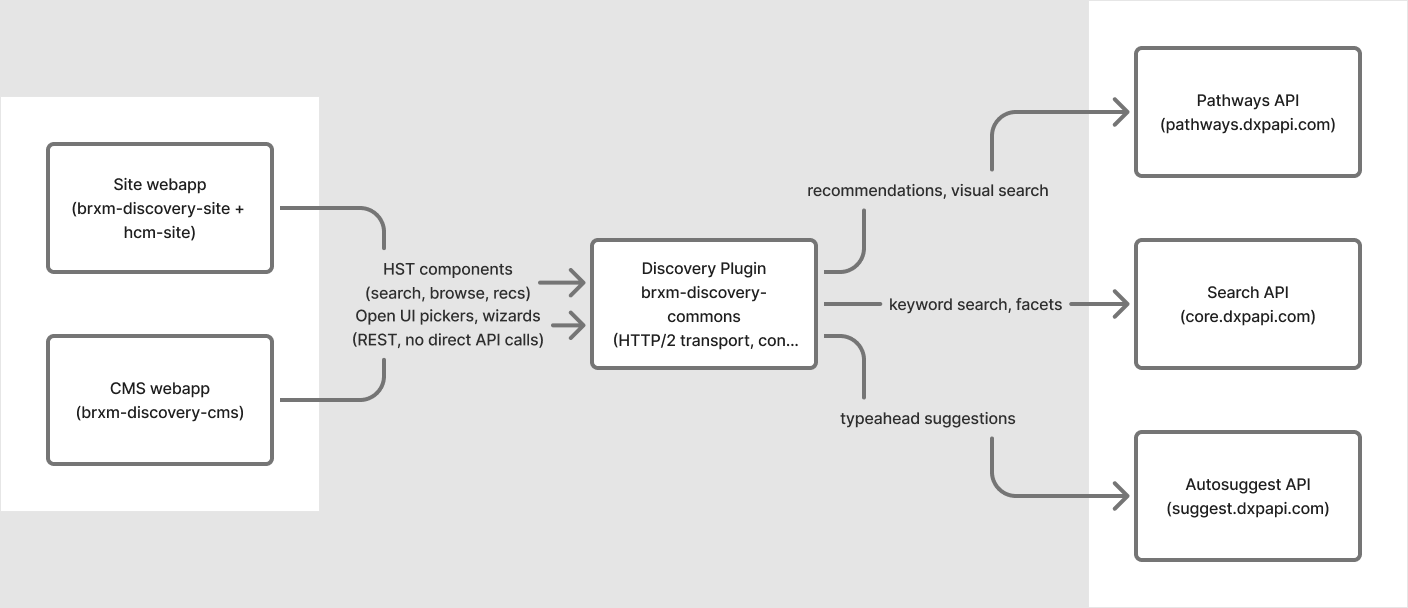
Diagram:
The diagram shows the Discovery Plugin (brxm-discovery-commons) positioned between two Bloomreach Content web applications and three external Discovery APIs. The Site webapp and CMS webapp connect to the plugin, using HST components for search, browse, and recommendations, as well as Open UI pickers and wizards. The plugin communicates with the Pathways API (for recommendations and visual search), the Search API (for keyword search and facets), and the Autosuggest API (for typeahead suggestions). The plugin acts as an intermediary, handling all communication from the site and CMS applications to the external Discovery services.
Plugin Features
- Search and browse: Provides keyword search and category browse pages with server-generated facets, pagination, sorting, did-you-mean suggestions, and keyword redirect handling.
- Autosuggest: Includes a search bar component with a live typeahead dropdown for query, attribute, and product suggestions.
- Recommendations: Offers four widget types (product-keyed, category-keyed, global/personalized, and keyword-keyed). Editors can configure these widgets without code changes.
- Visual search: Allows shoppers to search by uploading a photo. The plugin proxies uploads so Discovery credentials remain server-side.
- Editorial curation: Supports hand-picked product and category highlight components for merchandising slots that do not require algorithmic recommendations.
- CMS editor tooling: Provides Open UI pickers and step-by-step wizards for selecting products, categories, and recommendation widgets within document editing.
- Analytics: Implements a server-side pixel service to report impressions, clicks, and page views to Discovery for ranking and A/B testing. Consent gating is supported.
- Headless-ready: All components expose data via the Page Model API and Freemarker, supporting both traditional sites and decoupled React/SPA front ends.
The plugin only queries and displays data already indexed in Discovery. Product catalog synchronization is managed by your commerce platform’s connector.
Requirements
| Requirement | Version |
|---|---|
| Bloomreach Content / Bloomreach Content | 17.0.0 |
| Java | 17 (LTS) |
| Maven | 3.8+ |
| Bloomreach Discovery account | Provisioned account ID and domain key required |
The plugin operates across both Bloomreach Content runtimes: the CMS webapp and the site webapp. Each runtime uses a separate artifact. See Installation for details.
Module Overview
| Module | Artifact | Runs in |
|---|---|---|
| Commons | brxm-discovery-commons | Both runtimes (transitive dependency) |
| CMS | brxm-discovery-cms | CMS webapp |
| Site | brxm-discovery-site | Site webapp |
| HCM Site | brxm-discovery-hcm-site | Bundled automatically via the site artifact |
Next Steps
| Task | Page |
|---|---|
| Add the plugin to your project | Installation |
| Configure Discovery credentials | Configuration |
| Place search, browse, or recommendation components on a page | Component Parameters |
| Configure recommendation widgets or visual search | Recommendations & Visual Search |
| Enable editors to select products, categories, and widgets in the CMS | CMS Document Types & Pickers |
| Set up analytics and consent management | Pixel Tracking & Consent |