Enterprise Forms: Pluggable Behaviors
Overview
Enterprise Forms supports pluggable behaviors, allowing you to extend form functionality by integrating custom logic at defined extension points. The CMS form editor also supports custom UI plugins, enabling configuration of these behaviors through the user interface.
Enterprise Forms includes several built-in pluggable behaviors:
- Submission confirmation
- Submission counter
- Actual store counter
- Form introduction
- Mail form data
- Store form data
- After process (confirmation text)
If these built-in behaviors do not meet your requirements, you can implement custom behaviors as described below.
Extension Points
The abstract base form component, com.onehippo.cms7.eforms.hst.components.EformComponent, exposes several extension points. You can add custom behavior by implementing one or more of the following interfaces:
DoBeforeRenderBehavior
Implement com.onehippo.cms7.eforms.hst.api.DoBeforeRenderBehavior to execute logic before the form component renders. Use this interface to prepare additional data required for rendering.
ValidationBehavior
Implement com.onehippo.cms7.eforms.hst.api.ValidationBehavior to add custom validation logic. ValidationBehavior instances run after the form's built-in validation. You can use this to perform additional checks and raise validation errors even if the default validation passes.
OnValidationErrorBehavior
Implement com.onehippo.cms7.eforms.hst.api.OnValidationErrorBehavior to execute logic when form validation fails. These behaviors run after the form's onValidationError method.
OnValidationSuccessBehavior
Implement com.onehippo.cms7.eforms.hst.api.OnValidationSuccessBehavior to execute logic when form validation succeeds. These behaviors run after the form's onValidationSuccess method.
The following sequence diagram illustrates how the HST-2 Container, EformComponent, and pluggable behavior components interact:
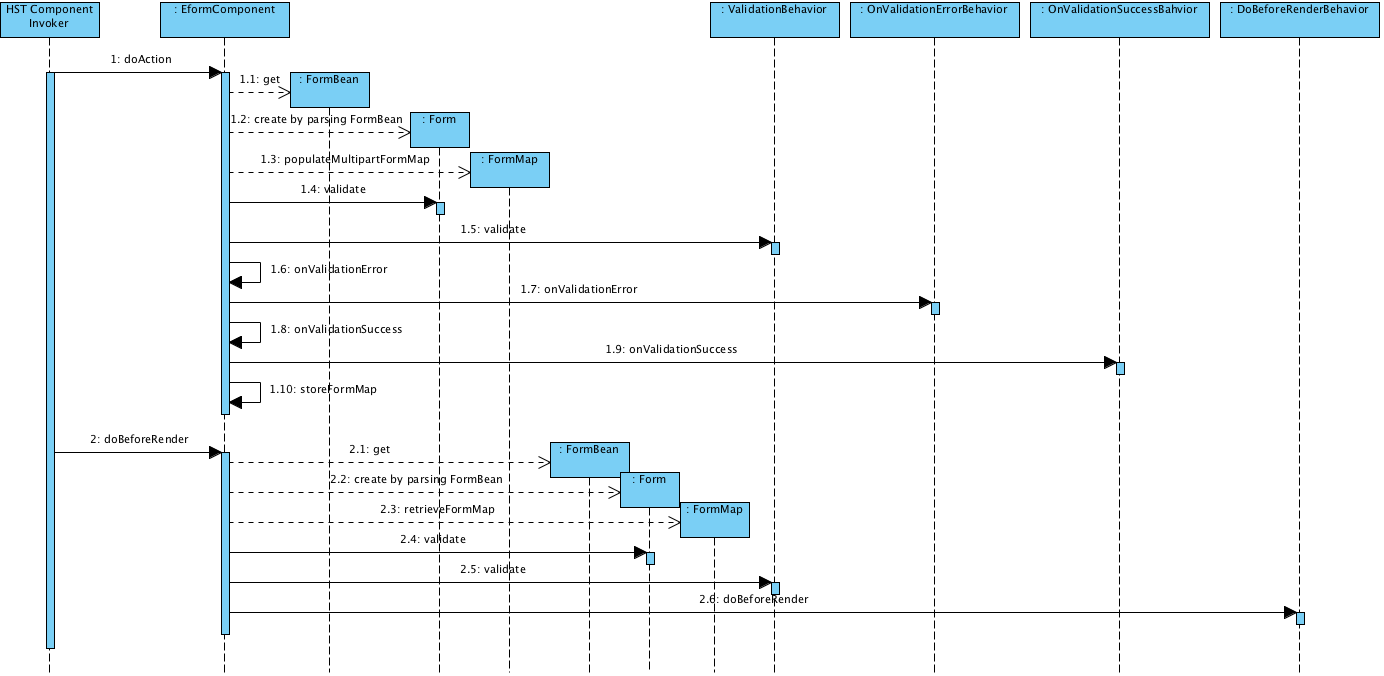
Diagram: This UML sequence diagram shows the flow between HST Component Invoker, EformComponent, FormBean, Form, FormMap, and the four behavior interfaces: ValidationBehavior, OnValidationErrorBehavior, OnValidationSuccessBehavior, and DoBeforeRenderBehavior. The diagram details method calls for both action handling and rendering, highlighting where pluggable behaviors are invoked.
Download the above diagram at full size
The class diagram below shows the hierarchy of pluggable behavior interfaces and their current implementations:
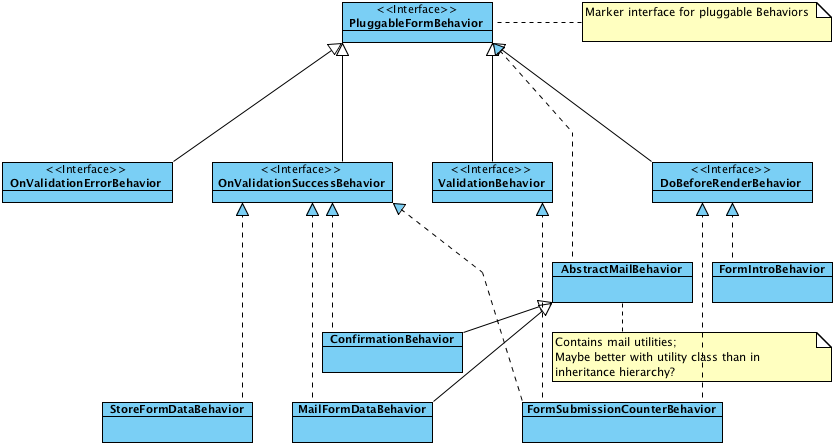
Diagram: This UML class diagram presents the interface structure for pluggable enterprise form behaviors.
PluggableFormBehavioris the marker interface, with specialized interfaces for OnValidationErrorBehavior, OnValidationSuccessBehavior, ValidationBehavior, and DoBeforeRenderBehavior. Concrete implementations include StoreFormDataBehavior, ConfirmationBehavior, MailFormDataBehavior, FormSubmissionCounterBehavior, FormIntroBehavior, and AbstractMailBehavior.
Download the above diagram at full size
Adding Behaviors to a Form
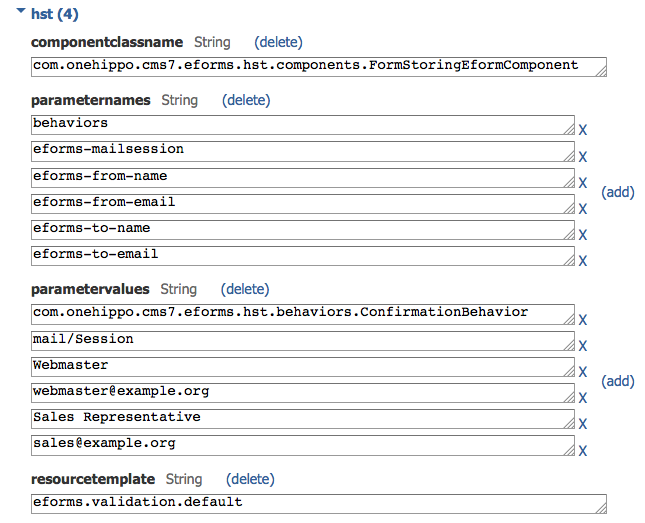
You can add pluggable behaviors to a form through the HST component configuration. Any component that extends com.onehippo.cms7.eforms.hst.components.EformComponent accepts a component parameter named behaviors. This parameter is a comma-separated list of fully qualified class names for the behaviors you want to enable.
The following screenshot shows a form component configuration. The component class com.onehippo.cms7.eforms.hst.components.FormStoringEformComponent extends EformComponent, so it supports pluggable behaviors. The behaviors parameter is set to com.onehippo.cms7.eforms.hst.behaviors.ConfirmationBehavior, which enables the Submission Confirmation behavior for this form.
Configuring Pluggable Behaviors in the CMS
The CMS form editor provides an extension point for custom UI plugins, allowing users to configure pluggable behaviors. You can use any CMS RenderPlugin, but the abstract plugin com.onehippo.cms7.eforms.cms.extensions.AbstractFormExtensionPlugin is available to simplify development. This abstract class provides standard markup and a getFormDocument() method to access the form document's JcrNodeModel.
To register your plugin:
- Add your plugin to the global form content type in the
eformsnamespace (/hippo:namespaces/eforms/form), or create a custom form content type and add your plugin there. - Add a node of type
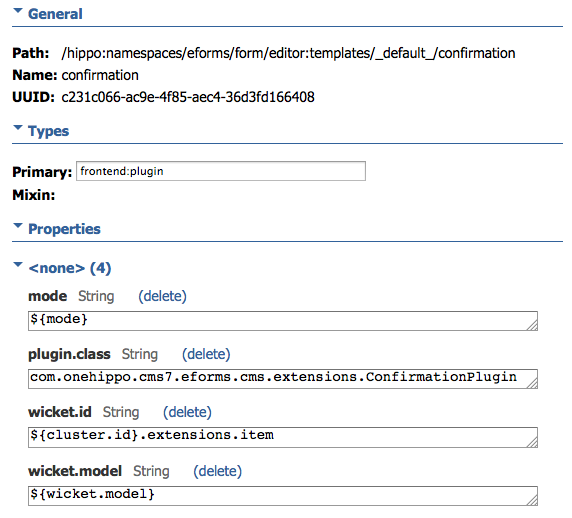
frontend:pluginunder/hippo:namespaces/[your_namespace]/[your_content_type]/editor:templates/_default_. - Set the
plugin.classproperty to your plugin's fully qualified class name. - Add the properties
mode,wicket.id, andwicket.modelas shown in the screenshot below.
This configuration registers your plugin at the extension point and provides it with the necessary data.
Implementation Guidelines
When implementing any pluggable behavior, verify whether the form data has already been processed. Check the generated form field eforms_process_done, which is set to "true" after all form processing completes. Use the constant EformComponent.ATTRIBUTE_PROCESS_DONE to retrieve this field from the FormMap. This ensures your behavior only executes at the appropriate stage of form processing.