Submission Counter Behavior
- HST Behavior class:
com.onehippo.cms7.eforms.hst.behaviors.FormSubmissionCounterBehavior - CMS Plugin class:
com.onehippo.cms7.eforms.cms.extensions.FormCounterExtensionPlugin
Overview
The Submission Counter behavior adds a submission counter to a form. The counter increases each time a user submits the form. This behavior provides the following features:
- Displays the submission counter in the form document within the CMS
- Allows you to configure a maximum number of form submissions
- Lets you set a custom message to display when the maximum is reached
- Supports incrementing the counter by a custom value on each submission
- Supports using the value from a numerical dropdown field to increment the counter
- Can be combined with
StoreFormDataPluginby enabling "Use actual store data for counter". For details, see Actual Store Counter.
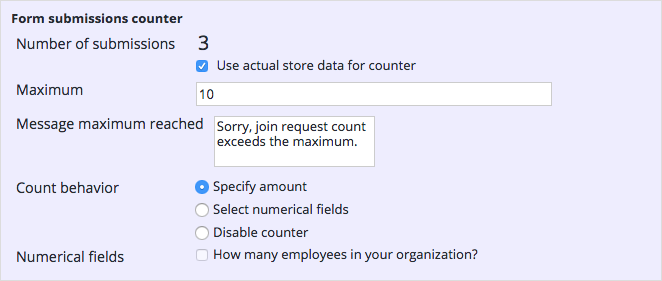
CMS Configuration
To add the Submission Counter plugin to the form editor in the CMS, create a node of type frontend:plugin under /hippo:namespaces/eforms/form/editor:templates/_default_. Set the following properties on the node:
plugin.class = com.onehippo.cms7.eforms.cms.extensions.FormCounterExtensionPluginmode = ${mode}wicket.id = ${cluster.id}.extensions.itemwicket.model = ${wicket.model}
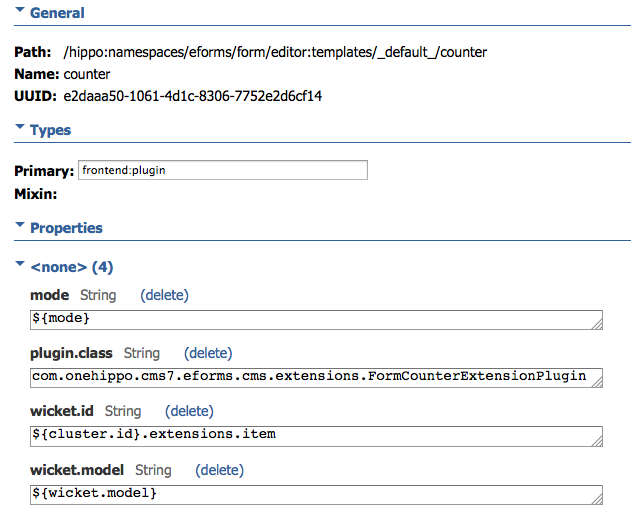
You can also add the plugin to a custom form template instead of the default ef:form template.
HST Configuration
To enable the Submission Counter behavior for a form component, add the following parameter to the component configuration:
behaviors = com.onehippo.cms7.eforms.hst.behaviors.FormSubmissionCounterBehavior
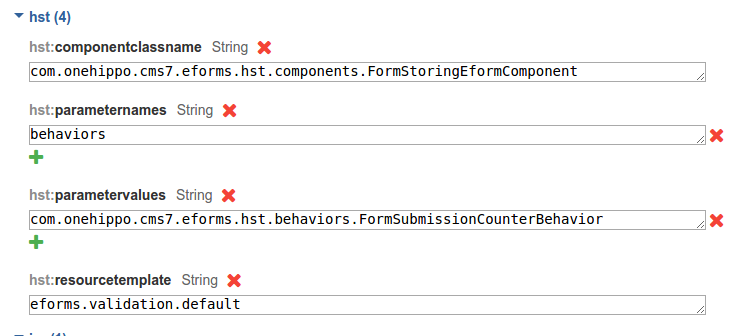
Request Attributes
The Submission Counter behavior implements DoBeforeRenderBehavior and sets these request attributes:
maxFormSubmissionsReached(boolean): Indicates whether the maximum number of form submissions has been reachedmaxFormSubmissionsReachedText(String): The message to display when the maximum number of submissions is reached
Demo
The Enterprise Forms demo includes a form with the Submission Counter behavior enabled.