Submission Confirmation Behavior
- HST Behavior class:
com.onehippo.cms7.eforms.hst.behaviors.ConfirmationBehavior - CMS Plugin class:
com.onehippo.cms7.eforms.cms.extensions.ConfirmationPlugin
Overview
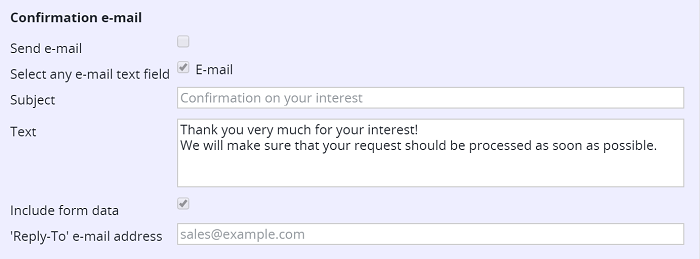
The Submission Confirmation behavior sends a confirmation email to an address entered in the form. You can configure this behavior in the form document using several fields. The following table lists each configuration field, its purpose, and the corresponding JCR property.
| Field | Description | JCR Property |
|---|---|---|
| Send e-mail | Sends a confirmation email only if this checkbox is selected. This allows you to add the confirmation behavior to a form document type by default, while editors can enable or disable email sending per form document. | eforms:confirmationenablesending |
| Select any e-mail text field | Displays a checkbox list of all text fields in the form that use the "E-mail Address" validation rule. Editors can select one or more fields to receive the confirmation message. Note: After adding a new email field, save the form to update the list. | eforms:confirmationemailfields |
| Subject | Sets the subject line for the confirmation message. If left empty, the subject defaults to 'Confirmation of receipt' (localized via a properties file). | eforms:confirmationsubject |
| Text | Adds an optional paragraph to the confirmation message. | eforms:confirmationtext |
| Include form data | Determines whether the confirmation message includes the submitted form field values. | eforms:confirmationincludefields |
| 'Reply-To' e-mail address | Sets an optional reply-to address for the confirmation message. You can enter a full email address or use the format 'MySender<[[email protected]](/cdn-cgi/l/email-protection)>'. If not set, the value defaults to the parameters 'eforms-from-name' and 'eforms-from-email'. | eforms:confirmationreplytoaddress |
The default confirmation message includes the form name, the optional text paragraph, and optionally a list of all form fields with their submitted values. You can override the default message by providing a Freemarker or Velocity mail template in your site.
CMS Configuration
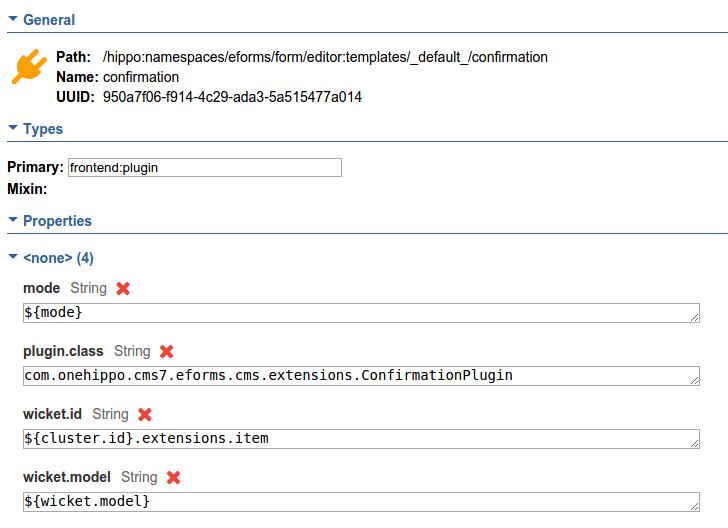
To enable the confirmation plugin in the form editor, add a node of type frontend:plugin under /hippo:namespaces/eforms/form/editor:templates/_default_. Set the following properties:
plugin.class = com.onehippo.cms7.eforms.cms.extensions.ConfirmationPluginmode = ${mode}wicket.id = ${cluster.id}.extensions.itemwicket.model = ${wicket.model}
Important:
Add at least one text field with an email address validation rule to your form. You can then select one or more of these fields as the destination addresses for the confirmation email.Ensure that at least one selected email address field is required. If all are optional, users can submit the form without providing a destination address for the confirmation email.
You can add the plugin to the default eforms:form template or to a custom form template.
HST Configuration
To activate the confirmation behavior in your form component, add the following parameters to the component configuration:
behaviors = com.onehippo.cms7.eforms.hst.behaviors.ConfirmationBehavioreforms-mailsession = mail/Session(adjust based on your environment)
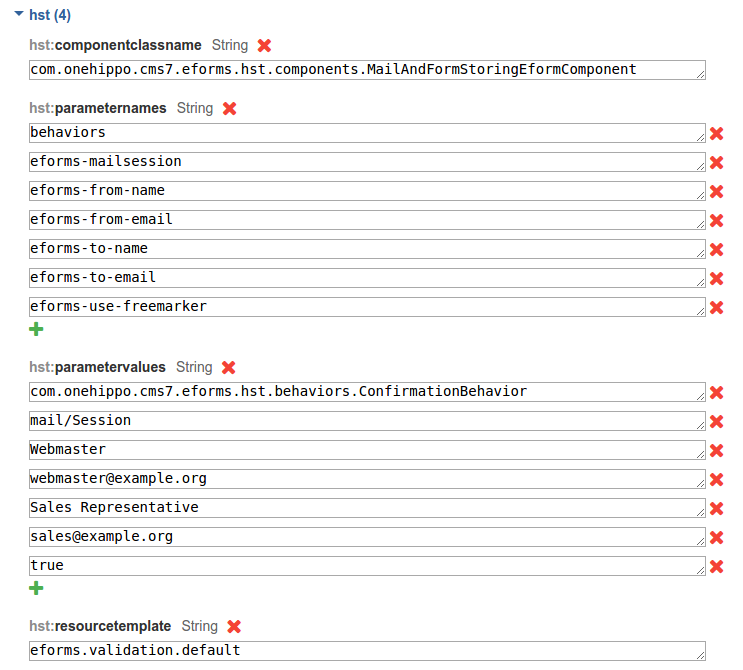
You can also configure email headers using these optional component parameters. If you do not set them, the mail server uses its default values.
- 'From' header:
eforms-from-emaileforms-from-name
- 'Sender' header:
eforms-sender-emaileforms-sender-name
Demo
The Enterprise Forms demo includes a form with the confirmation behavior enabled.