Mail Form Data Behavior
- HST Behavior class:
com.onehippo.cms7.eforms.hst.behaviors.MailFormDataBehavior - CMS Plugin class:
com.onehippo.cms7.eforms.cms.extensions.MailFormDataPlugin
Overview
The Mail Form Data behavior sends one or more email messages with the submitted form data to specified email addresses. You can configure the recipients, subject, message body, and attachments.
Info: Support for configuring multiple email messages is available from version 14.3.0.
Screenshot:
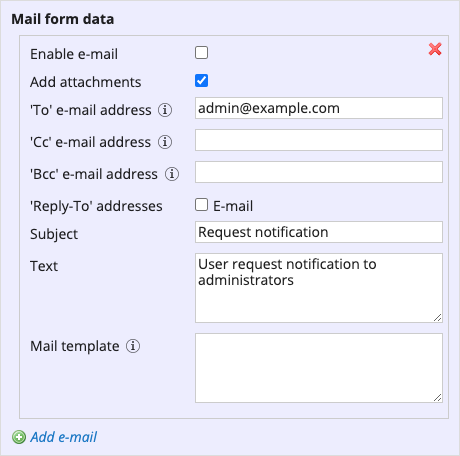
The following table describes each configuration field available in the document editor, along with the corresponding JCR property where the value is stored.
Info: In versions up to 14.2.0, these properties are stored in the document's root node. From version 14.3.0 onward, each email configuration is stored in a child node of type
eforms:formconfigurationto support multiple emails.
| Field | Description | JCR Property |
|---|---|---|
| Enable e-mail | Enables or disables the configured email message. | eforms:mailformdata |
| Add attachments | Includes files uploaded through the form as attachments in the email. > Info: Available since 14.3.0 | eforms:addattachments |
| 'To' e-mail address | Email address to receive the form data. | eforms:notificationemail |
| 'CC' e-mail address | Optional email address for carbon copy recipients. | eforms:notificationccemail |
| 'BCC' e-mail address | Optional email address for blind carbon copy recipients. | eforms:notificationbccemail |
| 'Reply-To' addresses | Checkbox list of all text fields in the form with the "E-mail Address" validation rule. Checked fields are added to the email's Reply-To header. Note: After adding a new email field to the form, the checkbox list updates only after saving the form. | eforms:notificationreplytoemailfields |
| Subject | Subject line for the email. | eforms:notificationsubject |
| Text | Paragraph to insert into the email body. The placement depends on the mail template. | eforms:notificationtext |
| Mail template | Select a supported template engine to compose the email content. If left empty, the default template is used. | eforms:notificationtemplate |
CMS Configuration
To add the CMS plugin to the form editor, create a node of type frontend:plugin under /hippo:namespaces/eforms/form/editor:templates/_default_. You can choose any name for this node.
Set the following properties:
plugin.class=com.onehippo.cms7.eforms.cms.extensions.MailFormDataPluginmode=${mode}wicket.id=${cluster.id}.extensions.itemwicket.model=${wicket.model}
Screenshot:
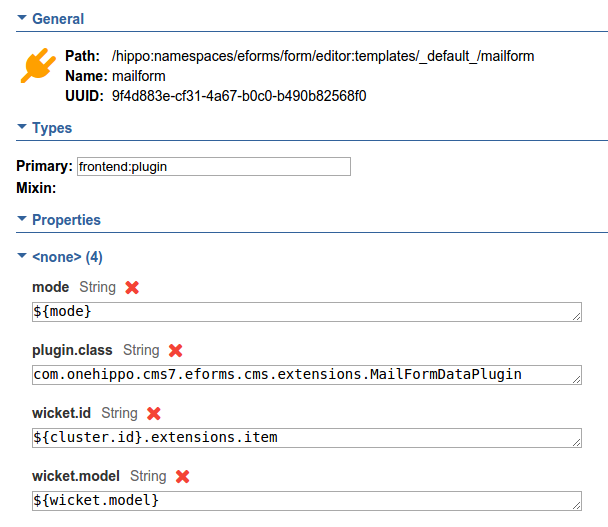
You can also define a custom form template instead of modifying the default eforms:form template. Add the plugin to your custom template as needed.
HST Configuration
To enable the behavior in your form component, add at least the following parameters to the component configuration:
behaviors = com.onehippo.cms7.eforms.hst.behaviors.MailFormDataBehavioreforms-mailsession = mail/Session(adjust based on your environment)
You can configure additional email headers using these optional component parameters. If not set, the mail server's defaults are used:
- 'From' header:
eforms-from-emaileforms-from-name
- 'Sender' header:
eforms-sender-emaileforms-sender-name
- 'Subject' header:
eforms-subject
Template Engines
Enterprise Forms supports both Freemarker and Velocity template engines for generating email content. Select the engine using the eforms-use-freemarker component parameter:
false(default): Use the Velocity template engine.true: Use the Freemarker template engine.
Demo
The Enterprise Forms demo includes a form configured with the mail form data behavior: