Migrate to the Taxonomy Field in 15.3
Overview
Starting with brXM 15.3, the document type editor includes a new taxonomy field type. This update is part of broader improvements to taxonomy management.
This guide explains how to migrate from the legacy mixin-based taxonomy implementation to the new taxonomy field type, which behaves like other standard field types.
Prerequisites
- A brXM 15.2 project with at least one document type using a taxonomy field, configured manually or via Essentials, following the legacy taxonomy mixin approach described in Taxonomy Plugin Configuration.
Migration Steps
1. Upgrade to brXM 15.3.0
Follow the standard upgrade procedure for minor releases.
After upgrading, build the project locally and run it against your existing storage. The upgrade adds new properties at the hippotaxonomy.cnd level, including hippotaxonomy:defaultLocale at the taxonomy node. You can verify these changes using the Console application.
2. Optimize the Taxonomy Tree Data Structure (Optional)
To improve performance, update the taxonomy tree data structure as described in "Upgrade Considerations" in JCR Tree Model Restructuring in 15.3.
3. Add the New Taxonomy Field Type
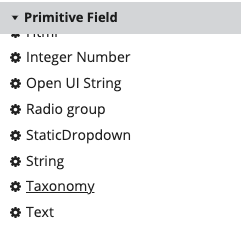
As an administrator, open the document type editor. Add a new taxonomy field from the Primitive Field section to your document type.
In the field properties panel, configure the following:
- Path: Set the JCR property path for the field.
- Required: Specify if the field is mandatory.
- Default Caption and Hint: Provide user-facing labels and help text.
- taxonomy.name: Set this property to the JCR node name of the taxonomy to use.
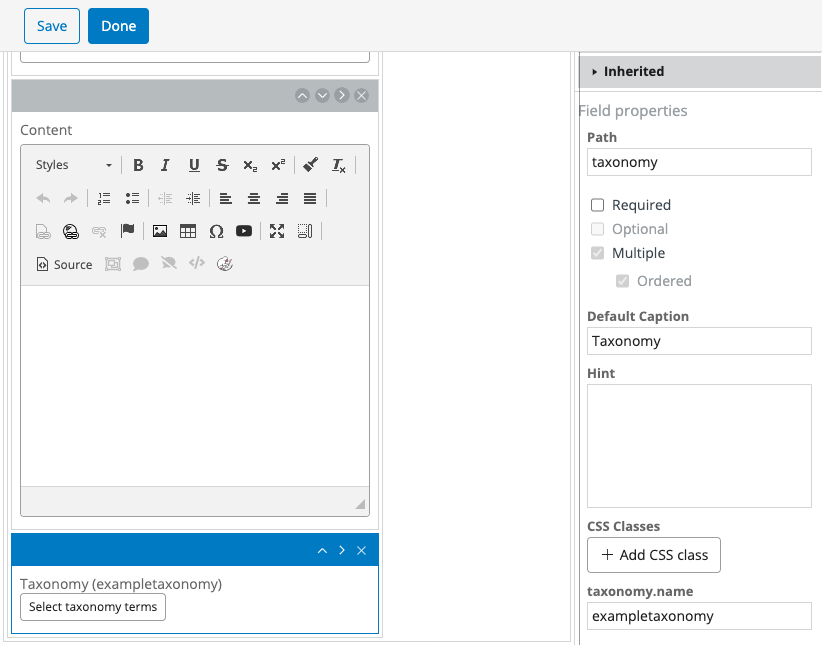
You can localize the caption and hint fields as with other document fields. Refer to Add Internationalization (i18n) To Document Types for details.
Hint:
To minimize changes on the delivery tier, you can set the new field's path tohippotaxonomy:keys. This approach keeps the delivery implementation unchanged. Ensure that the content type allows arbitrary properties (for example, by including thehippostd:relaxedmixin).
4. Remove the Legacy Taxonomy Field
As an administrator, use the document type editor to remove the existing (legacy) taxonomy field from the document type.
5. Migrate Existing Document Data
Existing documents store taxonomy category keys in the hippotaxonomy:keys property, defined by the hippotaxonomy:classifiable mixin. To migrate data to the new property, create a Groovy Updater script and bootstrap it into your project using a YAML file.
Example Groovy Updater Script
The following script copies values from hippotaxonomy:keys to a new project-specific property and removes the hippotaxonomy:classifiable mixin. If your project defines the mixin at the myproject.cnd level, remove the mixin-removal logic from the script. If you set the new field's path to hippotaxonomy:keys, you do not need to move property data, but you should still remove the mixin.
package org.hippoecm.frontend.plugins.cms.admin.updater import org.hippoecm.repository.util.JcrUtils import org.onehippo.repository.update.BaseNodeUpdateVisitor import javax.jcr.Node import javax.jcr.NodeIterator import javax.jcr.RepositoryException import javax.jcr.Session import javax.jcr.query.Query import org.onehippo.taxonomy.api.TaxonomyNodeTypes /** * Groovy script to move category values from the standard hippotaxonomy:keys * property to a new project namespaced property. * * XPath query: //element(*, myproject:mydocument) * Parameters: { "keysProperty" : "hippotaxonomy:keys", * "newTaxonomyProperty" : "myproject:myproperty" } */ class MoveTaxonomyKeys extends BaseNodeUpdateVisitor { boolean doUpdate(Node node) { def classifiableMixin = TaxonomyNodeTypes.NODETYPE_HIPPOTAXONOMY_CLASSIFIABLE def keysProperty = parametersMap["keysProperty"] def newTaxonomyProperty = parametersMap["newTaxonomyProperty"] String[] keys = JcrUtils.getMultipleStringProperty(node, keysProperty, null) if (keys == null) { log.debug "Not copying values to ${newTaxonomyProperty}: no ${keysProperty} on node ${node.path}" return false } log.debug "Copying values from ${keysProperty} to ${newTaxonomyProperty} on node ${node.path}" node.setProperty(newTaxonomyProperty, keys) node.getProperty(keysProperty).remove() if (node.isNodeType(classifiableMixin)) { node.removeMixin(classifiableMixin) } return true } boolean undoUpdate(Node node) { throw new UnsupportedOperationException('Updater does not implement undoUpdate method') } boolean logSkippedNodePaths() { return false } boolean skipCheckoutNodes() { return false } Node firstNode(final Session session) throws RepositoryException { return null } Node nextNode() throws RepositoryException { return null } }
6. Delivery Tier Adjustments
If your project does not use dynamic content beans, add a method to the HST content bean to retrieve the new taxonomy property, similar to the legacy getKeys() method described in Taxonomy Plugin Delivery Tier.
If your project uses dynamic content beans (the default), the new property is available to the front end without additional changes.
In the Delivery API, the taxonomy field appears as shown below. The response includes both taxonomyValues and taxonomyAllValues, with ancestor information:
"taxonomy": { "taxonomyValues": [{ "key": "my-sub-category", "label": "My Sub Category", "keyPath": "1/my-category/my-sub-category/", "labelPath": "1/My Category/My Sub Category/" }], "taxonomyAllValues": [{ "key": "my-sub-category", "label": "My Sub Category", "keyPath": "1/my-category/my-sub-category/", "labelPath": "1/My Category/My Sub Category/" }, { "key": "my-category", "label": "My Category", "keyPath": "0/my-category/", "labelPath": "0/My Category/" } ], "taxonomyName": "myTaxonomy" }
Deployment
Document type changes, including adding or removing fields, are managed in YAML files within your project codebase. To apply these changes to test, staging, or production environments, deploy the updated project.
Bootstrap the Groovy updater script into the registry at /hippo:configuration/hippo:update/hippo:registry using YAML, and run it in the target environment to migrate existing document data.