Configure a Required Taxonomy Field
Legacy Documentation (Taxonomy Mixin Field)
This page documents the legacy approach for configuring required taxonomy fields using the Taxonomy Mixin Field. Starting with version 15.3, you can use the Taxonomy field type in the Document Type Editor to add required taxonomy fields directly.
Overview
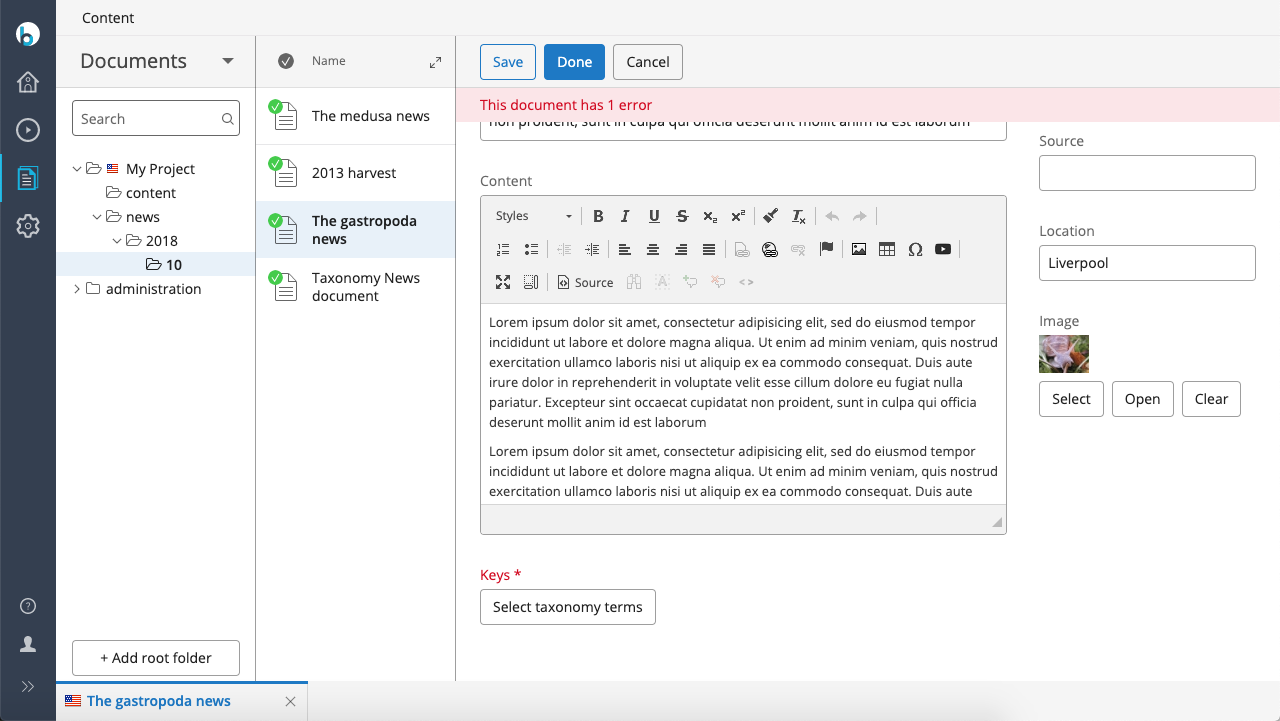
You can configure a taxonomy field in a document type to be required. When a user tries to save a document without selecting any categories, the taxonomy field will be visually marked as invalid with red highlighting.
When to Use
Use this configuration if you need to enforce category selection for documents and require the taxonomy field to display standard invalid field highlighting in the CMS editor.
Prerequisites
- Access to the Console for configuration changes
- An existing document type with a taxonomy field
- Familiarity with JCR node structure
Implementation Steps
1. Configure the TaxonomyPickerPlugin as a Frontend Plugin
By default, taxonomy fields added using the Essentials setup application use a classifiable node with the org.hippoecm.frontend.editor.plugins.mixin.MixinLoaderPlugin. This setup only displays a feedback message when validation fails and does not highlight the field in red.
To enable validation highlighting, configure the TaxonomyPickerPlugin directly under the editor:templates node of your document type. Use the following configuration as an example:
/hippo:namespaces/myproject/mydocumenttype/editor:templates/_default_: /classifiable: jcr:primaryType: frontend:plugin field: keys plugin.class: org.onehippo.taxonomy.plugin.TaxonomyPickerPlugin taxonomy.classification.dao: service.taxonomy.dao taxonomy.id: service.taxonomy taxonomy.name: exampletaxonomy wicket.id: ${cluster.id}.field (or applicable layout part e.g. ${cluster.id}.right.item)
2. Set the 'required' Validator
You must set a required validator on the taxonomy field. You can do this at either the mixin level or the document type level.
2a. Set the 'required' Validator on the Classifiable Mixin
To require taxonomy fields in all document types, add the required validator to the hippotaxonomy:classifiable mixin:
/hippo:namespaces/hippotaxonomy/classifiable/hipposysedit:nodetype/hipposysedit:nodetype: /keys: jcr:primaryType: hipposysedit:field hipposysedit:validators: [ required ]
2b. Set the 'required' Validator on the Document Type Field
To require the taxonomy field only for a specific document type, add a field node with the required validator under the hipposysedit:nodetype node for that type:
/hippo:namespaces/myproject/mydocumenttype/hipposysedit:nodetype/hipposysedit:nodetype: /keys: jcr:primaryType: hipposysedit:field hipposysedit:multiple: true hipposysedit:path: hippotaxonomy:keys hipposysedit:type: String hipposysedit:validators: [ required ]
Verification
When configured correctly, the CMS editor will highlight the taxonomy field in red if a user attempts to save a document without selecting any categories. The following screenshot shows the expected result: