Extra Taxonomy Field in Document Type (Taxonomy Plugin)
Legacy Documentation: Taxonomy Mixin Field
This page documents the legacy approach for adding extra taxonomy fields using the Taxonomy Mixin Field. Starting in version 15.3, you can use the Taxonomy field type in the Document Type Editor to add multiple taxonomy fields directly to a document type.
Adding an Extra Taxonomy Picker to a Document Type
To add a second taxonomy picker to a document type, complete these steps:
- Configure a second taxonomy DAO service by creating a new
MixinClassificationDaoPluginwith a unique configuration. - Add a new plugin context to your editor template that references the new service.
Configure a Second Taxonomy DAO Service
The org.onehippo.taxonomy.plugin.MixinClassificationDaoPlugin class uses the fieldPath property to determine where additional taxonomy keys are stored.
For example, if you configure the service as service.taxonomy.dao.alternate, alternate taxonomy keys will be stored in a property such as taxonomydemo:alternatekeys.
/alternateClassificationDaoService: jcr:primaryType: frontend:plugin fieldPath: myproject:alternatekeys plugin.class: org.onehippo.taxonomy.plugin.MixinClassificationDaoPlugin taxonomy.classification.dao: service.taxonomy.dao.alternate
Configure additional taxonomy fields using the CMS Console.
To add the service:
- In the Console, navigate to
/hippo:configuration/hippo:frontend/cms/cms-services. - Create a new node as shown above, or copy the existing
classificationDaoServicenode and add thefieldPathproperty with your desired property name. - Save your changes to the repository.
Record this change in your project's bootstrap resources to ensure it is available in all environments.
Add a Plugin Context for the Extra Taxonomy Field
Assume you have a document type named doubletaxonomy with the namespace prefix taxonomydemo. By default, the editor templates structure for a single taxonomy field appears as follows:
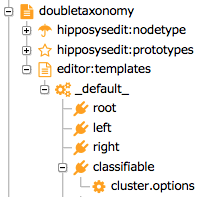
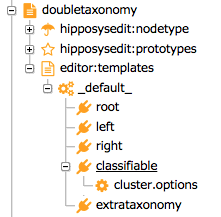
To add an extra taxonomy field, add the following configuration to the editor:templates/_default_ node:
/extrataxonomy: jcr:primaryType: frontend:plugin plugin.class: org.onehippo.taxonomy.plugin.TaxonomyPickerPlugin taxonomy.classification.dao: service.taxonomy.dao.alternate taxonomy.id: service.taxonomy taxonomy.name: exampletaxonomy wicket.id: ${cluster.id}.left.item field: extrataxonomy
Next, add this configuration to the hipposysedit:nodetype/hipposysedit:nodetype node:
/extrataxonomy: jcr:primaryType: hipposysedit:field hipposysedit:multiple: true hipposysedit:path: myproject:alternatekeys hipposysedit:type: String
Adjust the following properties as needed:
| Property name | Description |
|---|---|
taxonomy.classification.dao | Name of the DAO service to use. |
taxonomy.name | Name of the taxonomy to use. |
wicket.id | Layout location for the taxonomy field (e.g., ${cluster.id}.left.item). |
To add the template plugin to your document type:
- In the Console, import the updated XML (the new
frontend:pluginnode) at/hippo:namespaces/[yournamespace]/[yourdocumenttype]/editor:templates/_default_. - Save your changes to the repository.
- Log in to the CMS again to reload the services and view the changes.
Record this change in your project's bootstrap resources to ensure consistency across environments.
To provide labels for the classifiable and extrataxonomy fields, add configuration under /hippo:configuration/hippo:translations/hippo:types/[yourdocumenttype]/ as described in Internationalization of Field Captions.
Starting with Taxonomy Plugin 3.0.1, the label for the extrataxonomy field is determined by the value of the hipposysedit:path property configured at /hippo:namespaces/[yournamespace]/[yourdocumenttype]/hipposysedit:nodetype/hipposysedit:nodetype/extrataxonomy.
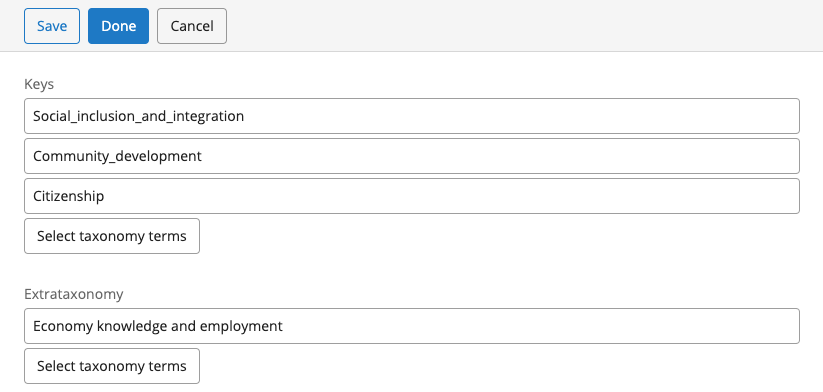
After configuration, your document type should display both taxonomy fields:
Verification
To verify your configuration:
- Create a new document using the updated document type.
- Select taxonomy items in both taxonomy pickers.
- Save the document.
- In the Console, confirm that all taxonomy keys are stored in the correct properties.
Use the following query to find documents with both properties://element(*,taxonomydemo:doubletaxonomy)/[@hippotaxonomy:keys and @taxonomydemo:alternatekeys]
Additional Notes
- Existing documents will not have the new property until updated. The prototype does not include the new property by default.
- You can add
hippotaxonomy:classifiableto your document type in the CND. The new property is not defined by a mixin.
For further details on field internationalization, see Internationalization of Field Captions.