Taxonomy Plugin Localization
Overview
This page describes how to localize taxonomies in Bloomreach Content. It covers category localization, locale fallback behavior, and field label translation for taxonomy fields in document types.
Taxonomy Category Localization
You can localize taxonomy categories by specifying translated names and descriptions for each supported language. Define the set of available languages when you create the taxonomy in the setup application.
To add a language that is not already available, update the taxonomy node in the Bloomreach Content Console. Set the hippotaxonomy:locales property at:
/content/taxonomies/[taxonomy-handle-node]/[taxonomy-node]/@hippotaxonomy:locales
For example:
/content/taxonomies: /exampletaxonomy: jcr:primaryType: hippo:handle /exampletaxonomy: jcr:primaryType: hippotaxonomy:taxonomy hippotaxonomy:locales: [en, nl]
You can use any valid locale name, such as en, en_US, en_GB, nl, nl_NL, or nl_BE.
To localize a category, provide a translated name and description for each language in the taxonomy editor:
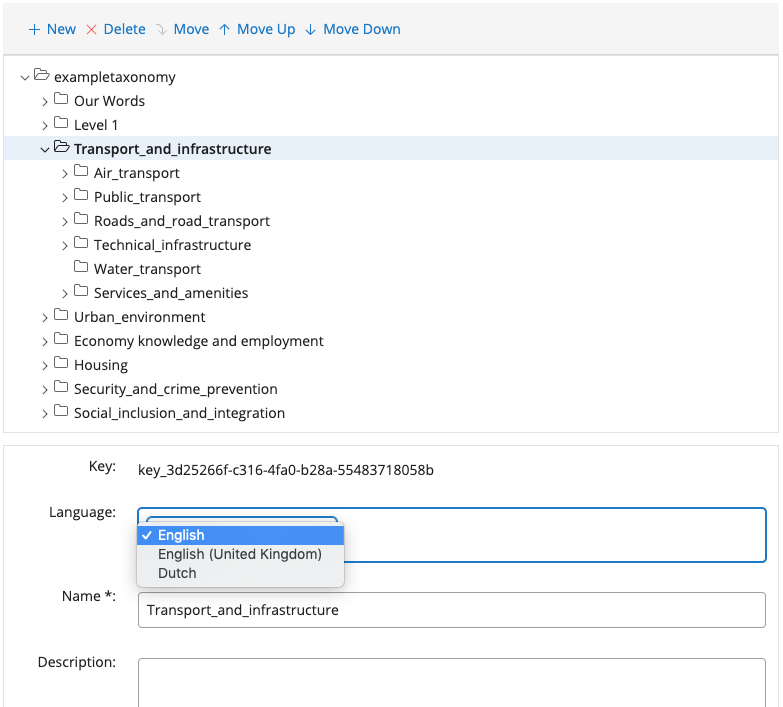
For details on how localized category data is stored in the JCR, see the JCR Tree Model.
Fallback and Default Locales
Info: Default locale support is available in brXM 15.3.0 and later.
A taxonomy can define a default locale. Administrators can set or update the default locale in the taxonomy editor:
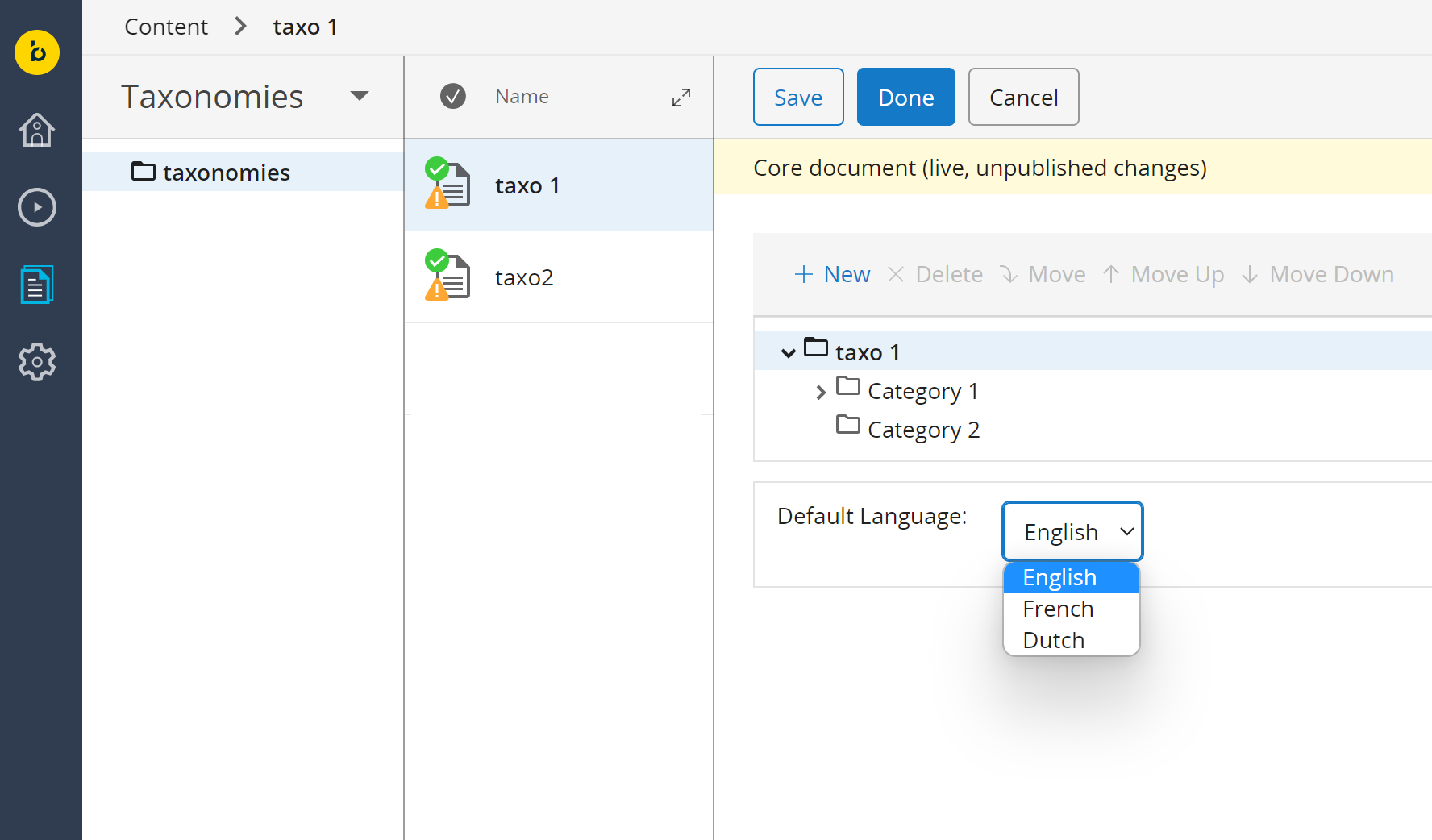
The dropdown lists the languages specified in the hippotaxonomy:locales property.
The default locale is stored in the hippotaxonomy:defaultLocale property on the taxonomy node:
/content/taxonomies: /exampletaxonomy: jcr:primaryType: hippo:handle /exampletaxonomy: jcr:primaryType: hippotaxonomy:taxonomy hippotaxonomy:defaultLocale: en hippotaxonomy:locales: [en, nl]
Language-Only Locale Fallback
Info: Language-only fallback is available in brXM 16.9.2 and 17.1.0.
If the taxonomy does not support the document’s full locale (for example, fr_FR), the system attempts to use the language-only variant (fr) to retrieve the category name.
Default Locale Fallback
If neither the document’s full locale nor the language-only variant is supported, the default locale is used as a fallback. This applies in both the document editors and taxonomy picker, in both the Content app and Experience Manager.
For example, if category node names are non-descriptive (such as numbers) but English names are provided, and no French translations exist, the English names are displayed for documents in a French content tree.
Taxonomy Field Translations for Document Types
Taxonomy Field (Version 15.3 and Later)
Info: The taxonomy field type supports localization starting with brXM 15.3.0.
To localize taxonomy fields, follow the process described in Add Internationalization (i18n) To Document Types. This approach applies to the taxonomy field type introduced in version 15.3.0 and newer.
Legacy Taxonomy Mixin
The mixin-based taxonomy field, used in versions prior to 15.3.0, remains supported for backward compatibility. You can translate mixin-based taxonomy fields using resource bundles.
To change the field name, navigate in the CMS Console to:
/hippo:configuration/hippo:translations/hippo:types/[project-namespace]:[document-type]/[language]
Add a property named hippotaxonomy:keys and set the translated field name.
To set a generic field name for all languages, go to:
/hippo:namespaces/[project-namespace]/[document-type]/editor:templates/_default_/classifiable/cluster.options
Add a caption property with the desired field name. You can also set this property through the document editor interface in the CMS. The same method applies to the "hint" field.
This method applies to the default taxonomy field using the hippotaxonomy:classifiable mixin. For secondary taxonomy fields in a document, refer to this page.