Dashboard Document Wizard Plugin Configuration
Overview
The Dashboard Document Wizard plugin enables you to add document creation shortcuts to the Bloomreach Content dashboard. You can configure the plugin using the setup application.
Prerequisites
- A Bloomreach Content project with the setup application enabled.
- At least one document type available for wizard creation.
Implementation Steps
-
In the setup application, add the Document Wizard feature to your project.

-
In the setup application, locate Document Wizard under Installed features and select Configure.

-
Provide the required configuration parameters:
Parameter Description Shortcut name Name of the JCR node where the wizard configuration is stored (child node of /hippo:configuration/hippo:frontend/cms/cms-dashshortcuts). This value does not affect the UI.Shortcut display name Label for the dashboard shortcut that opens the wizard dialog. Document name label Label for the document name field in the wizard dialog. Select target folder Folder where the new document will be created. Document type Type of document to create. Document query name (Optional) Uses the new-documentquery by default to create the document. To override, specify a different query name. You can use the query to inject values from the wizard dialog into the new document. See value injection for details.Type Wizard type: 'date'or'list'.- When set to
'date', documents are created in a folder structure using theyyyy/MMformat. For example, a document dated December 16, 2022, is created in/2022/12. You can customize the folder structure using the advanced "dateFormat" setting (see below). - When set to
'list', the document is created in a folder named after the selected value's key.
Note: The backend also supports a third type,"listdate", not available via Essentials. Set the propertyclassificationTypeto"listdate"in the Console application. This type displays both list and date fields in the wizard dialog. The list value determines the folder path, and the date value can be used for value injection.Date label (Only for type 'date') Label for the date field in the wizard dialog.Value list document (Only for type 'list') Path to the document containing list values.List label (Only for type 'list') Label for the list field in the wizard dialog.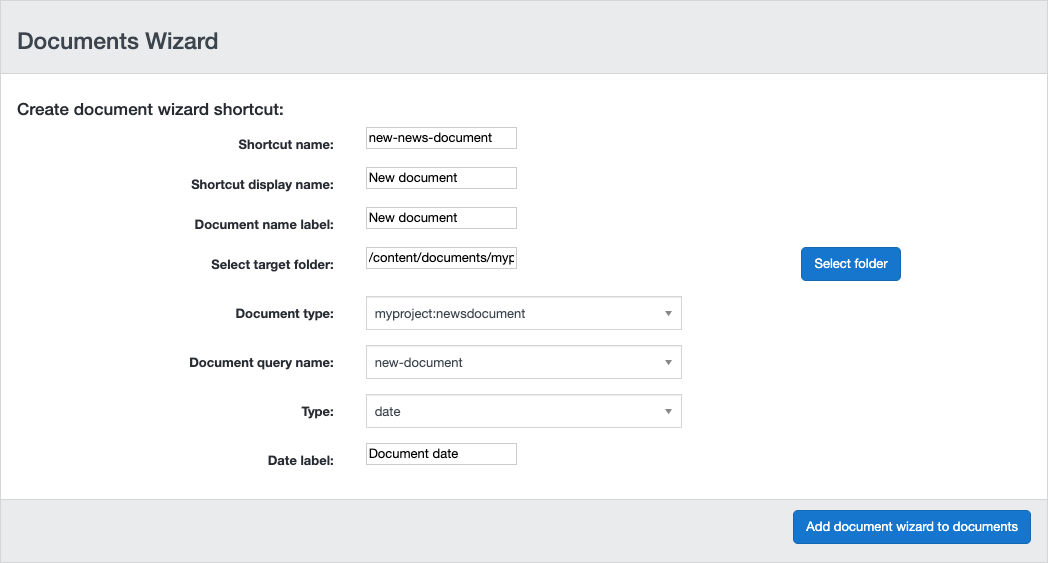
- When set to
-
Select Add document wizard to documents.
Verification
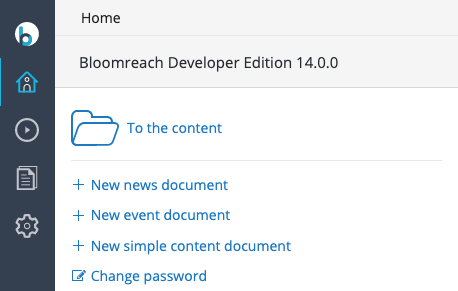
Log in to the CMS. The dashboard displays a new shortcut for the configured wizard.
Advanced Configuration
The setup application's configuration UI does not support advanced options or localization. To apply advanced settings or localize wizards, use the Console.
Configuring Folder Path for the 'date' Type
Info: Available since version 15.4.0.
For wizards of type 'date', documents are created in a folder structure based on the yyyy/MM format by default. To change this format, add a String property named dateFormat to your wizard's configuration node:
/hippo:configuration/hippo:frontend/cms/cms-dashshortcuts/your-wizard-name
Set the value to a pattern supported by java.text.SimpleDateFormat. For example, using YYYY/ww creates folders by year and week number.
Localization
Each wizard's configuration is stored in a child node of /hippo:configuration/hippo:frontend/cms/cms-dashshortcuts, such as /hippo:configuration/hippo:frontend/cms/cms-dashshortcuts/news.
Labels configured in the setup application are stored in a child node of the configuration node, for example /hippo:configuration/hippo:frontend/cms/cms-dashshortcuts/news/en for the English locale.
Each label is stored as a String property:
/hippo:configuration/hippo:frontend/cms/cms-dashshortcuts: /news: jcr:primaryType: frontend:plugin /en: jcr:primaryType: frontend:pluginconfig shortcut-link-label: New news document name-label: New news document date-label: Document date
To support additional locales, copy the en node and rename it to the desired locale (such as nl or fr). Update the label values as needed:
/hippo:configuration/hippo:frontend/cms/cms-dashshortcuts: /news: jcr:primaryType: frontend:plugin /en: jcr:primaryType: frontend:pluginconfig shortcut-link-label: New news document name-label: New news document date-label: Document date /nl: jcr:primaryType: frontend:pluginconfig shortcut-link-label: Nieuw nieuwsdocument name-label: Nieuw nieuwsdocument date-label: Documentdatum