Dashboard Document Wizard Plugin Value Injection
Overview
You can inject values from the Dashboard Document Wizard dialog into new documents created in Bloomreach Content. This allows you to prefill document fields with values entered by users in the wizard dialog.
How Value Injection Works
When you create a new document in the CMS, the system uses queries defined in the repository. You can view these queries in the Console at:
/hippo:configuration/hippo:queries/hippo:templates
By default, the new-document query is used to create new documents. You can override this by setting the query property in your shortcut configuration. For details on configuring the wizard, see the configuration page.
The wizard dialog collects values from the user, such as a date or a list selection. You can inject these values into the new document by modifying the creation query.
Injecting Values Using Variables in the Creation Query
Queries for creating new documents often include a multivalued String property named hippostd:modify. This property defines which fields to set when the document is created.
To inject a value:
- Add two consecutive values to the
hippostd:modifyproperty:- The first value is the field name, prefixed with
./. For example, use./myproject:publicationdatefor themyproject:publicationdatefield. - The second value is the variable name that holds the value from the wizard dialog.
- The first value is the field name, prefixed with
The available variables depend on the classification type of the plugin:
| Classification type | Variable |
|---|---|
| date | $date |
| list | $list |
Example: Injecting a Date Value
1. Configure a Custom Query
Define a shortcut in the CMS dashboard and set its query property to use a custom query.

For example, the shortcut at /hippo:configuration/hippo:frontend/cms/cms-dashshortcuts/new-news-document specifies a custom query.
2. Map the Field and Variable in the Query
Edit the query to add the appropriate values to the hippostd:modify property.
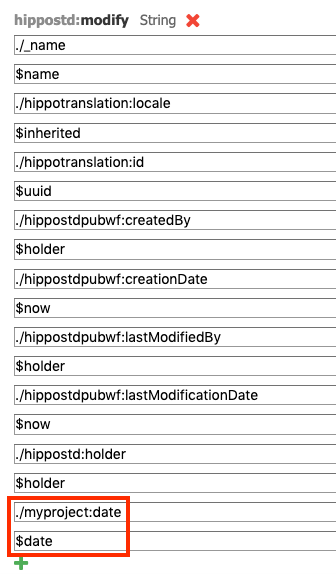
In this example, add:
./myproject:publicationdate$date
This maps the value entered in the wizard's date field to the myproject:publicationdate field in the new document.
3. Create the Document and Verify Value Injection
-
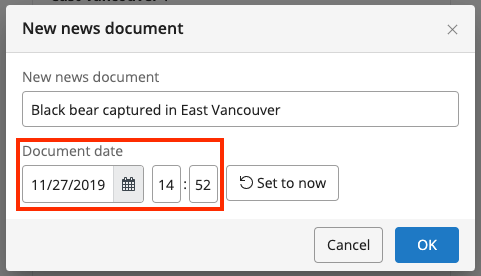
Click the dashboard shortcut to open the wizard dialog.
-
Enter a name and select a date.
-
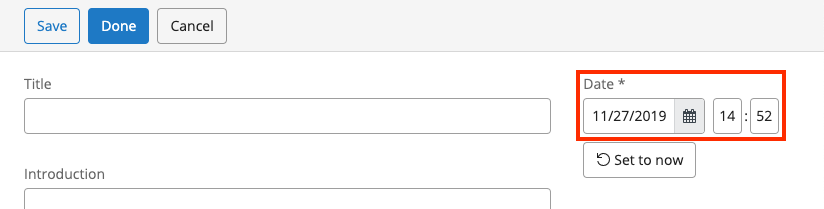
Complete the wizard. The date you entered is injected into the new document.
Summary
To inject values from the Dashboard Document Wizard dialog into new documents:
- Use a custom query and set the
queryproperty in your shortcut configuration. - In the query, add field-variable pairs to the
hippostd:modifyproperty. - Use the appropriate variable for your classification type (
$dateor$list). - When users create a document through the wizard, their input is automatically injected into the corresponding document fields.