Add the Collectors Bundle to a Project
Info: The Collectors Bundle feature in Bloomreach Content requires a standard or premium license. Contact Bloomreach for licensing details.
Overview
This page describes how to add the Collectors Bundle to a Bloomreach Content project. The Collectors Bundle provides a set of commonly used collectors, characteristics, and UI plugins for the Relevance Module.
When to Use
Use the Collectors Bundle to quickly add preconfigured collectors and related UI plugins to your project. The bundle simplifies the process of enabling visitor data collection and personalization features.
Installation Methods
You can install the Collectors Bundle using Essentials or by adding it manually to your project.
Install via Essentials
To install the Relevance Collectors Bundle using Essentials:
- When creating a new project, select
Make use of Enterprise features. - Open the
Librarytab in Essentials. - Locate the
Relevance Collectors Bundlefeature. - Click
Install feature.
Essentials will apply the manual installation steps automatically. After installation, rebuild and restart your project. Then configure the collectors as described in Configure Collectors.
Info: Install the Relevance Collectors Bundle only if the Relevance Module is also enabled.

Manual Installation
To add the Collectors Bundle manually, include the following dependency in the pom.xml file of your project's cms module:
<dependency> <groupId>com.onehippo.cms7</groupId> <artifactId>hippo-addon-targeting-bundle-collectors</artifactId> </dependency>
Some collectors require additional configuration. See Configure Collectors for details.
Bundle Contents
Collectors Provided
The Collectors Bundle includes configuration for these collectors:
| Class Name | Description |
|---|---|
DayOfWeekCollector | Captures the (server-side) day of the week when a visitor views pages. |
DocumentTypesCollector | Tracks the types of documents a visitor has viewed. |
GroupsCollector | Identifies the groups a logged-in visitor belongs to. |
ReferrerCollector | Records the external web page that referred the visitor. |
ReturningVisitorCollector | Indicates if the visitor has visited the site before. |
TagsCollector | Captures tags from documents viewed by the visitor. |
CookieCollector | Collects HTTP cookies assigned to the visitor. |
PrincipalsCollector | Records the authenticated visitor's name, if available. |
EngagementCollector | Captures the Bloomreach Engagement segment assigned to the visitor. Available from brXM 16.2.0. Requires Bloomreach Engagement integration. |
Characteristics and UI Plugins
A collector only updates visitor data if a corresponding characteristic is configured. This reduces unnecessary data collection and backend calls. The bundle provides characteristics and UI plugins for these collectors:
| Collector | Characteristic Description | Pre-configured Target Groups |
|---|---|---|
DayOfWeekCollector | Visits the site on a (day of the week) | Monday, Tuesday, Wednesday, Thursday, Friday, Saturday, Sunday, Weekend |
DocumentTypesCollector | Mostly looks at (content type) | |
GeoIPCollector | Comes from (continent) | Africa, Asia, Europe, North America, Oceania, South America |
GroupsCollector | Is logged in as (group) | |
ReferrerCollector | Is referred from (URL) | |
ReturningVisitorCollector | Is a (returning or new visitor) | New visitor, Returning visitor |
EngagementCollector | Is segmented in (segment) |
These collectors update visitor data and include a characteristics plugin, allowing you to define target groups for personalization.
The following collectors do not include characteristics or UI plugins:
| Collector |
|---|
TagsCollector |
PrincipalsCollector |
These collectors do not update visitor data. To use their data for personalization, implement a custom characteristic and UI plugin.
Configure Collectors
Some collectors require project-specific configuration.
CookieCollector
You can specify which cookies the collector will track using the cookies property:
| Property name | Type | Example |
|---|---|---|
cookies | Multi-valued String | cartID, domain1.user.prefs |
- Cookie name matching is case-sensitive (
cartIDdoes not matchCartID). - If a cookie name contains dots, the collector replaces them with underscores.
This collector only gathers request data and does not update visitor data. Personalization is not supported for this collector, and no characteristic or UI plugin is provided.
RequestParamsCollector
This collector is included by default with the Relevance Module. It saves values of request parameters specified in the params property as targeting request data.
| Property name | Type | Example |
|---|---|---|
params | Multi-valued String | q, query, search |
- Parameter name matching is case-sensitive (
Qdoes not matchq). - Dots in parameter names are replaced with underscores.
This collector only collects request data and does not update visitor data. Personalization is not supported, and no characteristic or UI plugin is provided.
EngagementCollector
Info: The EngagementCollector is available in brXM 16.2.0 and later.
This collector integrates with the Segmentation feature in Bloomreach Engagement. Configuration is required.
Prerequisites
- Contact your Bloomreach Customer Success Manager to enable the "BrX Integration" feature in your Engagement account.
- Ensure you have access to Engagement projects with the Project Admin role.
Expose Segmentations in Engagement
To use a segmentation for content personalization in Bloomreach Content:
- In Engagement, go to
Analyses>Segmentations. - Use the
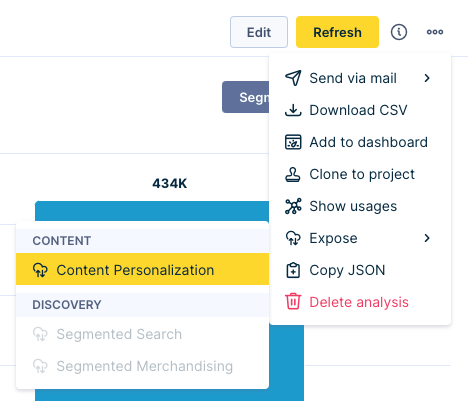
Show only exposedtoggle to view segmentations available for content personalization. - To expose a new or unexposed segmentation, edit the segmentation, click the three dots in the top right, and select
Expose>Content personalization.
Set Up API Access in Engagement
- In Engagement, navigate to
Project settings>Project>Access management>API. - Create a private API group.
- Save the API secret for later use.
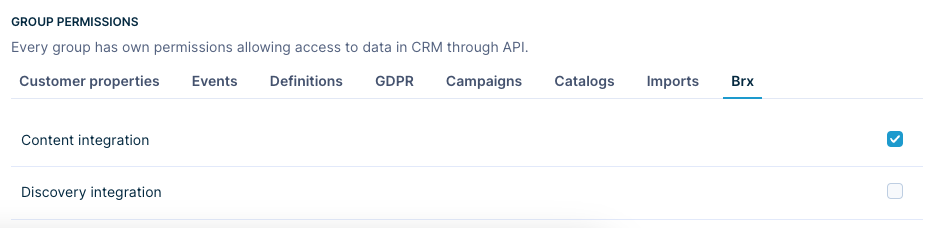
- Under
Group permissions, select theBrxtab and ensureContent integrationis checked.
Configure Engagement API in Bloomreach Content
Set the following system properties in your Bloomreach Content environment:
| Property name | Description |
|---|---|
| engagement.project.id | Engagement project token |
| engagement.api.base.url | Engagement API base URL |
| engagement.api.key.id | Engagement API key ID |
| engagement.api.secret | Engagement API secret |
- For local development with Cargo, add these properties to the
<systemProperties>section of thecargo.runprofile in the root POM. - For Cloud or on-premise deployments, add these to the properties file.
Integrate the Engagement Tracking Snippet
The EngagementCollector requires the Engagement tracking snippet to be present on your site.
- In Engagement, go to
Settings>Web integration. - Copy the tracking snippet.
- Add the snippet to your site's HTML.
For a standard implementation project created with the Maven archetype, add the snippet to the <head> section of repository-data/webfiles/src/main/resources/site/freemarker/myproject/base-layout.ftl.