Scoring and Normalization
Overview
The Relevance Module in Bloomreach Content determines which segment most accurately represents a visitor. It does this by combining segment definitions with scores calculated by the Scorer. Each segment receives a score based on how well a visitor matches its criteria.
This page explains how request data is processed to produce normalized segment scores, and the reasoning behind each step.
Scoring Components
Scoring
A scorer assigns a value between 0 and 1 to each target group defined in the configuration. Different characteristics can use different scorers, allowing you to select the most suitable targeting data type, target group configuration, and scoring logic for each case. A score of 0 indicates "no match," while a score of 1 indicates a "perfect match."
The value assigned to target group X for visitor V is written as Value[ X, V ]. For example, X could be 'Amsterdam' and V is a specific visitor.
Segment Expression
A segment expression combines scores from multiple target groups into a single value. This expression defines how a segment is evaluated. For example, the segment
"An 'Urban Sunbather' is someone who comes from Amsterdam, and the weather is Sunny"
is represented as:
RawScore['Urban Sunbather', V] := Value['Amsterdam', V] * Value['Sunny', V]
Each Value[ X, V ] is a real number between 0 and 1, inclusive. The actual value depends on the scoring engine for the characteristic. Some scoring engines return any value between 0 and 1, while others only return 0 or 1. For weather, a value of 0 means "not sunny," 1 means "sunny," and values in between indicate partial sun. For location, the value is typically 0 or 1.
Normalization
To compare scores across different segments, normalization is required. The normalization process ensures that less frequent events are considered more significant when they occur.
For example, if the average raw score for the Urban Sunbather segment is low (e.g., 0.08), most visitors do not match both criteria. If a visitor receives a raw score of 0.24 for this segment, this is significantly higher than the average, making the segment more relevant for that visitor.
Normalization uses the following formula:
Score['Urban Sunbather', V] = RawScore['Urban Sunbather', V] / AverageRawScore['Urban Sunbather']
where
AverageRawScore['Urban Sunbather'] = Sum[ RawScore['Urban Sunbather', W], for all visitors W ] / number of visitors
The engine calculates the average using only the most recent visitors (default: 1000). This approach uses an exponential moving average, allowing averages to adapt over time.
Normalization enables comparison between related segments. For example, consider two segments:
- Urban Sunbather (from Amsterdam and the weather is sunny)
- Amsterdammer (from Amsterdam)
The raw score for Urban Sunbather cannot exceed that of Amsterdammer, since both require the visitor to be from Amsterdam, but only the first also requires sunny weather. Normalization ensures that Urban Sunbather receives a higher normalized score than Amsterdammer when sunny weather is less common than the average.
Data Flow in the Relevance Module
The Relevance Module processes request data through several components:
- Collectors (pluggable): Inspect incoming requests and store targeting data for the visitor.
- Scorers: Use targeting data to calculate scores for each configured target group.
- Segment evaluator: Combines target group scores using the segment configuration and produces normalized segment scores.
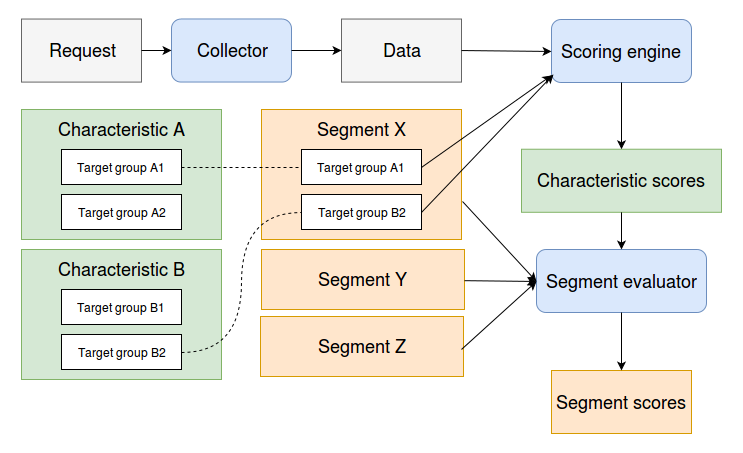
Diagram: The diagram illustrates the flow from request collection through collectors and scorers to the segment evaluator. It shows how characteristics and target groups are referenced by segments, and how the scoring engine and segment evaluator produce normalized segment scores.
Scoring and normalization occur at the end of this process, integrating input from all relevant target groups.
Example
The following example demonstrates the scoring and normalization process. Assume a visitor is located in Amsterdam on a Reasonably Sunny day:
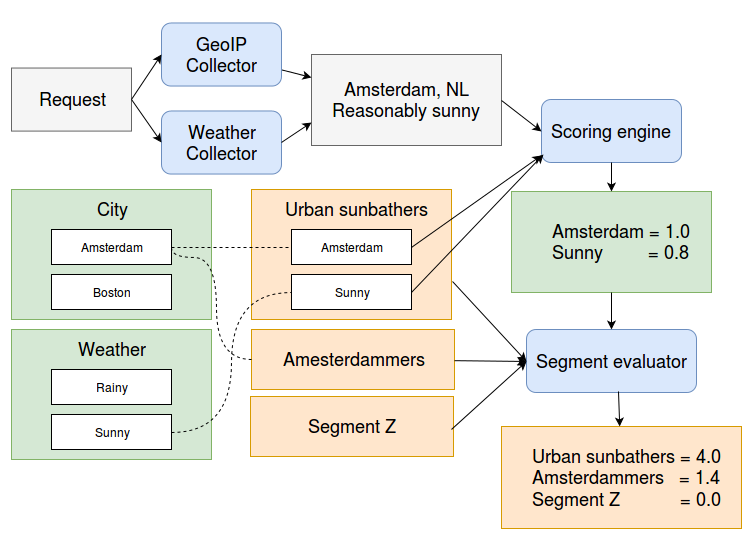
Diagram: The diagram shows a request processed by a GeoIP Collector and a Weather Collector, producing attributes "Amsterdam, NL" and "Reasonably sunny." These feed into the scoring engine, which assigns scores to target groups. Segment definitions reference these groups, and the segment evaluator produces final scores.
- The
GeoIPCollectoradds the targeting data "Amsterdam, NL". - The Weather collector adds "Reasonably Sunny".
- Configured target groups include "Amsterdam" (NL) and "Sunny".
- The scorer assigns values: Amsterdam = 1.0, Sunny = 0.8.
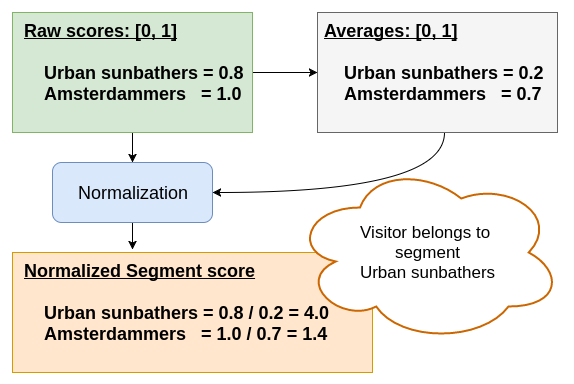
Diagram: The diagram shows normalization of segment scores. Raw scores and average scores are combined to produce normalized segment scores, which determine the most relevant segment for the visitor.
The evaluator processes these scores:
- Raw scores: Urban Sunbather = 0.8, Amsterdammer = 1.0.
- Average scores: Urban Sunbather = 0.2, Amsterdammer = 0.7.
- Normalized scores: Urban Sunbather = 0.8 / 0.2 = 4.0, Amsterdammer = 1.0 / 0.7 = 1.4.
In this case, the visitor matches the Urban Sunbather segment more closely than the Amsterdammer segment, due to the rarity of sunny weather in Amsterdam.
Fuzzy Boolean Expressions
Segment evaluation uses fuzzy logic to combine scores:
Value[ A ^ B ] := Value[ A ] * Value[ B ]
Value[ A v B ] := Value[ A ] + Value[ B ] - Value[ A ] * Value[ B ]
Value[ ¬ A ] := 1 - Value[ A ]
Here, Value[ A ] and Value[ B ] are between 0 ("false") and 1 ("true"). At the extremes, this system matches standard boolean logic. This approach allows compound expressions, such as:
Value[ (A ^ B) v C ]
which evaluates to:
Value[ A ] * Value[ B ] + Value[ C ] - Value[ A ] * Value[ B ] * Value[ C ]
You can interpret Value[ A ] as the probability that A is true. These translation rules correspond to the naive Bayesian approach, assuming variables are independent.