Scorers
Overview
A scorer evaluates how closely a target group matches collected targeting data. It returns a score between 0 and 1, inclusive.
Each scorer is associated with a characteristic and calculates a score for a visitor's data related to that characteristic. For example, in Scoring and Normalization:
RawScore['Urban Sunbather', V] := Value['Amsterdam', V] * Value['Sunny', V]
Here, Value['Amsterdam', V] represents the score indicating if visitor V is from Amsterdam, and Value['Sunny', V] indicates if it is sunny for visitor V. These values are determined by the scorers for the 'comes from (city)' and 'experiences (weather)' characteristics.
Types of Scorers
Scorers can be either boolean or fuzzy.
Boolean Scorers
Boolean scorers return only 0 or 1, with no intermediate values. These scorers are suitable for characteristics such as:
- Is the visitor logged in?
- Is the visitor from the US?
- Does the visitor come from a large city?
- Is today Tuesday?
For these characteristics, only a binary result is meaningful.
Fuzzy Scorers
Fuzzy scorers return a value between 0 and 1, inclusive. These are used for characteristics like:
- Mostly viewed documents tagged as...
- Mostly viewed documents of a specific type...
- Mostly searched with certain terms...
- Is a loyal visitor...
You can implement custom fuzzy scorers as needed.
Segment Score Calculation Example: Expensive Cars
Suppose you want to define a segment called 'Expensive car seeker' to target visitors who primarily view documents tagged as 'expensive cars'. For this segment, use:
- The characteristic 'mostly looks at documents that are tagged as (tags)'
- The target group 'expensive cars'
Documents representing expensive cars use different tags than those for inexpensive cars. You can identify visitors interested in expensive cars by analyzing the tags of the documents they view. For example, marketers may define the 'Expensive car seeker' segment as visitors who mostly view car documents tagged with 'sports wagon, high quality, fast, expensive'. The score for visitor V is:
RawScore['Expensive car seeker', V] := Value['sports wagon, high quality, fast, expensive', V]
You can combine this with other characteristics. For example, to score a segment 'Expensive car seeker from the US':
RawScore['Expensive car seeker from US', V] := Value['sports wagon, high quality, fast, expensive', V] * Value['US', V]
In this rule:
Value['US', V]returns either0or1.Value['sports wagon, high quality, fast, expensive', V]can return0,1, or a value close to1if the visitor mostly views expensive car documents, but occasionally views others.
The fuzzy VectorScoringEngine (described below) allows you to assign weights to terms by specifying their frequency in the target group configuration. For example, if 'expensive' is more important than 'sports wagon', you can configure the target group as:
Value['sports wagon * 3, high quality, fast, expensive * 10', V]
The Fuzzy Vector Scorers
The Relevance Module includes a fuzzy scorer called the Vector Scorer. This scorer is used by standard characteristics such as 'mostly looks at documents of type', 'mostly looks at documents tagged with', and 'mostly searches with'. The Vector Scorer is suitable for scenarios requiring fuzzy scores. Its approach is similar to the 'more like this' functionality in search libraries like Lucene (see Similarity), but it does not use inverse document frequency, as normalization and scoring are handled separately and are based on visitor data.
Score Calculation
The vector scorer operates as follows:
- It takes two arrays of terms (term vectors).
- Each vector is normalized to a length of 1 (Euclidean length).
- The scorer computes the dot product of the normalized vectors, which is equivalent to the cosine similarity between them.
The score, representing the cosine similarity between the vector representations 
Diagram: The image displays the vector notation V with an arrow above it, followed by parentheses containing d1. This represents the vector form of d1, used in the scoring formula.
and 
Diagram: The image shows the vector notation V with d2 as a subscript in parentheses, representing the vector form of d2 in the scoring formula.
for two term vectors d1 and d2 is:
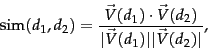
Diagram: The image shows a formula for similarity between two term vectors, d1 and d2. It defines sim(d1, d2) as the dot product of the normalized vectors V(d1) and V(d2), divided by the product of their magnitudes.
Key points:
- Normalizing vectors to length 1 ensures that vectors pointing in the same direction, regardless of length, receive a score of 1.
- The order of terms in the vector does not affect the score.
- All terms are weighted equally unless you adjust their frequency. You can increase a term's importance by increasing its frequency.
Example
Assume visitor A has viewed documents with these tags:
- 2 times expensive
- 2 times sports wagon
- 1 time luxury
- 1 time fast
The characteristic 'mostly looks at documents that are tagged as (tags)' collects these tags for visitor A.
These tags form a four-dimensional vector: 2 units along the expensive axis, 2 along sports wagon, 1 along luxury, and 1 along fast. Visitor A is likely to score well for the RawScore['Expensive car seeker', V] characteristic, since the target group is Value['sports wagon, high quality, fast, expensive', V].
Now, consider visitor B, who prefers inexpensive but fast and stylish cars. Visitor B's collected tags are:
- 2 times fast
- 3 times cheap
- 1 time Italian
Calculating the scores:
Visitor A:
RawScore['Expensive car seeker', Visitor A] := [2 x 1 + 2 x 1 + 1 x 0 + 1 x 1] / [ sqrt(2^2 + 2^2 + 1^2 + 1^2) x sqrt(1^1 + 1^1 + 1^1 + 1^1) ] = 5 / 6.32 = 0.79
Visitor B:
RawScore['Expensive car seeker', Visitor B] := [2 x 1 + 3 x 0 + 1 x 0] / [ sqrt(2^2 + 3^2 + 1^2) x sqrt(1^1 + 1^1 + 1^1 + 1^1) ] = 2 / 7.48 = 0.27
Visitor A scores significantly higher than visitor B for the target group 'mostly looks at documents that are tagged as "expensive cars"'.
References
For more information, see: