Bloomreach Cloud Concepts and Terminology
This page defines key concepts and terminology used in Bloomreach Cloud.
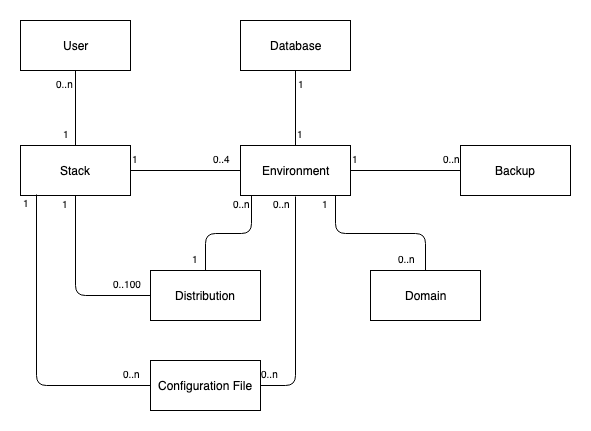
Diagram: The diagram illustrates the relationships between User, Stack, Database, Environment, Backup, Distribution, Domain, and Configuration File. It shows cardinalities such as 0..n users per stack, 1 stack per user, and connections between these entities. Environment is the central node, linking to Backup, Distribution, Domain, and Configuration File, with multiplicities indicating possible associations.
This diagram shows the core Bloomreach Cloud concepts and their relationships.
Platform
The Bloomreach Cloud platform provides the managed infrastructure for deploying and running Bloomreach Experience Manager.
Stack
A stack is a dedicated set of resources assigned to a single customer in Bloomreach Cloud. Each stack is isolated from other customers and named after the customer. Refer to your onboarding documentation to identify your stack name.
Environment
An environment is a deployment context within a stack. Each environment runs a single Bloomreach Experience Manager distribution and maintains its own databases. You can create and manage multiple environments within a stack.
Mission Control
Mission Control is the web interface for managing your stack and its environments. Use Mission Control to perform administrative tasks such as deployments and configuration.
See Use Mission Control.
Distribution
A distribution is a packaged Bloomreach Experience Manager implementation prepared for deployment in Bloomreach Cloud. You must package and upload a distribution before deploying it to an environment.
Configuration File
A configuration file contains environment-specific settings, including Java system properties, in the Java properties file format. Upload configuration files to your stack using Mission Control. When deploying a distribution to an environment, you can select a configuration file to apply.
See Set Environment Configuration Properties.
Domain
A domain specifies a DNS name, such as customer.com or www.customer.com, and can optionally reference an environment. Multiple domains can point to the same environment. The Bloomreach Cloud team must install an SSL certificate for each domain in your stack.
See Configure Domains.
Database
Each environment includes several databases: the content repository database, relevance database, projects workflow database, and an Elasticsearch index. You can create a backup of all databases in an environment.
Backup
A backup captures the state of an environment's databases, including the content repository, relevance, projects workflow databases, and Elasticsearch index. You can create backups automatically or manually. Backups can be restored to any environment running a compatible distribution.
Automated Backup
The platform creates automated backups of an environment's databases on a schedule. Automated backups are retained for 90 days and then deleted automatically.
Manual Backup
You can create manual backups of an environment's databases using Mission Control or the API. Manual backups are retained until you delete them.
See Restore a Backup.