Create a Project Distribution
Overview
This guide describes how to package your Bloomreach Content project as a distribution that can be deployed to a Tomcat environment.
When to Use
After completing a development iteration, you must package your project for deployment to test, acceptance, or production servers. If your project was created using the Maven archetype, you can generate a Tomcat-ready distribution without additional configuration. This page explains the process.
Deployment Structure
The following diagram illustrates the deployment structure for a typical Tomcat installation with Bloomreach Content CMS and Site applications.
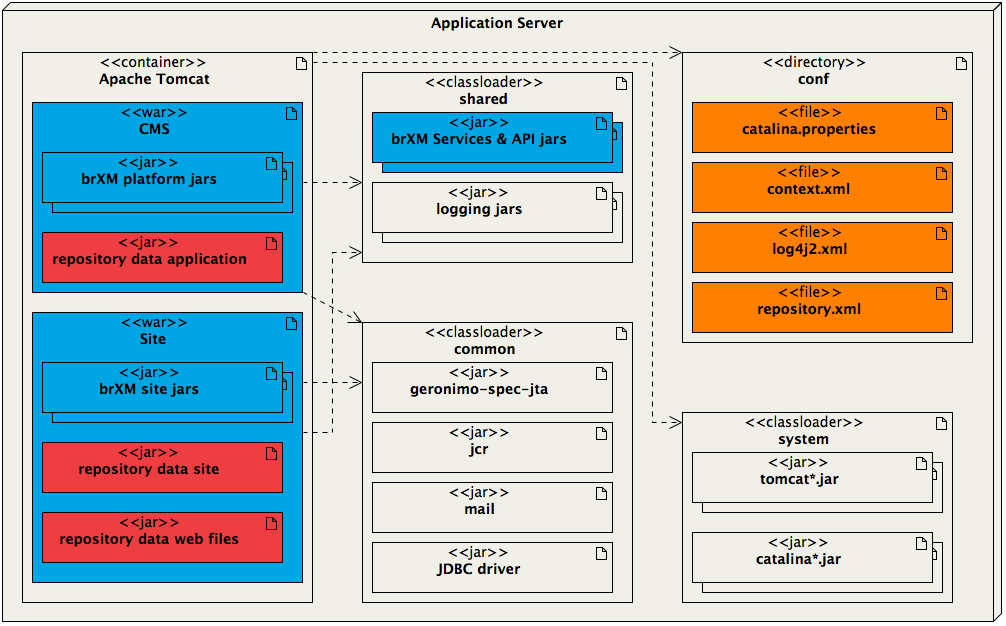
Diagram:
The application server contains an Apache Tomcat container with Tomcat classloaders and a configuration directory. Two WAR files are deployed: CMS and Site.
- The CMS WAR includes Bloomreach Content platform JARs and a project-specific repository data application JAR.
- The Site WAR includes Bloomreach Content site JARs and project-specific repository data site and repository data web files JARs.
- The shared classloader contains Bloomreach Content Services & API JARs and logging JARs.
- The common classloader contains geronimo-spec-jta, jcr, mail, and JDBC driver JARs.
- The system classloader contains tomcat*.jar and catalina*.jar.
- The conf directory holds environment-specific files such as catalina.properties, context.xml, log4j2.xml, and repository.xml.
Dashed arrows indicate relationships between the deployed WARs, classloaders, and configuration area.
Legend:
- Blue: Bloomreach Content out-of-the-box
- Light grey: third party
- Red: project-specific
- Orange: environment-specific
Key Components:
-
Apache Tomcat container
Deploy two WAR files to${catalina.base}/webapps/:- CMS
cms.warcontains the Bloomreach Content platform web application and the repository-data-application module as a JAR. This JAR bootstraps application configuration into the repository during initial deployment and, optionally, during subsequent deployments depending on deployment settings. - Site
site.warcontains the Bloomreach Content site web application and the repository-data-site and repository-data-webfiles modules as JARs. These JARs bootstrap site configuration and web files into the repository.
- CMS
-
Common classloader
Artifacts in${catalina.base}/common/lib/are loaded by Tomcat's common classloader. -
Shared classloader
Artifacts in${catalina.base}/shared/libare loaded by Tomcat's shared classloader, which is used by all deployed web applications. This enables communication between the CMS and Site web applications through the Bloomreach Content Services and API JARs.
When creating a distribution with development data, therepository-data-developmentandrepository-data-site-developmentJARs are also added to${catalina.base}/shared/lib. -
Configuration directory
Place environment-specific configuration in${catalina.base}/conf. For example, use different database configurations for development and production environments. The project distribution does not include production-specific configuration; configure these settings in this directory as needed.
Note:
The distribution directory structure is designed as a generic baseline and works out-of-the-box when unpacked in a default Tomcat installation.
In most production environments, common libraries (common) and environment-specific configuration (conf) are managed at the container level. In these cases, only thewebappsandshareddirectories (blue in the diagram) should be unpacked from the distribution. See the deployment instructions for details.
Create a Project Distribution
A standard Bloomreach Content project created with the Maven archetype includes two Maven profiles in the root POM. These profiles configure the Maven Assembly Plugin to generate a distribution:
dist: creates a distribution without development datadist-with-development-data: creates a distribution that includes development data
Select the appropriate profile based on your deployment scenario. Use a distribution with development data when deploying to a new, empty environment to seed initial content. For subsequent deployments, use a distribution without development data unless your release requires it.
Create a Project Distribution without Development Data
To generate a distribution without development data, run the following commands from your project's root directory:
mvn clean verify
mvn -P dist
This creates a tar.gz distribution file in the target directory. For brXM 16.0.0, the archive contains the following files:
$ tar -tf target/myproject-0.1.0-SNAPSHOT-distribution.tar.gz
common/lib/angus-activation-2.0.2.jar
common/lib/angus-mail-2.0.3.jar
common/lib/geronimo-jta_1.1_spec-1.1.1.jar
common/lib/jakarta.activation-api-2.1.3.jar
common/lib/jakarta.mail-api-2.1.3.jar
common/lib/jcr-2.0.jar

conf/context.xml
conf/log4j2.xml

shared/lib/hippo-cms7-commons-16.0.0.jar
shared/lib/hippo-repository-api-16.0.0.jar
shared/lib/hippo-repository-builtin-16.0.0.jar
shared/lib/hippo-services-16.0.0.jar
shared/lib/hst-api-16.0.0.jar
shared/lib/jcl-over-slf4j-1.7.36.jar
shared/lib/log4j-api-2.23.1.jar
shared/lib/log4j-core-2.23.1.jar
shared/lib/log4j-slf4j-impl-2.23.1.jar
shared/lib/slf4j-api-1.7.36.jar

webapps/cms.war
webapps/site.war
Note:
Some out-of-the-box features, such as the relevance module, add additional JARs to shared/lib.
The distribution includes:
- Two web applications (
cms.warandsite.war) in thewebappsdirectory - Libraries in
shared/libandcommon/lib - Configuration files (e.g.,
log4j2.xml,context.xml) in theconfdirectory
This layout matches Tomcat's conventions. Unpack the distribution in the root directory of your Tomcat installation to place the artifacts in the correct locations.
For brXM 15.6 and earlier, the structure is similar, but library versions differ. The common/lib contents change because brXM 16 uses Angus mail/activation instead of Sun mail:
$ tar -tf target/myproject-1.0.0-distribution.tar.gz
common/lib/jakarta.mail-1.6.7.jar  // (jakarta.activation.jar is to be provided)
common/lib/jcr-2.0.jar
common/lib/geronimo-jta_1.1_spec-1.1.1.jar

conf/context.xml
conf/log4j2.xml

shared/lib/hippo-cms7-commons-15.6.0.jar
shared/lib/hippo-repository-api-15.6.0.jar
shared/lib/hippo-repository-builtin-15.6.0.jar
shared/lib/hippo-services-15.6.0.jar
shared/lib/hst-api-15.6.0.jar
shared/lib/jcl-over-slf4j-1.7.30.jar
shared/lib/log4j-api-2.17.1.jar
shared/lib/log4j-core-2.17.1.jar
shared/lib/log4j-slf4j-impl-2.17.1.jar
shared/lib/slf4j-api-1.7.30.jar

webapps/cms.war
webapps/site.war
Create a Project Distribution with Development Data
To generate a distribution that includes development data, run the following commands from your project's root directory:
mvn clean verify
mvn -P dist-with-development-data
This creates a tar.gz file in the target directory. The archive contains the same files as a distribution without development data, plus the following JARs (assuming project name myproject and version 1.0.0):
shared/lib/myproject-repository-data-development-1.0.0.jar
shared/lib/myproject-repository-data-site-development-1.0.0.jar
The deployment structure with development data is shown below:
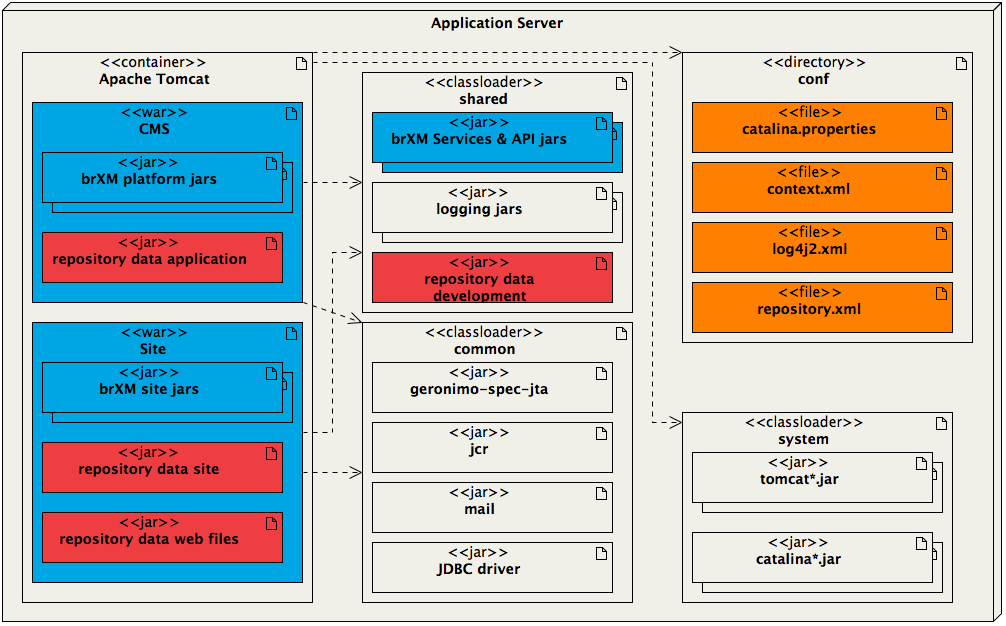
Diagram:
The application server contains an Apache Tomcat container, shared and common classloaders, a system classloader, and a conf directory.
- CMS and Site WARs are deployed, each containing Bloomreach Content platform and repository data JARs.
- The shared classloader includes Bloomreach Content Services & API JARs, logging JARs, and repository data development JARs.
- The common classloader contains geronimo-spec-jta, jcr, mail, and JDBC driver JARs.
- The system classloader contains tomcat*.jar and catalina*.jar.
Dashed arrows indicate loading paths and relationships between web applications, classloaders, and configuration files.
Customizing the Distribution
The Maven Assembly Plugin uses an assembly descriptor to define the distribution structure. The main descriptor is located at src/main/assembly/distribution.xml and references several component descriptors.
Example distribution.xml:
<assembly xmlns="http://maven.apache.org/plugins/maven-assembly-plugin/assembly/1.1.2" xmlns:xsi="http://www.w3.org/2001/XMLSchema-instance" xsi:schemaLocation="http://maven.apache.org/plugins/maven-assembly-plugin/assembly/1.1.2 http://maven.apache.org/xsd/assembly-1.1.2.xsd"> <id>distribution</id> <formats> <format>tar.gz</format> </formats> <includeBaseDirectory>false</includeBaseDirectory> <componentDescriptors> <componentDescriptor>conf-component.xml</componentDescriptor> <componentDescriptor>webapps-component.xml</componentDescriptor> <componentDescriptor>common-lib-component.xml</componentDescriptor> <componentDescriptor>shared-lib-component.xml</componentDescriptor> </componentDescriptors> </assembly>
To include additional web applications or shared libraries, modify the relevant component descriptors. For example, to package an extra shared artifact, add an <include> element with the artifact's groupId:artifactId coordinates to the dependency set in shared-lib-component.xml. Ensure the artifact is defined as a dependency with scope=provided in your POM. The assembly plugin requires this to resolve the artifact.
To package a container-wide artifact (such as a JDBC driver for use as a JNDI DataSource in Tomcat), add the dependency to common-lib-component.xml. For example, to include the MySQL driver:
<include>com.mysql:mysql-connector-j</include>
Again, define the artifact as a provided dependency in your primary POM.
For advanced customization, refer to the Maven Assembly Plugin descriptor documentation.