Poll Plugin Developer Guide - Channel Editor
Setup in the Channel Editor
To allow webmasters to add poll components to containers on pages using the Channel Editor, configure the poll component as described below. This approach enables flexible page layouts, compared to predefining poll component placement through component instantiation.
Create the Container(s)
Pages must include one or more HST component containers to support adding poll components. Refer to the containers configuration documentation for setup instructions. The archetype project homepage includes a preconfigured container you can use as a starting point.
Prepare the Component
The Poll plugin provides a default poll component class that is compatible with the Channel Editor starting from version 1.05.06. If you implement a custom poll component class, you must register it in the CMS component catalog.
To register your component:
- Open the CMS Console.
- Navigate to
/hst:[your project]/hst:configuration/[your project]/hst:catalog/[your project]-catalog. - Add a
hst:containeritemcomponentnode with the desired component name for display in the Channel Editor. - Set the default attributes that should be copied when the component is instantiated.
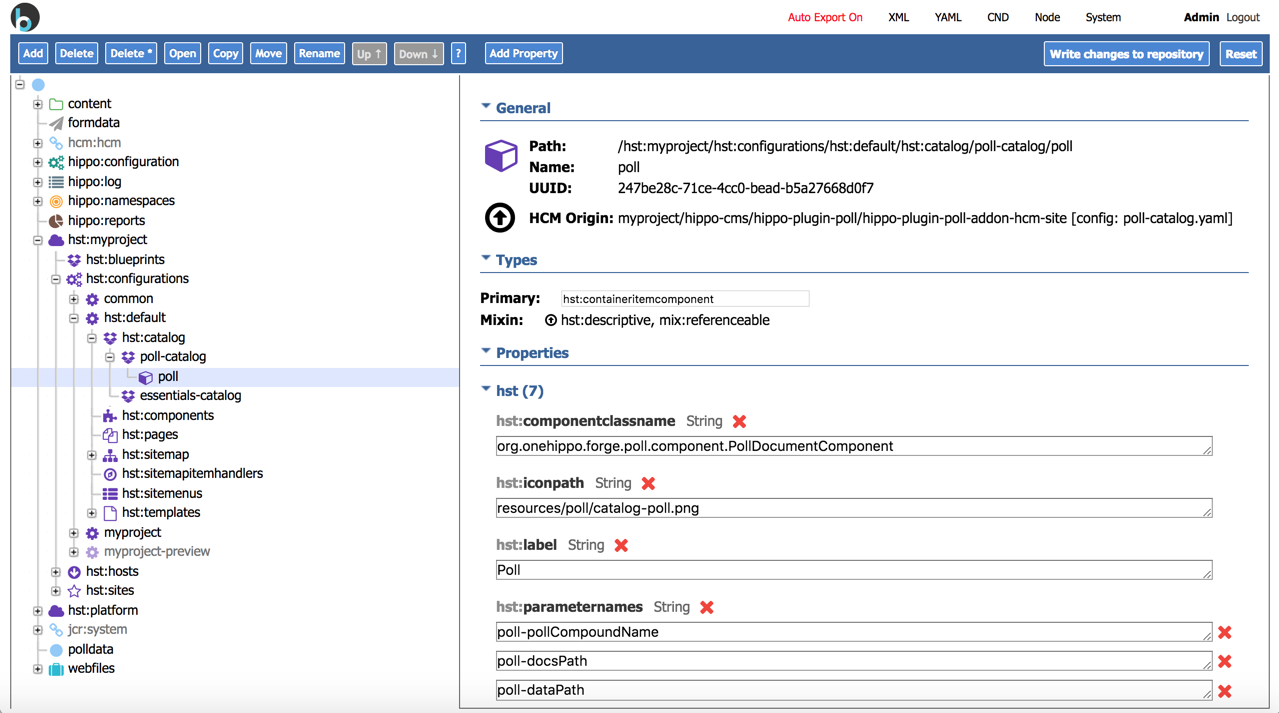
The screenshot below shows the configuration properties for the poll component provided by the plugin. If you use a custom component class, set the hst:componentclassname property to reference your class. If you use a custom template for rendering, set the hst:template property accordingly.
Note: For instructions on adding your Poll component to a page, see the Poll plugin configuration documentation.