Poll Plugin Developer Guide - Poll Documents
Creating Poll Document Types
The Poll plugin includes a default Poll document type. This type acts as a wrapper for the poll compound, which stores the core data for a poll.
To define a custom poll document type, use the Configuration section in the Content application. Your custom document type must include the poll compound from the poll plugin at the top level. You can add additional fields as needed. When you create a custom poll document type, implement a content bean that represents your type. Refer to the poll-docsClass and poll-pollCompoundName parameters for poll component configuration.
If you use a poll component that allows explicit selection of a poll document for rendering (recommended), create a specialization of the PollComponent. This specialization should restrict the document picker to your custom poll document type. Review the @JcrPath annotation in the PollDocumentComponentInfo class for guidance.
The default poll document type includes a poll results plugin that displays the number of votes for each poll option. To use this plugin with your custom poll document type, copy its configuration from /hippo:namespaces/poll/polldocument/editor:templates/_default_/poll-result into your custom type.
Creating Poll Documents
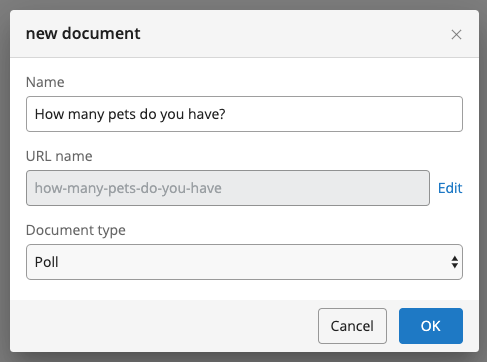
A poll document contains a 'multiple' field that stores all available poll options (possible answers). To create a new poll document, go to the Documents section in the Content application. Select a folder that allows poll documents, open the context menu, and choose Add new document. Enter a name, optionally specify a URL name, and select Poll from the Document type dropdown. Click OK to open the document editor.
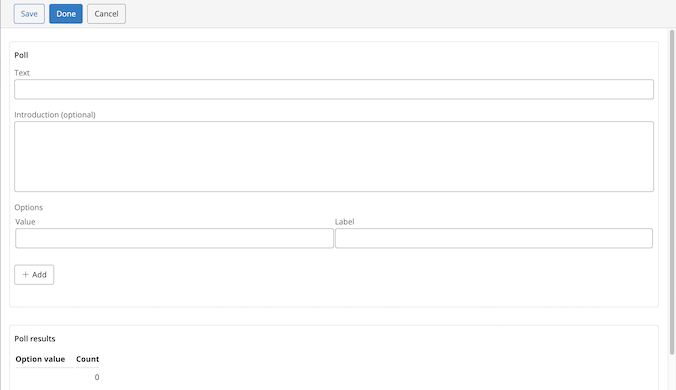
Complete the fields in the new poll document. The default rendering template always displays the text field, both when inviting users to vote and when showing results. The introduction field appears only when inviting users to vote.
The Options field is a multiple field that stores the possible answers. The Value attribute is used internally for repository management. The Label attribute is typically displayed on the website. Both attributes are available to the rendering code.
Before proceeding, ensure that you have created at least one poll document.