Install Bloomreach B2C Commerce Accelerator
Info: This feature requires a standard or premium Bloomreach Content license. Contact Bloomreach for details.
Starting with version 14.3, Java-based Accelerators and Connectors are deprecated. Use the GraphQL Service instead.
Overview
From version 14.2, use the Bloomreach B2C Commerce Accelerator Maven plugin to install the B2C Commerce Accelerator in your Bloomreach Content project. This replaces the previous approach of downloading the Boot project. For instructions on the earlier method, see Install B2C Commerce Using Boot Project.
Purpose
This guide explains how to install the Bloomreach B2C Commerce Accelerator using the Maven plugin and connect it to your commerce backend.
Context
The Bloomreach B2C Commerce Accelerator Maven plugin installs the accelerator in your Bloomreach Content project. This enables integration between your commerce backend, Bloomreach Content, and Bloomreach Discovery.
You can configure the accelerator with any supported commerce backend and with Bloomreach Discovery.
This page covers local installation, backend connection, and deployment steps.
Install B2C Commerce Accelerator
Before installing the B2C Commerce Accelerator, ensure you have a Bloomreach Content project set up. If you do not have one, follow Get Started with Bloomreach Content to create a new project and complete the initial configuration.
In your project root, run the following command to install the B2C Commerce Accelerator. Replace 14.3.3 with the version matching your Bloomreach Content installation.
mvn com.bloomreach.commercedxp:starterstoreboot-maven-plugin:14.3.3:install \
    -DpluginRepository=https://maven.bloomreach.com/repository/maven2-enterprise
The Maven plugin (com.bloomreach.commercedxp:starterstoreboot-maven-plugin) performs the following actions:
- Adds configuration files such as
conf/*.xml,conf/*.properties,web.xml, and others. - Updates Maven properties and dependencies.
- Installs default B2C Commerce Accelerator webfiles.
- Adds bootstrapping configuration and content YAML files.
- Provides an updater script to install HST configurations and example content.
Note for v14.2:
After installing with the Maven plugin, edit site/webapp/src/main/webapp/WEB-INF/applicationContext-security.xml and remove the following line:
<csrf disabled="@{spring.security.csrf.disabled}"/>
This step is required in v14.2 to prevent startup errors due to a known issue.
Hint: The Maven plugin should automatically configure shared dependencies in the
cargo.runprofile and the distribution assembly (src/assembly/shared-lib-component.xml). If you encounter shared dependency errors when running thecargo.runprofile, verify that the required dependencies are present. Example configuration:
<profile> <id>cargo.run</id> <build> <plugins> <plugin> <groupId>org.codehaus.cargo</groupId> <artifactId>cargo-maven3-plugin</artifactId> <configuration> <!-- SNIP --> <container> <!-- SNIP --> <dependencies> <dependency> <groupId>com.onehippo.cms7</groupId> <artifactId>hippo-addon-targeting-shared-api</artifactId> <classpath>shared</classpath> </dependency> <dependency> <groupId>com.fasterxml.jackson.core</groupId> <artifactId>jackson-annotations</artifactId> <classpath>shared</classpath> </dependency> <dependency> <groupId>org.onehippo.cms7</groupId> <artifactId>hippo-addon-crisp-api</artifactId> <classpath>shared</classpath> </dependency> <dependency> <groupId>com.onehippo.cms7</groupId> <artifactId>hippo-addon-universal-pixel-integration-api</artifactId> <classpath>shared</classpath> </dependency> <dependency> <groupId>com.bloomreach.commercedxp</groupId> <artifactId>starterstore-api</artifactId> <classpath>shared</classpath> </dependency> </dependencies> </container> </configuration> </plugin> <!-- SNIP --> </plugins> </build> <!-- SNIP --> </profile>
Set Up Local Development Environment
Configure Commerce Backends
Set connection properties for your commerce backends in the Bloomreach Accelerator Configuration File. Refer to the commerce backend configuration documentation for details. Example:
# Bloomreach B2C Commerce Accelerator parameters for bloomreach backend service.
bloomreach.cache.enabled = false
bloomreach.account.id = 0000
bloomreach.api.base.url = http://brm-core-0.brsrvr.com/api/v1/core/
bloomreach.domain.key = domain_key_here

# Commerce Connector Parameters for ElasticPath Commerce Connector Module.
elasticpath.cache.enabled = true
elasticpath.baseUrl = http://instance_name.epdemos.com/cortex
elasticpath.accessTokenUri = http://instance_name.epdemos.com/cortex/oauth2/tokens
elasticpath.username =
elasticpath.password =
elasticpath.scope = ep_scope
elasticpath.role = PUBLIC
Build the application:
mvn clean verify
Start the application:
mvn -P cargo.run
Run the Updater Script: Accelerator - Install StarterStore Boot Configurations
After the system starts, open the CMS UI and go to the Updater Editor. Run the Accelerator - Install StarterStore Boot Configurations script. This script installs HST configurations and example content for the B2C Commerce Accelerator.
Take Example Product/Category Documents Offline
The updater script copies example product and category documents into your content folder. For details, see the Upgrade Notes for v14.2.
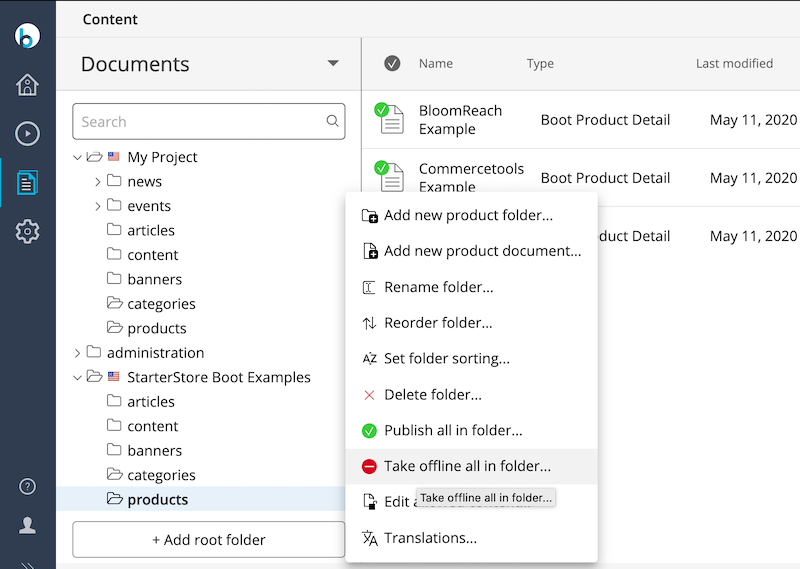
To prevent duplicate product or category validation errors, take all documents in the example products and categories folder offline:
Verify Installation
Confirm that the CMS is accessible at http://localhost:8080/cms/ (login: admin / admin).
To verify the commerce backend connection:
- Open the
Contentapplication. - Browse to the
productsfolder. - Open an example product document or create a new one.
- Ensure your commerce backend is selected under
Commerce Connector. - Click
BrowseunderRelated External Product.
You should be able to browse products from your commerce backend.
Hint: Automated migration of existing projects to a Bloomreach B2C Commerce Accelerator project is not supported. Start a new project and apply the required features.
Deploy in a Server Environment
Deployment for the B2C Commerce Accelerator follows the standard process for Bloomreach Content projects.
Deploy in Bloomreach Cloud
For deployment in Bloomreach Cloud, follow the instructions in Deploy in Bloomreach Cloud.
As described in Configure Bloomreach B2C Commerce Accelerator, the project requires the Bloomreach Accelerator Configuration File (braccelerator.properties by default). Deploy the distribution with this configuration file and follow Set Environment Configuration Properties. Rename the uploaded file to braccelerator.properties, which is referenced by both conf/platform.xml and conf/hst.xml.
Deploy a Project Distribution in Other Environments
For environments other than Bloomreach Cloud, follow Create a Project Distribution and Deploy a Project Distribution.
Ensure the distribution includes the Bloomreach Accelerator Configuration File (braccelerator.properties by default), as referenced by both conf/platform.xml and conf/hst.xml.