SPA Integration
Introduction
Bloomreach provides JavaScript SDKs (see SDKs) to integrate single-page applications (SPAs) and other JavaScript front-end applications with the Bloomreach Content delivery tier and CMS features.
As a front-end developer, you can connect your SPA to Bloomreach Content so that it consumes content and configuration managed in Bloomreach Content, using the Page Model API. You can also enable page editing in your SPA through Bloomreach Content's Experience manager. This allows users (such as webmasters) to control the content and structure of SPA-driven pages without requiring a front-end deployment for every change.
Conceptual Integration
To implement SPA integration with Bloomreach Content, you need to understand the following core concepts:
Page Structure
In Bloomreach Content, a page is defined by mapping the page's URL to a hierarchical tree of components. Each component represents a section of the page. Components can be nested and may have multiple children.
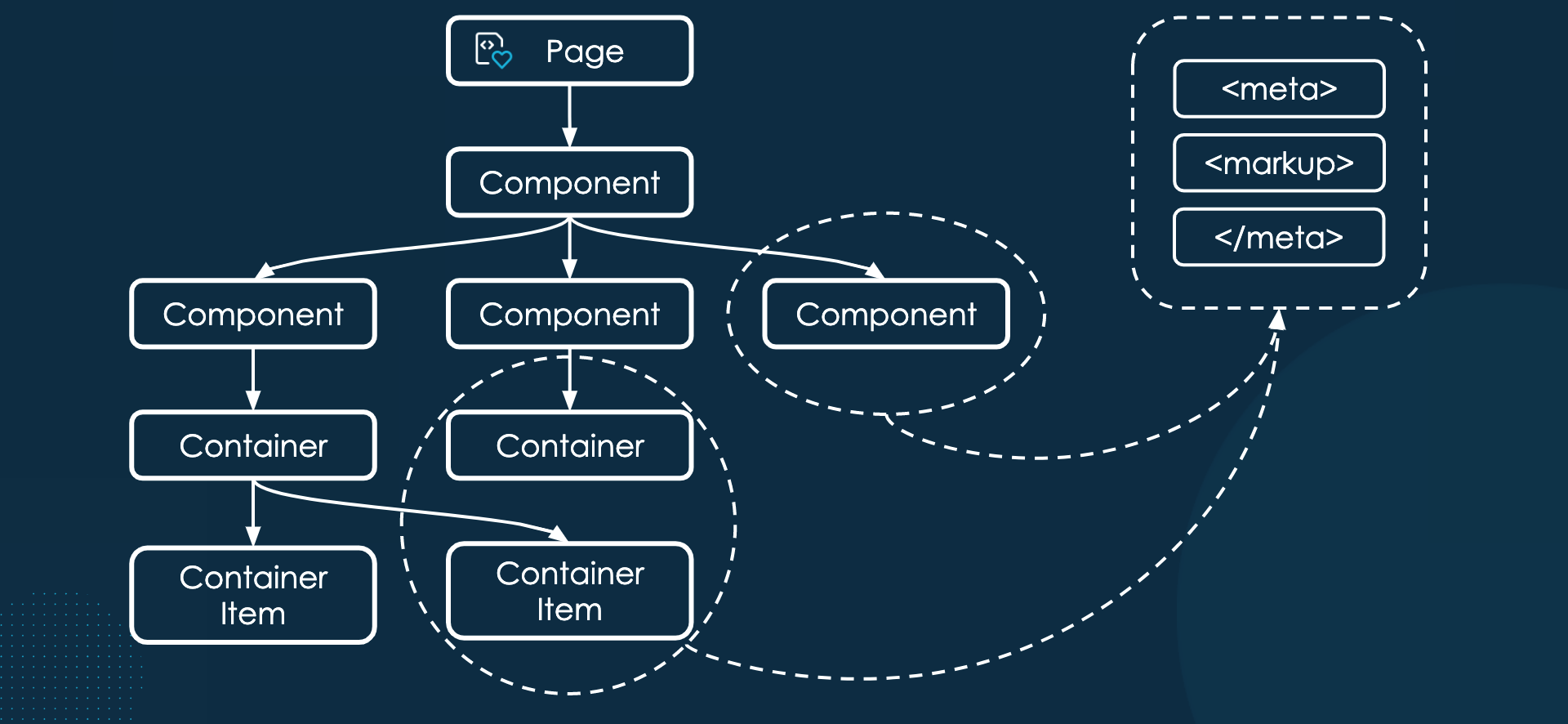
Diagram: The diagram illustrates a hierarchical page structure. A Page node contains a root Component, which branches into child Components. Some components lead to Containers and then to Container Items, showing nested composition and parent-child relationships. Dashed outlines highlight groups of components and containers, with arrows pointing to a box containing
<meta>,<markup>, and</meta>, indicating that component structures generate page metadata and markup.
There are three component types:
- Hard-coded components: These components are not editable in the Experience manager. They are controlled by a Bloomreach Content developer. The order of their children does not affect rendering; the SPA determines the rendering order.
- Container components: These components contain a list of editable container items (child components). The order of container children is significant and can be changed in the Experience manager. Containers have a type attribute, which helps the SPA wrap their children correctly.
- Container item components: These are the children of a Container component. In the Experience manager, users can add, edit, move, or delete container items. Editing a container item involves updating its component parameters. Parameters can be primitive values (strings, numbers, dates) or references to documents or menus, both editable in the Experience manager. Currently, container items must be leaves in the component hierarchy.
In addition to components, the page structure can include menus (editable in the Experience manager) and documents (editable in the Experience manager or Content application).
Each container item has a type attribute. The SPA must recognize this type to render the container item using the provided parameters.
Hint: For example, a container item of type Banner provides the SPA with an image, title, and link target. The SPA renders these parameters as a visible banner. A Latest News container item type provides a list of news documents, and the SPA renders the title and summary for each news item.
The page structure, along with referenced menus and documents, is stored in Bloomreach Content, managed through the Experience manager or Content application, and exposed to the SPA via the Page Model API.
Editing Integration
Editing integration is relevant only when the channel or SPA is displayed in preview mode within the Experience manager. When a user accesses the Experience manager, the backend prepares a preview version of the page model, specific to the user and current parameters (such as project, persona, or Alter Ego).
For editing integration, the SPA must be served in the browser (within an iframe in the Experience manager) from the same host as the Experience manager (the CMS host). Typically, the SPA is hosted separately (the SPA host). The Experience manager delegates page rendering requests to the external SPA host, which is configured in the virtual host configuration.
Because the preview SPA in the Experience manager iframe is served from the same host, the Experience manager can access the SPA window to set up editing integration. The Experience manager parses the SPA DOM to detect page structure elements, draws overlay boxes, edit menus, and manage-content buttons, and injects a JavaScript library for drag-and-drop functionality of container items. The SPA must insert Comment elements into the DOM when rendering in preview mode so the Experience manager can detect page structure elements.
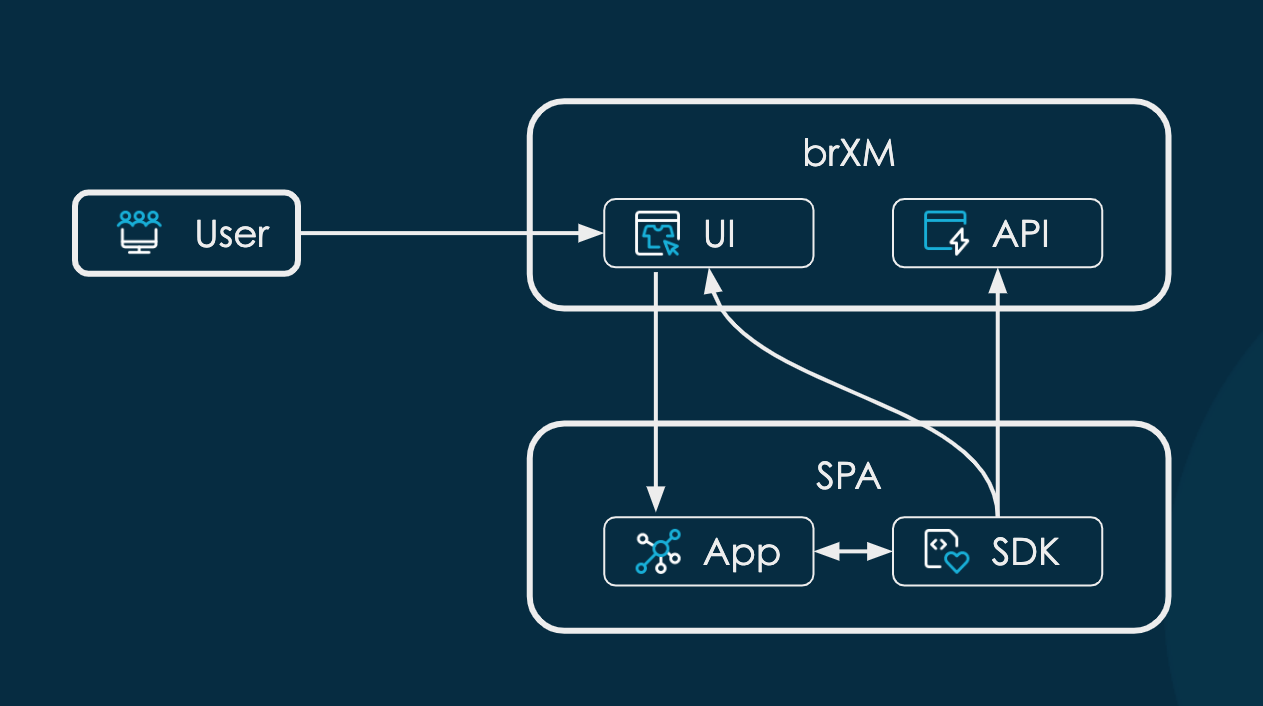
Diagram: The diagram shows three main areas: a User, a Bloomreach Content box (with UI and API), and an SPA box (with App and SDK). Arrows indicate user interaction with the UI, UI communication with the App, two-way communication between App and SDK, SDK interaction with the Bloomreach Content API, and additional communication from the SDK to the Bloomreach Content UI.
In addition to DOM access, the SPA and Experience manager communicate to support editing:
- When the SPA changes the DOM in a way that requires the Experience manager to re-inspect page structure elements, it sends a sync message to the Experience manager.
- When a user updates container item parameters in the Experience manager, it sends a renderComponent message to the SPA, instructing it to re-render the specified component with updated parameters.
- Other editing actions in the Experience manager trigger a full reload of the iframe, restarting the SPA and fetching a new page model.
SPA Integration SDKs
Bloomreach provides a SPA Integration SDK that exposes a JavaScript API for SPA integration. This SDK is framework-agnostic ("plain vanilla JavaScript"). Bloomreach also offers a React SPA Integration SDK, which builds on the SPA Integration SDK and is optimized for React.js SPAs. The React SDK demonstrates how to use the SPA Integration SDK with other frameworks such as Angular or Vue.js.
These SDKs handle the integration details with Bloomreach Content, so front-end developers do not need to implement low-level integration logic. Bloomreach recommends using these SDKs rather than building a custom integration.
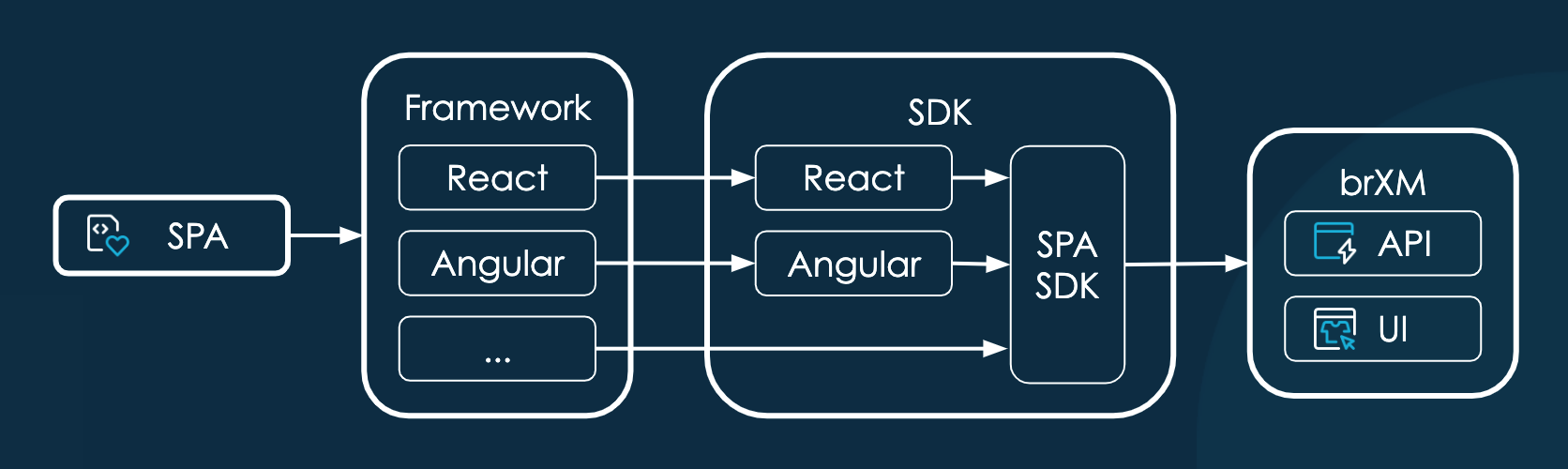
Diagram: The diagram shows an architecture flow from an SPA through a framework layer (React, Angular, others), into corresponding SDKs, and then to Bloomreach Content. The SDK area groups framework-specific and generic SPA SDKs, which connect to Bloomreach Content's API and UI.