Forgot Credentials Functionality
Info: This feature in Bloomreach Content requires a standard or premium license. Contact Bloomreach for licensing details.
Overview
The Bloomreach Commerce Accelerator includes out-of-the-box components and templates for credential reset workflows. These components interact with the CustomerRepository operations defined by the specific Commerce Connector Module. The Commerce Accelerator does not provide connector implementations by default. You must implement the relevant operations in your Commerce Connector Module for the credential reset components to function correctly.
Component Overview
The Commerce Connector SDK API adds reset credentials operations to the CustomerRepository interface. Review the reset credentials methods in the Customer Repository for details.
By default, reset credentials pages and components are disabled in Bloomreach Commerce Accelerator boot applications. You must extend and configure these components to fit your requirements. The following section explains how to enable and customize this functionality.
Component Details
The Commerce Accelerator library provides two components for credential reset:
ForgotCredentialsComponentResetCredentialsComponent
These components are implemented as HST components and primarily support the password reset flow. You can extend these components and their templates to support additional scenarios, such as username recovery or security questions.
Reset credentials pages are disabled by default. As a result, users cannot access these pages from the login form until you enable them. To display the "Forgot" link on the login page, set the isCredentialsResetEnabled configuration property to true.
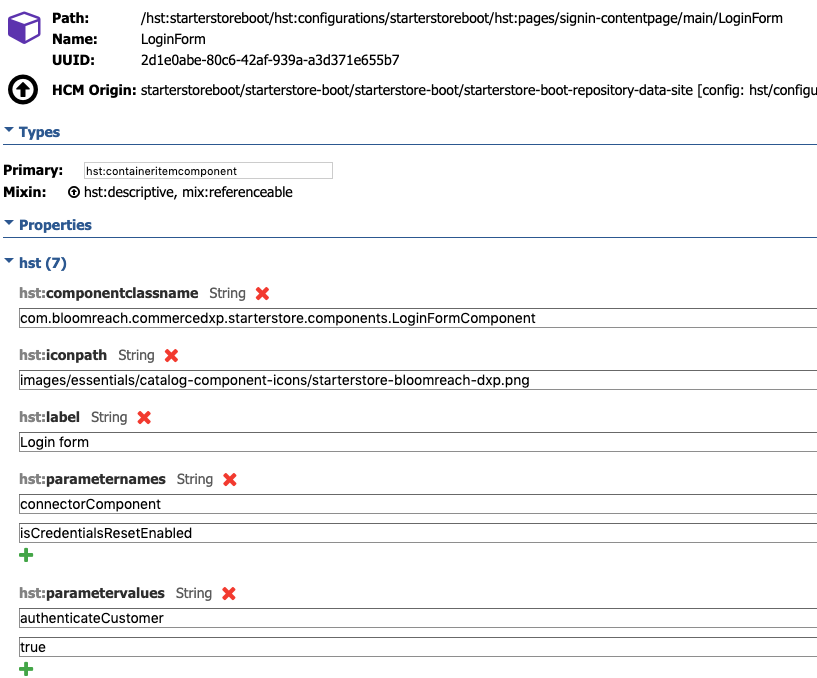
You must configure the backend connector component with the correct service base URL, HTTP method, and request body according to your backend implementation. After publishing the updated connector component, the login page will show a link to the forgot credentials form.
The credential reset flow in the Commerce Accelerator follows the OWASP Forgot Password Cheat Sheet guidelines. The default implementation does not cover all OWASP requirements, but you can extend it to meet your security needs. Currently, Bloomreach Accelerator: B2C Commerce provides two pages/components aligned with the recommended reset flow:
- A page with the forgot credentials form (
ForgotCredentialsComponent) - A page with the reset password form (
ResetCredentialsComponent)
To align with the OWASP guidelines, implement the credential reset flow as follows:
- Use
ForgotCredentialsComponentto process the initial forgot credentials request. - Use a custom
requestCredentialsResetimplementation in your commerce connector to send a reset token through a secure channel. - Use
ResetCredentialsComponentto process the new credentials. - Use the
credentialsResetimplementation in your commerce connector to update credentials and log the event.
Do not store sensitive data, such as reset tokens, in the Commerce Accelerator application.
Template Details
The Commerce Accelerator Boot applications provide two templates for credential reset components:
starterstore-forgot-form.ftlfor the forgot password formstarterstore-productlist-atc.ftlfor the reset password form