Search Component
Overview
The Search component in Bloomreach Accelerator: B2C Commerce enables flexible site search by allowing system integrators to select and configure the search backend. The component is extensible, so developers can implement custom logic to combine search results from multiple systems if needed.
Component Functionality
The Search component retrieves data, such as products, from backend systems. The specific API used for product search depends on your Bloomreach Accelerator: B2C Commerce configuration. Search results are displayed based on the selected API.
The search results page supports faceted navigation. Users can filter results using specific product attributes.
When using Bloomreach Discovery with the Products API, features such as autosuggest and related products are available by default.
Component Architecture
The Search component uses a command chain delivery pattern. It can interact with Bloomreach APIs. All connectors in the Default Commerce Connector Set provide the productSearch component, which the Search component uses to retrieve products. The connector configuration also provides a facetList component that returns only the set of facets for a given query parameter. Typically, facets are included in the product search result, but in some cases they may be fetched separately.
If the pageableCommand is included in the command chain, the backend response will be paginated. For the search results page, you can configure pagination options—such as page size and query limit—directly in the console.
Bloomreach API Integration
The Search component is fully compatible with Bloomreach APIs. To enable this integration, select the appropriate option in the Channel settings. For details, see the Bloomreach Configuration documentation.
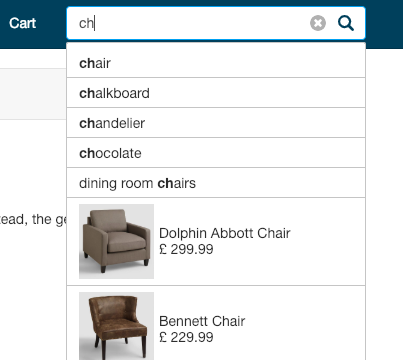
The boot application for Bloomreach Accelerator: B2C Commerce includes a Search Box component in the header. When Bloomreach APIs are enabled, the search box provides autocomplete and product suggestions as users type queries, as shown below:
Facets are included in the product search results. The boot application provides a product-list template that displays both facets and products.
Template Structure
The boot application includes two main templates for displaying product search results:
starterstore-productsearch.ftl: Displays only the product grid.starterstore-productlist.ftl: Displays both facets and products in the same section.
There is also a template for displaying only facet values:
starterstore-facetlist.ftl: Renders facet values for products that match a specific query.
Extension Points
The Search component uses a command chain delivery pattern. You can extend its default behavior by adding custom commands to the commands definition.