Bloomreach Commerce Accelerator 14.2.0 Upgrade Notes
Info: Bloomreach Commerce Accelerator requires a standard or premium Bloomreach Content license. Contact Bloomreach for details.
This page provides key information for upgrading to Bloomreach Commerce Accelerator 14.2.0.
For a summary of new features and improvements, see the Bloomreach Commerce Accelerator Release Notes.
Installation Using the Bloomreach Commerce Accelerator Maven Plugin
Removal of the "Boot" Project
Prior to version 14.2, Bloomreach provided B2C/B2B Commerce Accelerator Boot projects. These Boot projects allowed you to download and install a preconfigured starter to build commerce experience applications. However, Boot projects introduced the following limitations:
- The Boot project enforced the
starterstoreboot:namespace, making it difficult to maintain existing project namespaces. - Integrating Boot projects with existing Bloomreach Content projects made it challenging to reapply custom configurations.
Starting with version 14.2, Boot projects are no longer available. Instead, you can install Bloomreach Commerce Accelerator modules and configurations into any existing Bloomreach Content project by running the Bloomreach Commerce Accelerator Maven plugin, described below.
Installing Bloomreach Commerce Accelerator with the Maven Plugin
As detailed in the Installation guide, the Bloomreach Commerce Accelerator Maven plugin enables you to add Accelerator modules to any Bloomreach Content project as of version 14.2.
When you run the Maven plugin in your project, it performs the following actions:
- Adds properties and dependencies (addon module JARs and example configuration/content bootstrap JARs) to your project's POM files.
- Updates distribution XML files (
src/main/assembly/*.xml) to include the new dependencies and configuration files. - Copies files into your project, including:
- Configuration files (e.g.,
conf/*.xml,conf/*.properties) - Spring beans configuration files (e.g.,
site/webapp/src/main/webapp/WEB-INF/applicationContext*.xml,site/components/src/main/resources/META-INF/hst-assembly/overrides/*.xml) - Webfiles resources for the delivery tier (e.g.,
repository-data/webfiles/src/main/resources/site/freemarker/starterstore*/,repository-data/webfiles/src/main/resources/site/css/*.css,repository-data/webfiles/src/main/resources/site/js/*.js) - Bootstrapping YAML files for configuration and example content (e.g.,
repository-data/application/src/main/resources/**/.yaml,repository-data/site/src/main/resources/**/.yaml)
- Configuration files (e.g.,
- Updates existing configurations:
- Modifies the cargo.run profile configuration.
- Applies changes to
web.xmlfiles.
- Adds an updater script that copies default delivery-tier configurations and example content into the existing project (e.g.,
repository-data/application/src/main/resources/hcm-config/configuration/update/registry/*.yaml,repository-data/application/src/main/resources/hcm-config/configuration/update/registry/*.xml).
Hint: If your project uses version control (such as Git), you can review the changes introduced by the Bloomreach Commerce Accelerator Maven plugin.
Automatic Installation of Both starterstore: and starterstoreboot: Namespaces
In versions prior to 14.2, Commerce Connector document types were included in the addon module, while Commerce application document types (such as Category or Product) were included in the Boot project. With the removal of Boot projects in 14.2, all document types are now provided by the addon module.
When the Maven plugin adds the com.bloomreach.commercedxp:starterstore-dependencies-cms dependency to your project, both namespaces are included automatically. You no longer need to define the old Boot project namespace or use starterstoreboot: for custom document types.
Updater Script for Store Site Configuration with Example Content
By default, the Bloomreach Commerce Accelerator Maven plugin does not overwrite your existing site configurations. Instead, it adds the default store site configurations to a separate folder at hst:configurations/starterstoreboot.
To apply the store site configurations, you must run the Updater script ("Accelerator - Install StarterStore ...") once, as described in the Installation guide.
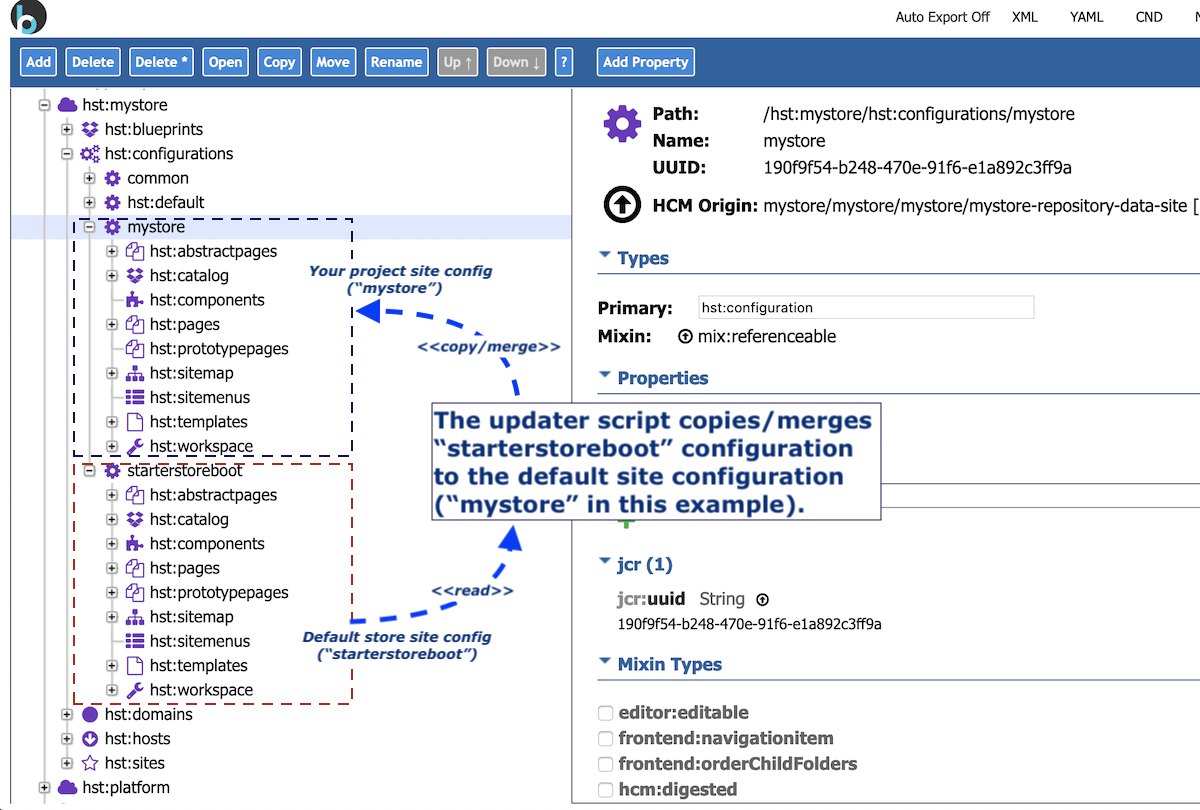
The Updater script copies or merges the default store site configurations from hst:configurations/starterstoreboot into your existing site configuration (for example, hst:configurations/mystore).
The script also copies example documents, such as sample category and product documents, into your existing content folder.
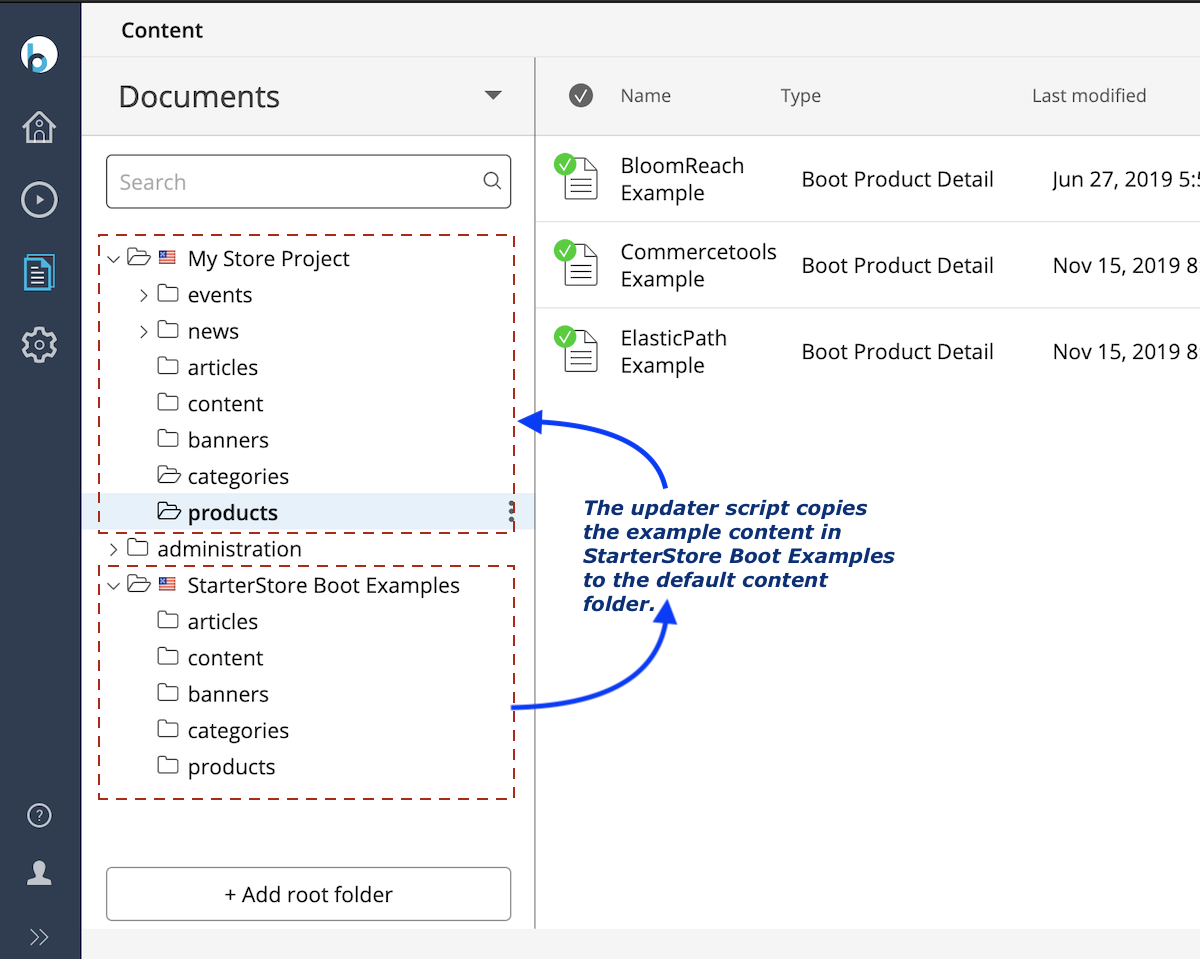
After you run the Updater script, the store site is ready to serve the default store site application with example content.
Hint: If Automatic Export is enabled, all copy/merge operations performed by the Updater script will be visible as changes in your local development environment.
Commerce Connector Document Changes
In previous versions (up to 14.1), Boot projects bootstrapped Commerce Connector documents into /content/documents/administration/commerce-connectors.
Starting with 14.2, each Commerce Connector Module automatically bootstraps Commerce Connector documents into two locations:
- The default Commerce Connector document in the internal module configuration at
/hippo:configuration/hippo:modules/starterstore-commerce-connectors/hippo:moduleconfig/commerce-connectors/(for example,/hippo:configuration/hippo:modules/starterstore-commerce-connectors/hippo:moduleconfig/commerce-connectors/commercetools).- Most Commerce Connector Component compound configurations are not customized, so these are provided by the Commerce Connector JAR module to prevent upgrade issues.
- Each document in the internal module configuration is identified by the
starterstore:idproperty.
- The configurable Commerce Connector document in the content folder at
/content/documents/administration/commerce-connectors/(for example,/content/documents/administration/commerce-connectors/commercetools).- Some Commerce Connector properties are environment-specific. These are provided in the content folder and merged into the default document in the internal module configuration at startup.
- Each document in the content folder is also identified by the
starterstore:idproperty, which links it to the corresponding default document.
The following screenshot shows a default Commerce Connector document in the internal module configuration:
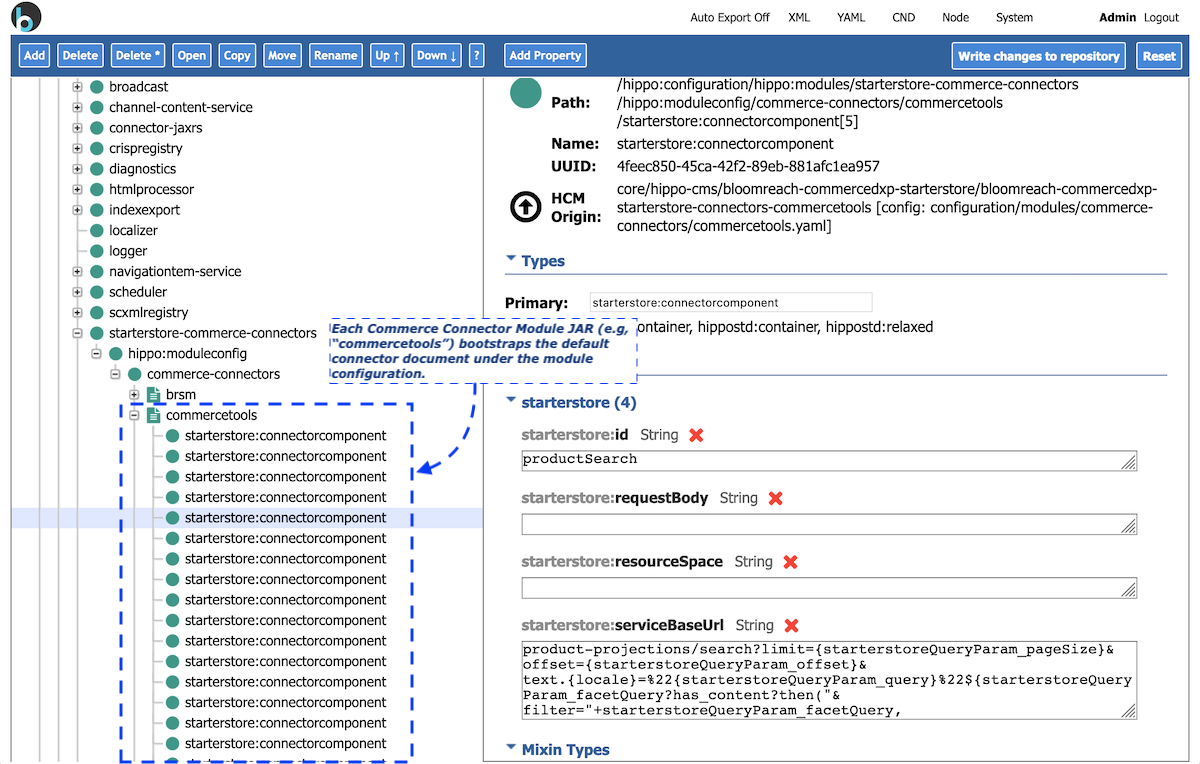
The default Commerce Connector document is bootstrapped into the internal module configuration to prevent upgrade issues, such as outdated compound configurations.
A mergeable Commerce Connector document is also provided in the content folder at /content/documents/administration/commerce-connectors/, allowing you to override or configure specific properties as needed.
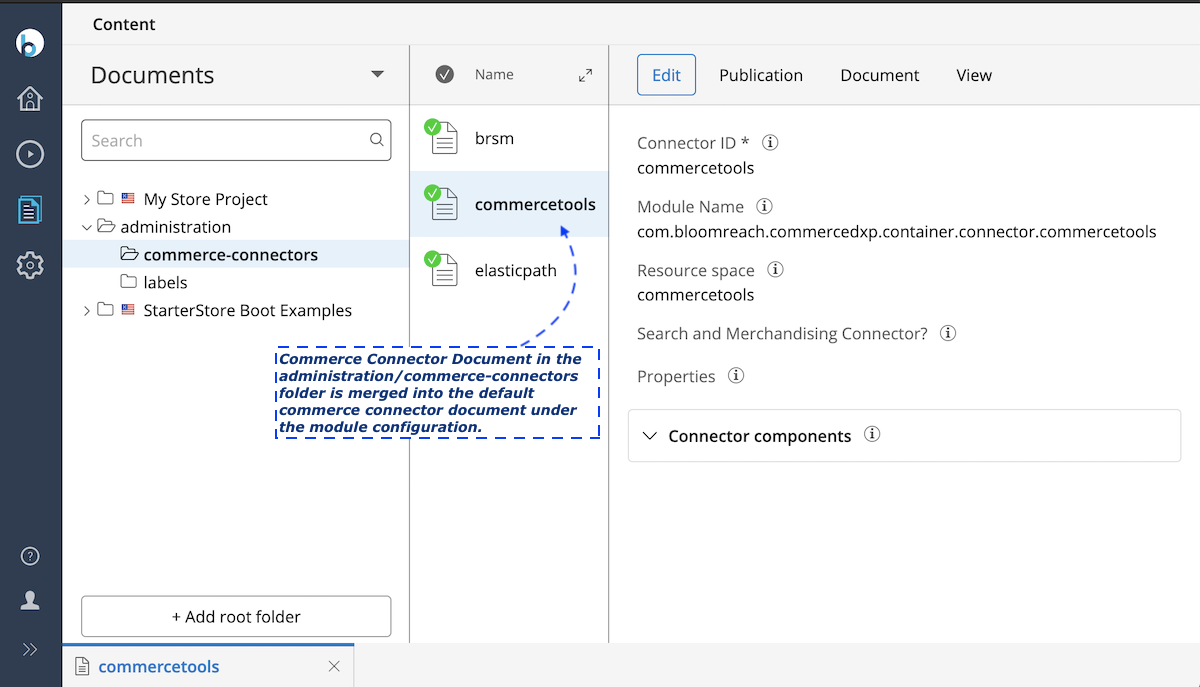
Hint: If you have not customized Commerce Connector documents, remove them from your project and allow the Commerce Connector Modules to bootstrap them again. If you have customizations, remove the existing documents, let them be bootstrapped, and then reapply your custom settings or custom compound configurations as needed.
Webfiles Location Changes
In versions prior to 14.2, Webfiles resources were spread across multiple folders. For example, the Boot project stored some templates in repository-data/webfiles/src/main/resources/site/freemarker/hstdefault/ and others in repository-data/webfiles/src/main/resources/site/freemarker/starterstoreboot/.
From version 14.2 onward, all store-specific templates are located in repository-data/webfiles/src/main/resources/site/freemarker/starterstoreboot/ (for B2C) or repository-data/webfiles/src/main/resources/site/freemarker/starterstoreb2bboot/ (for B2B) to avoid conflicts with existing templates.
Other resource files (such as .js and .css) now use consistent naming conventions. For example, all store-specific JavaScript files are prefixed, such as repository-data/webfiles/src/main/resources/site/js/starterstore*.js.
Hint: If you have customized templates or other resources in Webfiles, review and apply your changes to the upgraded templates to take advantage of new features, improvements, or bug fixes.
CRISP Resource Cache Name Changes
Info: If you have not customized internal CRISP resource cache configurations, you can ignore this section.
As described in the CRISP Configuration guide, most ResourceResolver bean configurations include the resourceDataCache property, as shown below:
<!-- SNIP --> <bean class="org.springframework.cache.ehcache.EhCacheCache"> <constructor-arg> <bean parent="abstractCrispResourceEhCache"> <property name="cacheName" value="demoProductCatalogsCache" /> <!-- SNIP --> </bean> </constructor-arg> <!-- SNIP --> </bean> <!-- SNIP -->
The cacheName property (for example, demoProductCatalogsCache) specifies the EhCache cache name used by the ResourceResolver for resource data caching.
Starting with version 14.2, cache name values have been updated for consistency:
| Commerce Connector | Old resource cache name | New resource cache name |
|---|---|---|
| Bloomreach Discovery | bloomreachCache | brsmCache |
| commercetools | demoProductCatalogsCache | commercetoolsCache |
| Elastic Path | elasticPathResourcesCache | elasticpathCache |
| SalesForce Commerce Cloud: B2B | salesforceccResourceDataCache | salesforceccCache |