BRIEF (BloomReach Integration & Enrichment Framework)
Info: BRIEF requires a standard or premium Bloomreach Content license. Contact Bloomreach for details.
Introduction
BRIEF (BloomReach Integration & Enrichment Framework) is a solution framework for developing commerce-enabled applications in Bloomreach Content. BRIEF provides a structured approach for integrating with multiple commerce backends and Bloomreach Discovery, enabling developers to assemble reusable components and adapt template libraries for specific use cases.
Key objectives of BRIEF:
- Extensible integration and content enrichment with various commerce backends
- Built-in integration with Bloomreach Discovery
- Accelerated solution delivery with cost efficiency
- Architecture designed for cloud environments
Overview
Commerce-enabled applications must support a range of users, including visitors, developers, cloud operators, marketers, merchandisers, and content editors. These applications often require integration with multiple commerce backends and Bloomreach Discovery.
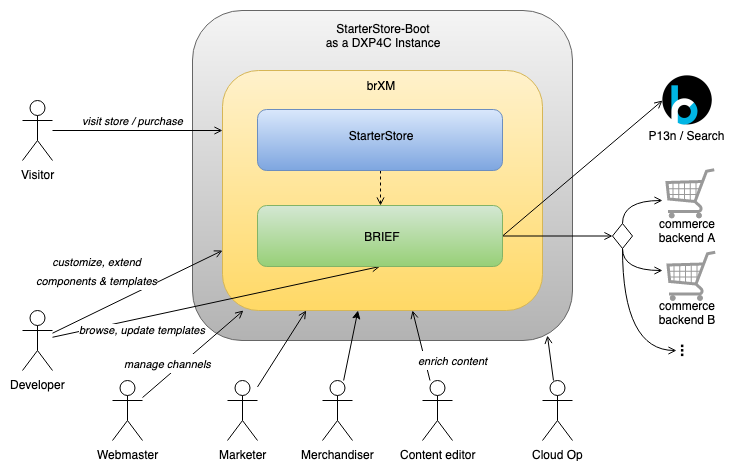
Diagram: The diagram illustrates a layered architecture. StarterStore-Boot, as a DXP4C instance, contains a Bloomreach Content area with a StarterStore component above a BRIEF component. A dashed arrow shows the relationship between StarterStore and BRIEF. User roles—including Visitor, Developer, Webmaster, Marketer, Merchandiser, Content editor, and Cloud Op—interact with the system for tasks such as customization, channel management, template updates, content enrichment, and operations. BRIEF connects to Bloomreach Discovery (P13n / Search) and multiple commerce backends, supporting integration with several systems.
BRIEF provides a framework and prebuilt components to support enterprise integrations with core backends in Bloomreach Content.
Features
BRIEF includes:
- A standardized development model for message exchanges between DXP modules and e-commerce backends:
- APIs and a common object model
- Generic and command chain delivery components
- Representations for commerce processing context and exchange state
- Management UIs for configuring DXP channels and backend commerce connectors
- Extensible, pluggable delivery components and template libraries
- Built-in integration with Bloomreach Search & Merchandising
Architecture Overview
BRIEF is organized into three layers:
- Backend commerce connector configuration models (blue): Define runtime models for commerce connector configuration.
- Commerce processing context and exchange state representations (green): Represent request-scope commerce exchange context and state.
- Generic and command chain delivery components (yellow): HstComponent abstractions for integrating commerce backends and enabling content enrichment.
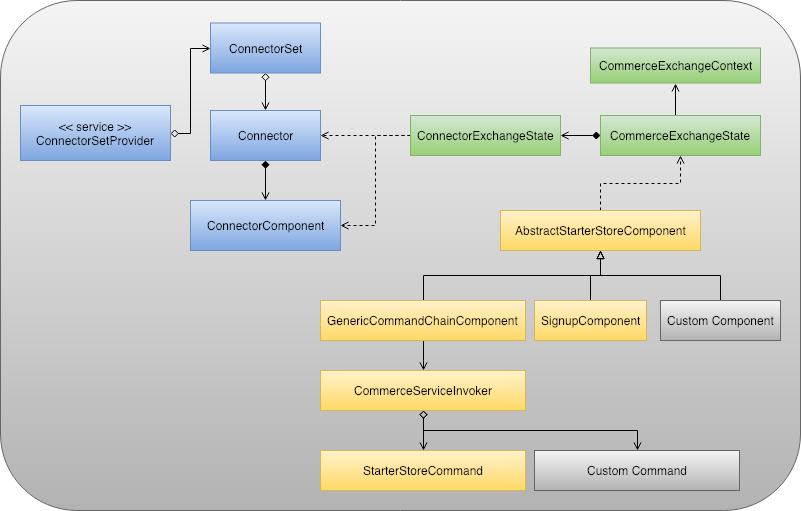
Diagram: The diagram shows BRIEF's structure with color-coded component groups. Blue boxes represent connector configuration elements (ConnectorSetProvider, ConnectorSet, Connector, ConnectorComponent), which interact with green commerce exchange state components (ConnectorExchangeState, CommerceExchangeState, CommerceExchangeContext). Yellow boxes at the bottom represent delivery and command-chain components (AbstractStarterStoreComponent, GenericCommandChainComponent, SignupComponent, Custom Component). Relationships between components are indicated by arrows and dashed lines.
Backend Commerce Connector Configuration Models
| Component | Description |
|---|---|
ConnectorExchangeState | Service abstraction for reading and maintaining connector set models from all commerce connector set documents in the CMS. |
ConnectorSet | Represents a set of commerce connectors. One document can define multiple connector sets for different backends. A ConnectorSet contains multiple connectors. |
Connector | Model abstraction for a specific commerce backend connector. Contains metadata such as service URLs and credentials. Each connector includes multiple ConnectorComponents. |
ConnectorComponent | Represents an invokable unit for a connector. Contains invocation-specific metadata such as relative URI and parameters. |
Commerce Processing Context and Exchange State Representations
| Component | Description |
|---|---|
CommerceExchangeState | Request-scope execution state within the HstComponent lifecycle. Provides access to backend commerce connectors and components. |
ConnectorExchangeState | Immutable execution state associated with the commerce connector for the current HstComponent execution cycle. |
CommerceExchangeContext | Mutable execution context data, initialized from ConnectorExchangeState and resolved with runtime request-scope attributes. |
Generic and Command Chain Delivery Components
| Component | Description |
|---|---|
AbstractStarterStoreComponent | Abstract HstComponent that provides CommerceExchangeState for data exchanges with backend commerce platforms. |
GenericCommandChainComponent | Generic HstComponent for building and executing a chain of reusable commands, supporting content enrichment in the delivery tier. |
CommerceServiceInvoker | Service abstraction that invokes the configured command chain for an HstComponent. |
SignupComponent | Application HstComponent extending AbstractStarterStoreComponent to process visitor sign-up. Serves as an example for custom implementations. |
Example: HstComponent Extending AbstractStarterStoreComponent
The following example shows a component that extends AbstractStarterStoreFormComponent (which itself extends AbstractStarterStoreComponent) to access the ConnectorExchangeState for backend operations:
// Example StarterStore component implementation: Visitor signup. public class SignupFormComponent extends AbstractStarterStoreFormComponent<Object> { // ...SNIP... @Override protected void doActionAfterFormValidation(HstRequest request, HstResponse response, Object object) throws HstComponentException { // Get the related commerce connector instance first. final CommerceConnector commerceConnector = getDecoratingCommerceConnector(request, response); // Get the CustomerRepository instance for the specific commerce connector. final CustomerRepository customerRepo = StarterStoreConnectorUtils.getCommerceRepository(commerceConnector, CustomerRepository.class); if (object instanceof CustomerForm) { final CustomerForm customerForm = (CustomerForm) object; // Invoke CustomerRepository#create() with the commerce connector and customer form object to create an account. final CustomerModel customerModel = customerRepo.create(commerceConnector, customerForm); if (customerModel != null) { log.debug( "Sign up successful for the new user. id: {}, email: {}, firstName: {}, middleName: {}, lastName: {}.", customerModel.getId(), customerModel.getEmail(), customerModel.getEmail(), customerModel.getFirstName(), customerModel.getLastName()); StarterStoreHstUtils.sendRedirectBySitemapItemRefId(request, response, SIGN_IN_SITEMAPITEM_REF_ID); } else { log.warn("Sign up not successful: please check the connector exception above."); } } } }
Chain of Responsibility Patterns with GenericCommandChainComponent
Applications often require content enrichment. For example, a product list page may need to retrieve product metadata from a personalized search backend, then combine it with real-time pricing information. BRIEF supports these scenarios by enabling the chain-of-responsibility pattern through command chains.
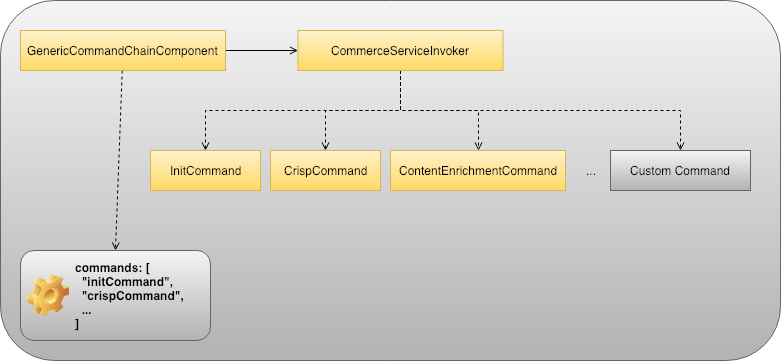
Diagram: The diagram shows a command-chain structure with GenericCommandChainComponent and CommerceServiceInvoker. GenericCommandChainComponent points to CommerceServiceInvoker and is linked to a configuration box listing commands such as "initCommand" and "crispCommand". CommerceServiceInvoker executes a configurable sequence of commands, including InitCommand, CrispCommand, ContentEnrichmentCommand, and custom commands.
An HstComponent configuration can define a "commands" parameter, for example [ "initCommand", "findProductsCommand", ... ]. Each command extends com.bloomreach.commercedxp.starterstore.commands.AbstractStarterStoreCommand. GenericCommandChainComponent instantiates and invokes these commands at runtime through CommerceServiceInvoker.
During the HstComponent processing cycle, each command can add product-related model objects to HstRequest attributes. The associated FreeMarker template can then render the required data, such as for a product list page.
Example: Command Extending AbstractStarterStoreCommand
The following example shows a command that extends AbstractStarterStoreCommand to access the ConnectorExchangeState for backend operations:
@Component public class FindProductsCommand extends AbstractStarterStoreCommand { @Override protected void doExecuteInternal(final CommerceExchangeState exchangeState) { if ((isRenderPhase(exchangeState) || isResourcePhase(exchangeState)) && StarterStoreHstUtils.isPersonalizationResponseEmpty(exchangeState)) { // Get the related commerce connector instance first. CommerceConnector commerceConnector = getDecoratingCommerceConnector(exchangeState); // Get the ProductRepository instance for the specific commerce connector. final ProductRepository productRepo = StarterStoreConnectorUtils.getCommerceRepository(commerceConnector, ProductRepository.class); if (productRepo != null) { final String query = StringUtils.defaultIfEmpty((String) exchangeState.getContext().getRequest() .getAttribute(StarterStoreConstants.ATTRIBUTE_QUERY), StringUtils.SPACE); final long pageSize = NumberUtils.toLong((String) exchangeState.getContext().getRequest() .getAttribute(StarterStoreConstants.ATTRIBUTE_PAGE_SIZE), 10); final long curPageIndex = NumberUtils.toLong((String) exchangeState.getContext().getRequest() .getAttribute(StarterStoreConstants.ATTRIBUTE_CURRENT_PAGE), 1); final long offset = (curPageIndex - 1) * pageSize; // Build a QuerySpec object. final QuerySpec querySpec = new QuerySpec(offset, pageSize, FilterSpec.create(FilterOperator.CONTAINS, FilterSpec.CURRENT_PATH, query)); // Invoke ProductRepository#findAll() with the commerce connector and querySpec object to get a result of products. final PageResult<ItemModel> beanResult = productRepo.findAll(commerceConnector, querySpec); // ...SNIP... } } } }
Summary
BRIEF provides:
- A standardized API and object model for extensible, transparent, and cost-effective development
- Management tools for configuring connector details and channels
- Built-in integration and content enrichment with Bloomreach Search & Merchandising
- Integration with multiple commerce backend platforms, with additional vendor support planned
- Component and template libraries to accelerate onboarding
- CLI tool support for template management via secure WebDAV service