Introduction to Commerce Connector SDK
Info: This feature requires a standard or premium Bloomreach Content license. Contact Bloomreach for details.
Overview
The Bloomreach Commerce Accelerator integration framework, BRIEF, introduces a standardized SDK API for integrating with Commerce Backend Platforms (from version 2 onward). With this approach, Commerce Accelerator Applications no longer rely on direct REST API calls or CRISP API at the application level. Instead, applications interact with a CommerceRepository service provided by the Commerce Connector Module to retrieve or update data as POJO models.
Commerce Connector SDK offers the following benefits:
- Applications and templates use POJO models directly; no additional bean mapping configuration is required.
- Application code and templates do not need to handle generic CRISP
Resourceobjects, improving maintainability and clarity. - Commerce Connector Modules are decoupled from the Commerce Accelerator, allowing independent testing and verification.
- Each Commerce Connector Module can read its own Commerce Connector Configuration managed in Bloomreach Content for module-specific settings.
Terminology
- Bloomreach Commerce Accelerator Applications: Delivery and authoring applications with BRX features, integrated with Bloomreach Discovery and a Commerce Backend Platform.
- Commerce Backend Platform: The e-commerce platform providing backend services for Commerce Accelerator Applications.
- Commerce Connector SDK: The standardized API set defining interfaces and abstractions that a Commerce Connector Module must implement for integration.
- Commerce Connector Module: A software package that provides configurations and implementations of the interfaces defined in the Commerce Connector SDK for a specific Commerce Backend Platform.
- Commerce Connector Configuration: A configuration document (or subset) stored in Bloomreach Content. This document registers a Commerce Connector Module and may include settings such as backend REST API URLs, HTTP headers, and HTTP methods.
Design Concepts
Commerce Backend Platforms implement e-commerce services differently, but most commerce-enabled user experiences require similar features: product search, category navigation, product carousels, cart and order management, and customer authentication. The Commerce Connector SDK standardizes the API set for these common use cases.
Repository, Model, and Form Objects
The primary abstraction in the commerce experience domain is the set of Repository services. These services allow you to retrieve, create, update, or delete resource items using straightforward methods, abstracting away backend-specific details. A Repository provides Model domain objects to applications. When creating or updating data, applications pass Form objects to the Repository.
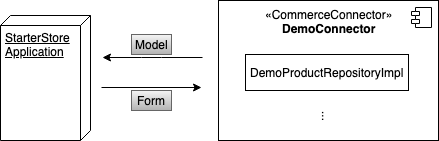
Diagram: The diagram shows a StarterStore Application interacting with a DemoConnector implementation. Model objects flow from the connector to the application; form objects flow from the application to the connector.
In the SDK:
- All
Repositoryinterfaces extend theCommerceRepositorymarker interface. - All
Modelinterfaces extend theCommerceModelmarker interface. - All
Forminterfaces extend theCommerceFormmarker interface.
Repository Interactions
Consider these example product resource use cases:
-
Search Product Resource Items
- When a visitor searches for products, the application retrieves the Commerce Connector Module and obtains the
ProductRepositoryimplementation. - The application does not interact directly with the Commerce Backend Platform or CRISP API. All access is through the standardized
CommerceRepositorySDK APIs. - To search and retrieve products, the application calls
ProductRepository#findAll(...)and receives a paginated collection ofItemModelobjects. - In the delivery tier, an
HstComponenttypically retrieves the models and passes them to the rendering template. - The template iterates over the
ItemModelcollection to render product details.
- When a visitor searches for products, the application retrieves the Commerce Connector Module and obtains the
-
Show Product Details
- When a visitor selects a product, the application navigates to the product detail page.
- The application calls
ProductRepository#findOne(...)to retrieve the product details and passes theItemModelto the template. - The template renders product information such as title, description, images, and pricing.
-
Add Product to Cart
- To add a product to the cart, the application retrieves the cart with
CartRepository#checkIn(...)or creates a new cart withCartRepository#create(...). - The application updates cart entries using
CartRepository#save(...). - The visitor can later check out the cart using
CartRepository#checkOut(...).
- To add a product to the cart, the application retrieves the cart with
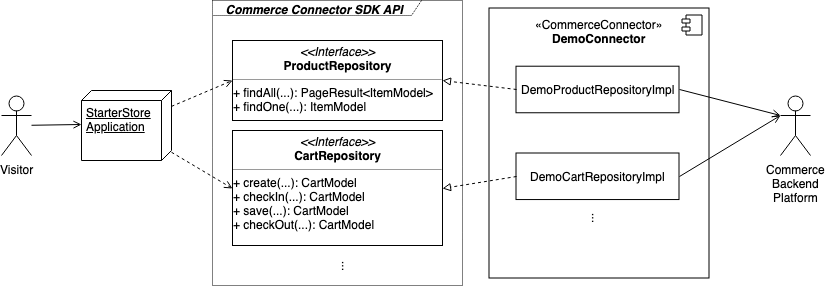
Diagram: The diagram illustrates the interaction between a StarterStore Application and the Commerce Connector SDK API, showing repository interfaces and their implementations, and how these communicate with the backend commerce system.
Model Objects
The SDK defines standardized CommerceModel interfaces for all model objects used in Commerce Accelerator Applications. Each interface exposes properties required by commerce-enabled applications. Each Commerce Connector Module must provide CommerceModel objects mapped to backend resource data.
For example, the ItemModel returned by ProductRepository includes methods such as getId(), getCode(), getDisplayName(), getDescription(), getImageSet(), getListPrice(), and getPurchasePrice().
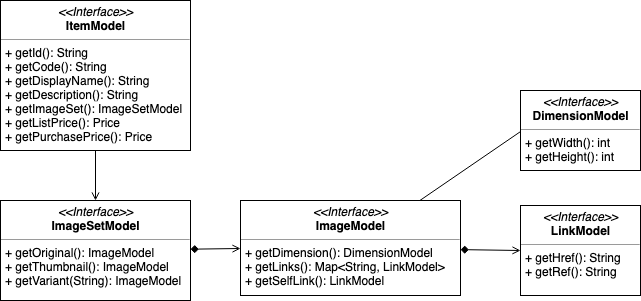
Diagram: The UML diagram shows the structure of commerce model interfaces, including ItemModel, ImageSetModel, ImageModel, DimensionModel, and LinkModel.
CommerceModel interfaces may reference other models. For example, an ItemModel can include an ImageSetModel, which contains one or more ImageModel instances. Each ImageModel can have a DimensionModel and multiple LinkModel instances. These abstractions are required for building commerce-enabled applications. Commerce Connector SDK provides these standardized model interfaces, which must be implemented by each Commerce Connector Module.
Form Objects
The SDK also defines standardized CommerceForm interfaces for objects passed to CommerceRepository components. A common use case is updating customer profiles.
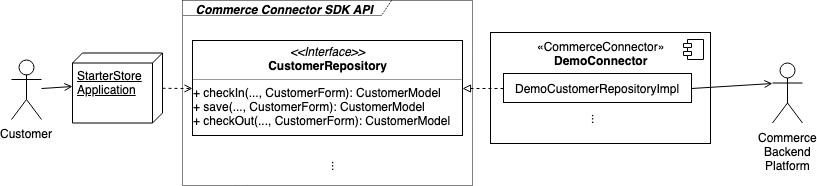
Diagram: The diagram shows the flow of a customer profile update from the application, through the SDK API, to the backend via a connector implementation.
Unlike CommerceModel objects, which flow from the repository to the application, CommerceForm objects are created by the application and passed to the repository.
For example, when a customer updates their email or password, the application creates a CustomerForm and passes it to CustomerRepository#save(..., CustomerForm). The repository implementation retrieves form data using methods like CustomerForm#getEmail().
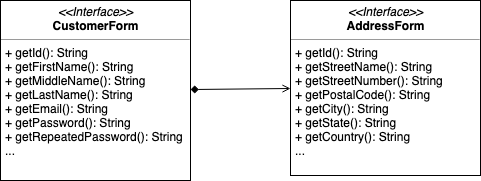
Diagram: The UML diagram shows the structure of CustomerForm and AddressForm interfaces, including their properties and relationships.
Separating CommerceForm from CommerceModel provides several advantages:
CommerceFormobjects may include properties not present inCommerceModel, such as repeated passwords or temporary tokens.- The structure of a
CommerceFormmay differ from the correspondingCommerceModel. For example,CartFormmay only include entries to update, whileCartModelcontains all cart entries. CommerceForminterfaces extendjava.io.Serializablefor flexibility in web applications.CommerceModelinterfaces do not, as not all backend objects are serializable.
Commerce Experience Domain Repositories
As of Commerce Accelerator v2, the following CommerceRepository interfaces are available:
CustomerRepository: Manages customer sign-in, sign-out, and profile updates.AddressRepository: Manages retrieval, creation, update, and deletion of customer addresses.CategoryRepository: Provides product category navigation data.ProductRepository: Retrieves product items.CartRepository: Manages creation and updates to a visitor's cart.OrderRepository: Retrieves customer order data.
Refer to Connector SDK API Details and the JavaDocs for more information.
Packaging and Deployment
A Commerce Connector Module is packaged as an HST Addon Module JAR file and deployed to the classpath of Commerce Accelerator Applications (e.g., /site/WEB-INF/lib/, /cms/WEB-INF/lib/). As an HST Addon Module, it can use Spring Beans Assembly for its internal components and is loaded dynamically by Bloomreach Content using its unique module name.
See Develop a Commerce Connector for implementation details.
Connector-Specific Configuration
Register each Commerce Connector Module in the Commerce Connector Set Model document using its unique module name. The Commerce Accelerator Application locates the module based on this configuration.
If a Commerce Connector Module uses CRISP API to communicate with the backend, you can add one or more Commerce Connector Component configurations under the main connector configuration. When the application invokes a CommerceRepository component, it receives a com.bloomreach.commercedxp.starterstore.connectors.CommerceConnector instance. The repository can then read a resolved com.bloomreach.commercedxp.starterstore.connectors.CommerceConnectorComponent object containing all CRISP API-related settings.
See Develop a Commerce Connector for configuration examples.
Reference Implementations
Commerce Accelerator v2 includes a built-in Commerce Connector Module for Elastic Path. If you have access to the Bloomreach Content Enterprise Maven Repository, you can download the sources and test-sources JAR files for the Elastic Path connector using the following Maven coordinates:
<dependency> <groupId>com.bloomreach.commercedxp.connectors</groupId> <artifactId>starterstore-connectors-elasticpath</artifactId> </dependency>
A demo Commerce Connector Module with static data is also available on the Develop a Commerce Connector page. This example demonstrates how to implement a connector module from scratch.
Summary
BRIEF provides a standardized SDK API for integrating with Commerce Backend Platforms. The Commerce Connector SDK decouples Commerce Accelerator Applications from direct REST API calls and CRISP Resource handling. Applications interact with POJO model objects, improving maintainability and clarity.
The SDK defines interfaces and abstractions for CommerceRepository components, CommerceModel objects, and CommerceForm objects. Each Commerce Connector Module implements these interfaces for a specific backend platform and uses CommerceForm objects to process changes initiated by the application.