Commerce Connector Set Model
Info: This feature requires a standard or premium Bloomreach Content license. Contact Bloomreach for licensing details.
Introduction
Bloomreach Commerce Accelerator applications use the Commerce Connector Set model to access commerce backend services at runtime. The model is defined in a Commerce Connector document within the CMS. Each field in the document maps to a property in the Commerce Connector Set model.
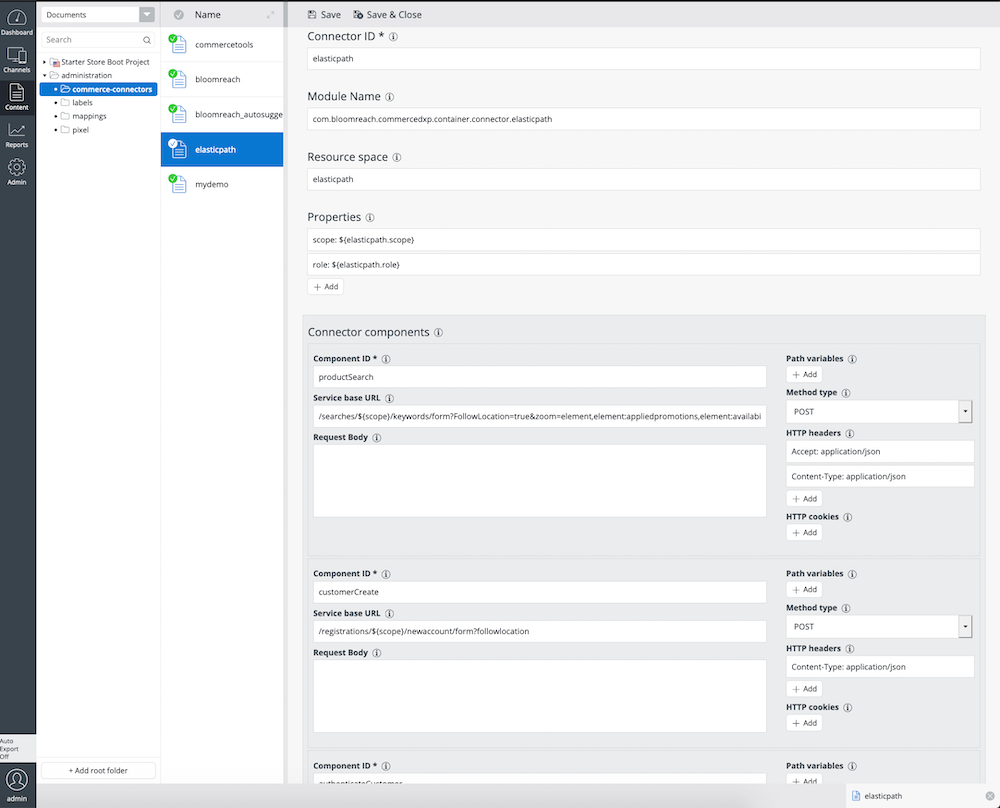
When you update and republish the corresponding Commerce Connector Set document, the Commerce Connector Set model refreshes automatically.
Overview
The Commerce Connector Set model provides all configuration required for applications to communicate with commerce backend services. Bloomreach Commerce Accelerator applications interact with backend services through logical Commerce Connectors and Commerce Connector Components. Only the detailed configurations for your Commerce Connectors and their Components contain the physical backend connection and invocation metadata. This separation allows application logic to remain decoupled from backend API implementations.
The following diagram illustrates the structure of the Commerce Connector Set model. The CommerceConnectorSetProvider service interface is available from the HippoServiceRegistry. Use this interface to access Commerce Connector Set models.
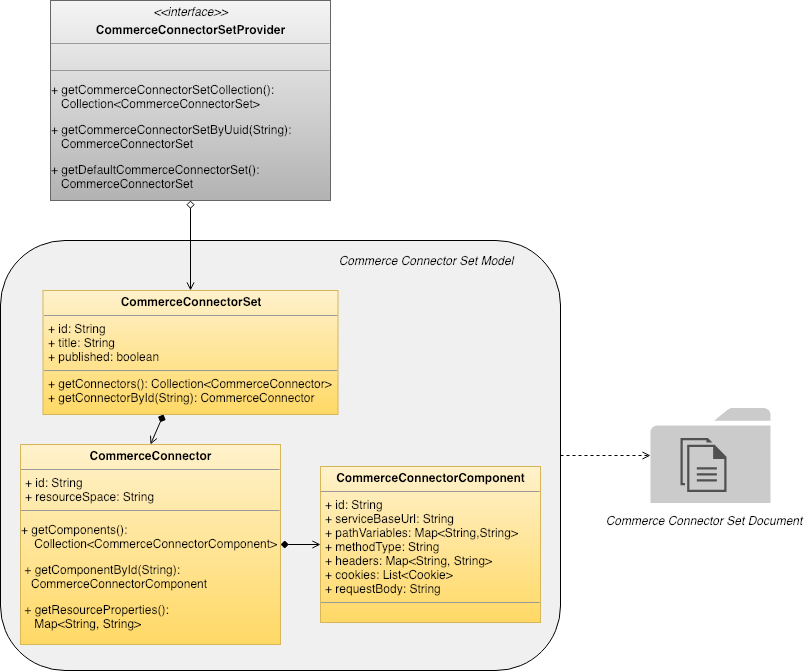
Diagram: The UML-style class diagram shows the
CommerceConnectorSetProviderinterface with methods to retrieve all connector sets, a set by UUID, and the default set. TheCommerceConnectorSetclass containsid,title, andpublishedfields, and methods to access connectors or retrieve one by ID. EachCommerceConnectorSetcontains multipleCommerceConnectorobjects. EachCommerceConnectorhasidandresourceSpacefields, methods to access components, retrieve a component by ID, and get resource properties, and contains multipleCommerceConnectorComponentobjects. TheCommerceConnectorComponentclass includes properties such asserviceBaseUrl,pathVariables,methodType,headers,cookies, andrequestBody. The diagram also links the model to a "Commerce Connector Set Document" icon.
A CommerceConnectorSet contains multiple CommerceConnector objects. Each CommerceConnector includes multiple CommerceConnectorComponent objects. The CommerceConnector stores shared connection information for a specific commerce backend. Each CommerceConnectorComponent defines the details for an invokable unit under the connector.
CommerceConnectorSet Model
A CommerceConnectorSet aggregates all CommerceConnector objects used by a Bloomreach Commerce Accelerator application.
The following table lists the available properties for the CommerceConnectorSet model:
| Property name | Field name (CMS) | Description |
|---|---|---|
id | N/A | Unique identifier for the CommerceConnectorSet model. The default implementation returns the document handle node's identifier. |
title | N/A | Title of the CommerceConnectorSet model. The default implementation returns the document's title in the CMS. |
published | N/A | Indicates if the CommerceConnectorSet model is published. The default implementation returns true if the underlying document is published. |
CommerceConnector Model
A CommerceConnector model defines the mapping required to resolve a CRISP API ResourceResolver.
The following table lists the available properties and their corresponding CMS fields for a CommerceConnector model:
| Property name | Field name (CMS) | Description |
|---|---|---|
id | Connector ID | Unique identifier for the CommerceConnector model (for example, "bloomreach"). |
resourceSpace | Resource space | Name of the resource space used to resolve the corresponding CRISP API ResourceResolver. |
Info: Each CommerceConnector model maps to a specific CRISP API
ResourceResolverusing the configuredresourceSpacevalue.
CommerceConnectorComponent Model
A CommerceConnectorComponent model defines metadata for an invokable unit, using the CRISP API.
Variable Interpolation in CommerceConnectorComponent
Some properties in a CommerceConnectorComponent model are resolved dynamically at runtime. For example, the URI path or other parameters for a commerce backend REST API endpoint may require expansion using context variables. Bloomreach Accelerator: B2C Commerce uses a FreeMarker-based TemplateProcessor to interpolate these variables.
For example, if the serviceBaseUrl property is set to products/${externalReferenceId} and the context variable externalReferenceId has the value 12345, the resolved serviceBaseUrl at runtime becomes products/12345.
The Commerce Accelerator collects variables in the following order:
- Attribute name and value pairs from the current
HttpServletRequestorHstRequestattributes - Parameter name and value pairs from the current
HstComponentparameters - Parameter name and value pairs from the current
ResolvedSitemapItemparameters - The current
ChannelInfoobject (for example,com.bloomreach.commercedxp.starterstore.channels.StarterStoreChannelInfo), available as the variable namechannelInfoif present
Hint: Only properties marked "Yes" in the Interpolation column in the table below support variable interpolation.
Properties of CommerceConnectorComponent
The following table lists all available properties and their corresponding CMS fields for the CommerceConnectorComponent model:
| Property name | Field name (CMS) | Description | Interpolation |
|---|---|---|---|
id | Component ID | Unique identifier for the CommerceConnectorComponent model (for example, "productDetail", "productList"). | No |
serviceBaseUrl | Service base URL | Relative URI path used in commerce backend REST API invocations. For example, products/${externalReferenceId}. | Yes |
pathVariables | Connector component variables | Map of variables passed to the underlying commerce repository implementation. For example, the fl variable in the Bloomreach Discovery connector. | Yes |
methodType | Method type | HTTP method name for invoking the CRISP API for the commerce backend service. Defaults to "GET". | No |
headers | HTTP headers | HTTP headers required by the commerce backend REST API. | No |
cookies | HTTP cookies | HTTP cookies required by the commerce backend REST API. | No |
requestBody | Request body | HTTP request body message required by the commerce backend REST API. | Yes |