Camunda BPM Engine
Starting with brXM version 14.4.0, the Camunda BPM engine is no longer used to manage project review states. This documentation applies only to brXM 14.3 and earlier. For upgrade instructions, see Upgrade 14.3 to 14.4 and Remove Camunda.
Camunda Web Applications
The Workflow Process Management feature requires a Business Process Management (BPM) engine. As described in Add Workflow Process Management to a Project, a provided WAR file hosts the Camunda BPM engine. This WAR file also includes the Camunda web applications for monitoring and managing workflow processes.
Configure Admin User Immediately After Deployment
The Camunda web applications allow administrator-level actions. To secure the application:
- If no admin username and password are configured, any user accessing the application is redirected to the admin registration page to set the initial admin credentials. Configure the admin username and password immediately after deploying the BPM WAR file.
- The web applications are intended for system administrators only. Do not expose the BPM web application to public networks.
Application Server
Deploy the BPM web application on the authoring server alongside the CMS application. This web application includes the Camunda BPM engine and a web UI for administration.
Database Server
The database server hosts an additional Workflow Process Management database. For a full schema description, refer to the Camunda Documentation. The web application creates the required tables automatically.
When performing backup or restore operations, include all tables from the Workflow Process Management database. The repository database references the Workflow Process Management database, so back up and restore both databases together when possible.
Tomcat
When using Tomcat as the application server, configure it to connect to the database server. The BPM web application requires access to the Workflow Process Management (WPM) database.
Define the database connection in conf/context.xml:
<Resource name="jdbc/wpmDS" auth="Container" type="javax.sql.DataSource" maxTotal="20" maxIdle="10" initialSize="2" maxWaitMillis="10000" testWhileIdle="true" testOnBorrow="false" validationQuery="SELECT 1" timeBetweenEvictionRunsMillis="10000" minEvictableIdleTimeMillis="60000" username="DBUSER" password="DBPASS" driverClassName="com.mysql.cj.jdbc.Driver" url="jdbc:mysql://DBHOST:DBPORT/DBNAME?characterEncoding=utf8"/>
Deployment Diagram
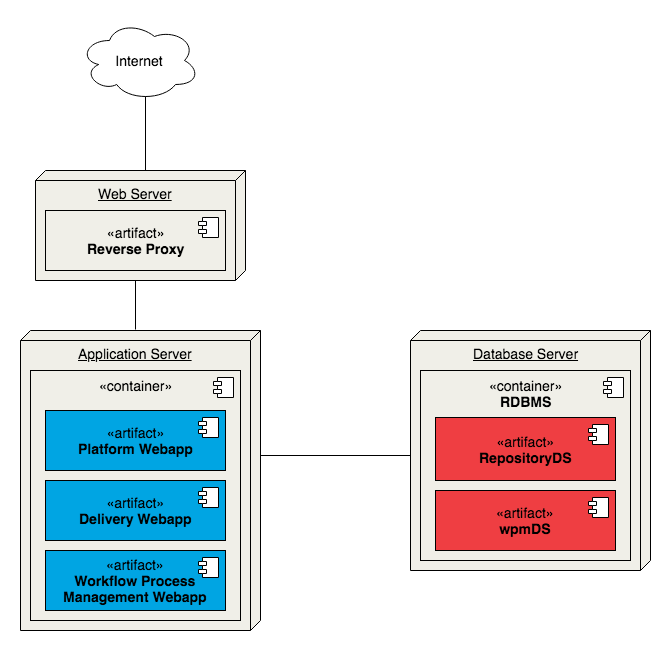
Diagram: The diagram illustrates a deployment with three main nodes: Web Server, Application Server, and Database Server. An Internet cloud connects to the Web Server, which contains a Reverse Proxy. The Reverse Proxy connects to the Application Server. The Application Server hosts three deployed artifacts: Platform Webapp, Delivery Webapp, and Workflow Process Management Webapp. The Application Server connects to the Database Server, which contains an RDBMS with two data sources: RepositoryDS and wpmDS. The application server uses both data sources hosted on the database server.