Project Workflow
Info: The Project Workflow feature in Bloomreach Content requires a standard or premium license. Contact Bloomreach for licensing details.
The Workflow Process Management add-on enables the Projects feature in Bloomreach Content. This page outlines the available states and actions in the Project workflow.
Project Workflow States and Actions
The diagram below illustrates the possible states of a Project and the actions that transition a project between these states.
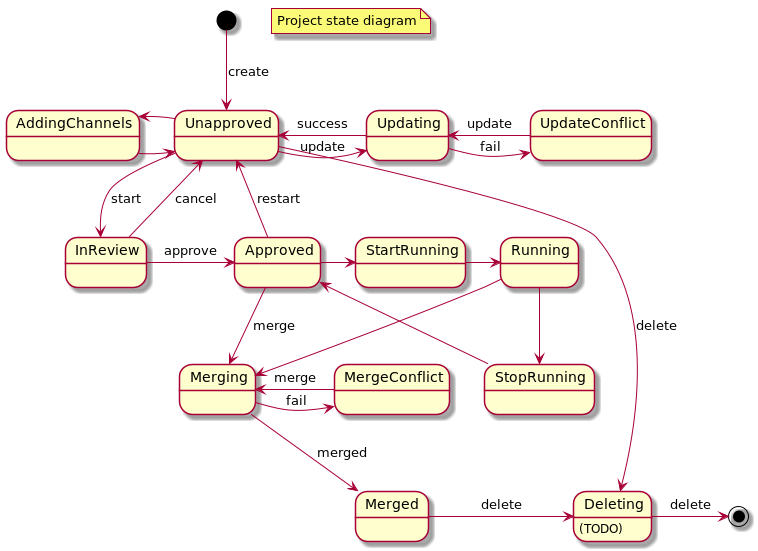
Diagram: The diagram represents the Project workflow as a state machine. Projects are created in the Unapproved state. Transitions connect states such as AddingChannels, InReview, Approved, Updating, UpdateConflict, StartRunning, Running, StopRunning, Merging, MergeConflict, Merged, and Deleting. Actions like create, start, cancel, approve, restart, update, success, fail, merge, merged, and delete move a project between these states. The flow covers standard progressions (e.g., Unapproved → InReview → Approved), execution (StartRunning, Running), merging (Merging, Merged), and conflict or failure handling (UpdateConflict, MergeConflict).
State Transitions and Preconditions
The following table lists each action, its source and target states, required roles, and any additional preconditions.
| From state | Action | To state | Roles | Preconditions |
|---|---|---|---|---|
| create | Unapproved | ad, we | ||
| Unapproved | start | InReview | ad, we | - Project is associated with at least one channel or document - No channels or documents have pending changes |
| Unapproved | update | Updating | ad, we | - Project is associated with at least one channel - No channels have pending changes Note: This action only affects channels. Changes on core are merged into the branches. |
| Unapproved | delete | Deleting* | ad | |
| Deleting* | delete | sys | ||
| Updating | success | Unapproved | sys | - No merge conflicts occurred |
| Updating | fail | UpdateConflict | sys | - Merge conflicts occurred that require user resolution |
| UpdateConflict | update | Updating | ad, we | - User has selected how to resolve the conflicts Note: The user can accept the conflicting change from core and discard changes from the branch. |
| InReview | approve | Approved | sys | - All channels and documents have been accepted Note: This action is performed by the system after all project items are accepted. |
| InReview | cancel | Unapproved | ad, we | |
| Approved | restart | Unapproved | ad, we | |
| InReview | accept / reject | InReview | ad, we, au | |
| Approved | merge | Merging | ad, we | Note: In the UI, merge is labeled as "Reintegrate". |
| Merging | merged | Merged | sys | - No merge conflicts occurred |
| Merging | fail | MergeConflict | sys | - Merge conflicts occurred that require user resolution |
| MergeConflict | merge | Merging | ad, we | - User has selected how to resolve the conflicts |
| Merged | delete | Deleting* | ad | |
| Approved | start running | StartRunning | ad, we | |
| StartRunning | runnin | Running | sys | |
| Running | stop running | StopRunning | ad, we | |
| StopRunning | stopped | Approved | sys | |
| Running | merge | Merging | ad, we |
Notes:
- Role abbreviations:
ad: adminwe: webmastered: editorsys: system (not a user role)
- The Deleting state is not currently persisted in the repository. You will not observe a project in this state.
Review Process
When a review is requested, the system initiates a review process for the project.