Configuring the Translations Add-on
Info: Bloomreach provides Enterprise support for the Translations Add-on. The release cycle for this feature may differ from the core product release cycle.
The Translations Add-on requires an additional license. Contact your account manager or sales representative for licensing details.
The Translations Add-on uses configuration in three main repository locations:
- Settings: Define namespaces, enabled languages, document types, and fields.
- Services daemon: Configure connector services.
- Scheduler jobs: Manage the job store cleaner and results processor.
The add-on also includes user interface configurations. See User Interface Configurations for details.
After installation, review and update these configurations to match your project requirements. Propagate configuration changes from your local development environment to other environments using the bootstrapping mechanism. You can also update configurations manually.
Settings
Project-specific language and document type configuration is stored at:
/translationsaddon:configuration/
Project Namespace
Configure the add-on to recognize your project's namespace. In the CMS console, set the following property:
/translationsaddon:configuration/namespaces/value={"namespaces":["yournamespace"]}
The value property is a JSON object containing an array of your project namespaces. The property type is String. To configure multiple namespaces, use comma-separated quoted values.
Enabled Languages, Document Types, and Fields
- For Experience Manager 14.0, as an admin, go to Control Panel > Manage Settings, then select the Translations tab. Using the Settings Management plugin is recommended but not required.
- For Experience Manager 14.x (add-on version 5.8.0+), as an admin, go to Extensions > Translations configuration.
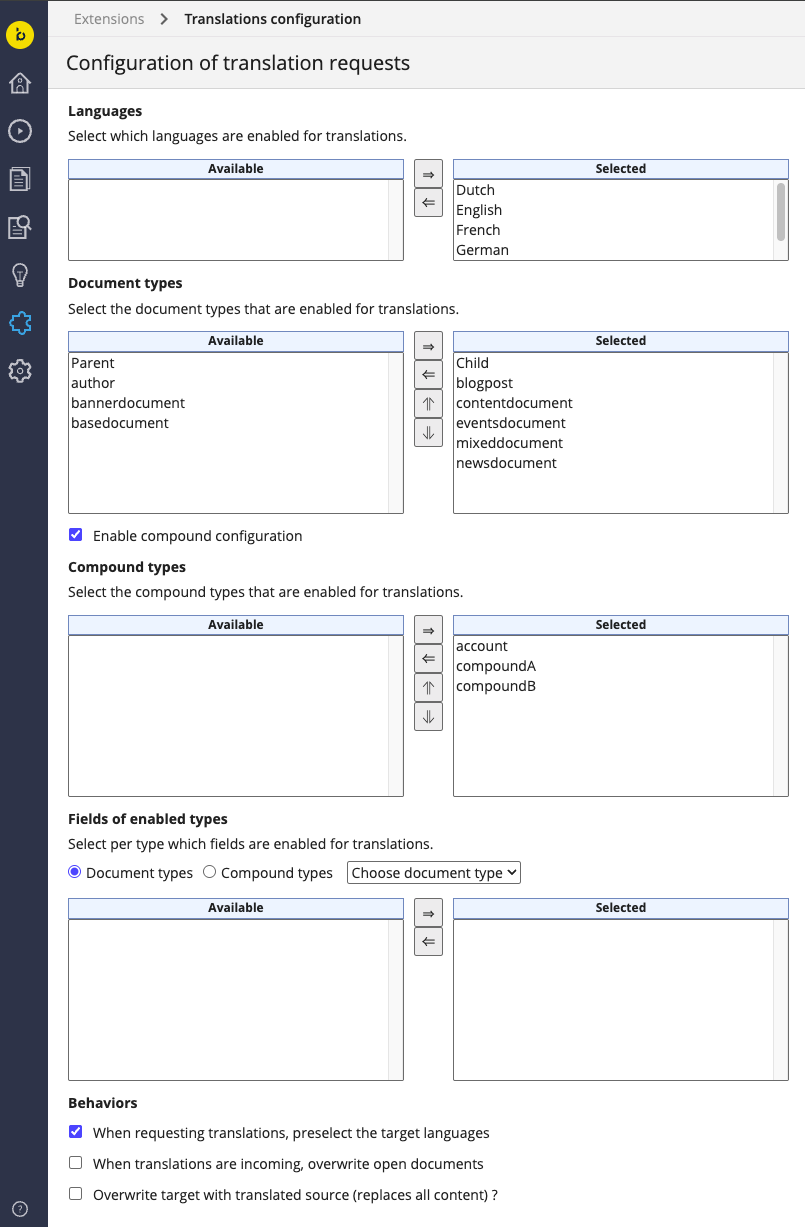
Configuration options:
- Languages: Select the target languages for document translation. The available languages are provided by the localeProviderService.
- Document types: Select the document types to enable for translation.
- Compound configuration (since 5.8.0): Enable this option to select compound types for translation. Compound types are document components included in translation requests.
- Fields of enabled types: For each enabled document type (and, since 5.8.0, for each compound type), select the fields to enable for translation. For details, see which fields to enable for translation.
- Behaviors: Select or deselect translation behaviors as needed.
- Overwrite target with translated source (since 8.0.0): Sets the default state for the "Overwrite target document" option in translation requests. Editors can override this setting per request. For more information, see Requesting Translations from a Document View.
Note: Compound fields can only be enabled or disabled as a whole, not at the subfield level. This also applies to fields using the Content Blocks plugin.
Content Root Specific Languages
Starting with version 5.9.0, you can configure enabled languages for specific content roots. In the console, add subnodes under /translationsaddon:configuration/languages to specify languages for each content root. The default languages are defined in the Configuration Perspective. Subconfiguration values must be subsets of the default. Example:
/translationsaddon:configuration/languages: jcr:primaryType: translationsaddon:configuration value: '{"languages":["nl","en","fr","de","en_GB"]}' /fr-translationsaddondemo: jcr:primaryType: translationsaddon:configuration value: '{"languages":["nl","en"]}' /translationsaddondemo: jcr:primaryType: translationsaddon:configuration value: '{"languages":["nl","fr","de"]}'
Services Daemon with the Connector
If your project uses a connector, configure the services daemon. The daemon can manage one or more services. The configuration is located at:
/hippo:configuration/hippo:modules/translation-services-daemon/hippo:moduleconfig
Each subnode represents a service instance. Connector configurations use subnodes with names starting with translationsaddon:connector.
For detailed connector configuration, see:
Environment-Specific Connector Configurations
You can configure environment-specific settings for services, especially connectors. This approach allows repository data to move between environments without requiring manual configuration changes.
The daemon uses the environment.system.property property (default: hippo.environment) to determine the system property name. If the system property exists, its value points to an optional subnode of the service configuration (hipposys:moduleconfig), which can override configuration properties.
For example, if you start the JVM with -Dhippo.environment=production, the following configuration ensures the LiveWords connector uses the live API only in production. Other environments use the test API.
/hippo:configuration/hippo:modules/translation-services-daemon/hippo:moduleconfig translationsaddon:connector/livewords.api.url=https://test.api.livewords.com translationsaddon:connector/production/livewords.api.url=https://live.api.livewords.com
Scheduler Jobs
Scheduler job configuration is located at:
/hippo:configuration/hippo:modules/scheduler/hippo:moduleconfig/translationsaddon/
TranslationJobStoreCleaner
The TranslationJobStoreCleanup subnode configures a scheduler job that deletes completed or archived translation jobs older than a specified age from /translationsaddon:jobs. Configuration options:
| Path below TranslationJobStoreCleanup | Default value | Description |
|---|---|---|
| hipposched:attributeValues[1] | 365 | Number of days before translation jobs are deleted (daysToLive). |
| hipposched:attributeValues[2] | 100 | Batch size for job deletions per iteration (batchSize). |
| hipposched:attributeValues[3] | 1000 | Search limit for job queries (searchLimit). |
| hipposched:triggers/nightly/hipposched:enabled | true | Enables the nightly trigger. |
| hipposched:triggers/nightly/hipposched:cronExpression | 0 0 5 1/1 * ? * | Cron expression for nightly cleanup at 5 AM. |
TranslationResultsProcessor
The TranslationResultsProcessor subnode configures a job that polls for completed translations in the external system. Configuration options:
| Path below TranslationResultsProcessor | Default value | Description |
|---|---|---|
| hipposched:triggers/every-minute/hipposched:enabled | false | Enables the every-minute trigger. Enable this for GlobalLink and Star connectors. |
| hipposched:triggers/every-minute/hipposched:cronExpression | 0 0/1 * * * ? | Cron expression for polling every minute. |
RetryTranslationRequests
The RetryTranslationRequests subnode configures a job that retries failed translation requests. Configuration options:
| Path below RetryTranslationRequests | Default value | Description |
|---|---|---|
| hipposched:triggers/minutes/hipposched:enabled | false | Enables the trigger. |
| hipposched:triggers/minutes/hipposched:cronExpression | 0 0/3 * * * ? | Cron expression for every 3 minutes. |
| hipposched:attributeValues[1] | 5 | Maximum number of resend attempts (maxRetry). |
User Interface Configurations
Editor UI configuration is located at:
/hippo:configuration/hippo:workflows/translations-workflow
/hippo:configuration/hippo:frontend/cms/cms-preview/workflowPlugin/workflow.categories=translations-workflow
Search UI configuration is located at:
/hippo:configuration/hippo:workflows/translations-workflow
/hippo:configuration/hippo:frontend/cms/cms-advanced-search/workflowPlugin/workflow.categories=collection-translations-workflow
Dashboard UI configuration is located at:
/hippo:configuration/hippo:frontend/cms/cms-static/translations
 // number of items shown on the page
 - (Long) panel.pagesize=12