Guideline for Configuring Fields with Links
Info: Bloomreach provides Enterprise support for this feature for Bloomreach Experience customers. The release cycle for this feature may differ from the core product release cycle.
This feature requires an additional license. Contact your account manager or sales representative for details.
The Translations Add-on can be enabled or disabled for each document type and for individual fields. Not all fields require translation through an external platform. Most non-textual fields—such as number fields, date fields, list fields, and image/asset/document link fields—do not need translation.
Translations for these fields are managed directly in the CMS. The add-on allows you to specify which fields are enabled for translation at the document type level. Only enabled fields will be overwritten when a new translation is imported.
Managing Links in Translated Variants
Content in the CMS may include embedded references to assets, images, documents, or external URLs. Translators are responsible only for textual content, not for managing these references. Content editors should manage references and links within the CMS.
By default, the add-on overwrites the content of fields enabled for translation when a new translation is imported. For dedicated link fields (such as hippo:mirror for internal links or String fields for external URLs), disable translation. Editors can then update links in translated variants, and these changes will persist after future translation imports.
Links in Rich Text Fields
Rich Text fields are an exception because links are embedded within the content. Any changes to a Rich Text field in a translated variant will be overwritten on import if the field is enabled for translation. To address this, the add-on automatically updates internal links in Rich Text fields during import.
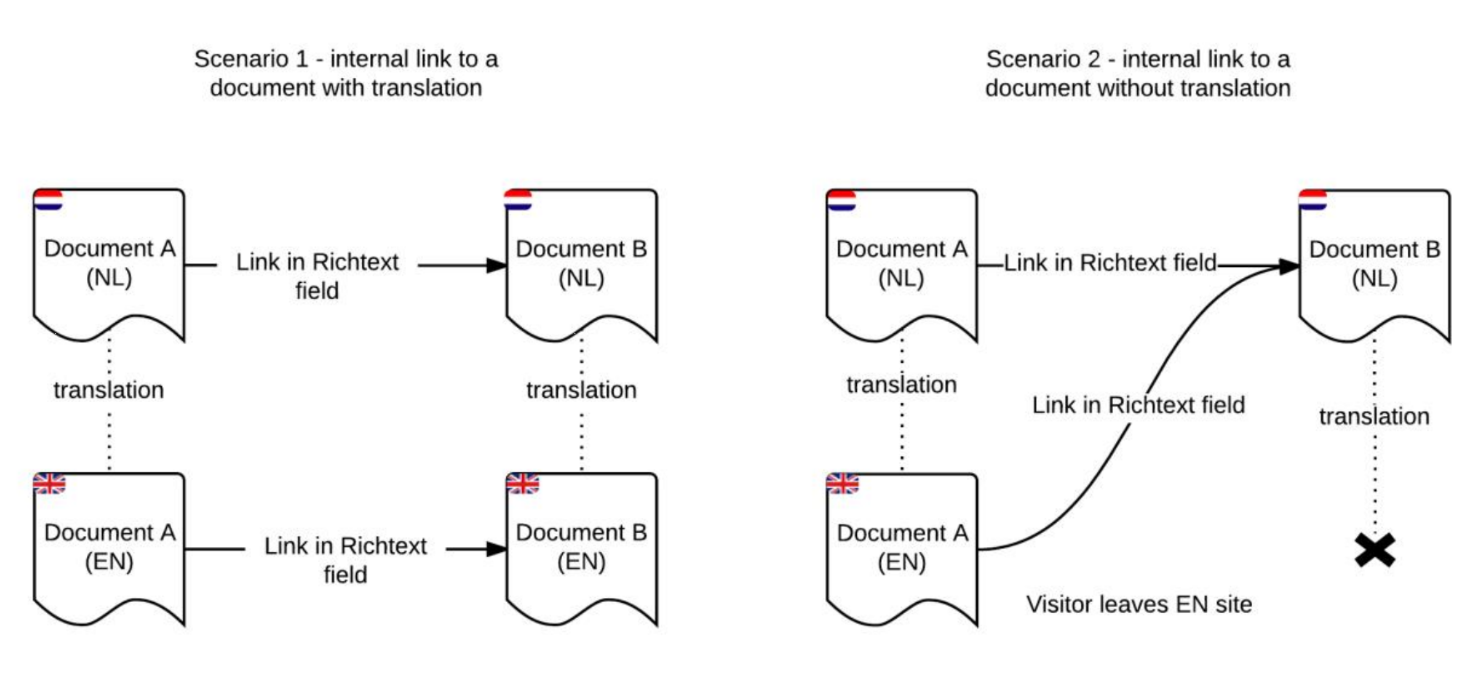
Diagram: The diagram shows two scenarios for internal links in Rich Text fields during translation. In scenario 1, Document A (NL) links to Document B (NL), and both have English translations; after translation, Document A (EN) links to Document B (EN), so the link is updated to the translated target. In scenario 2, Document A has an English translation but Document B does not; Document A (EN) still links to Document B (NL), and a note indicates the visitor leaves the English site because no translated target exists.
When importing a new translation, the add-on automatically updates internal links in Rich Text fields to point to the translated variant of the linked document, if available in the target language.
Links in Link (mirror) fields are not updated automatically. These fields should not be sent to the translation service. Managing site link structure is the responsibility of content editors, not translators. Disable the add-on for these fields in the plugin settings, and manage their contents directly in the translated variants within the CMS.
Configuration Guideline
Use the table below to configure the add-on for different field types.
| Type of field | Field translated outside CMS? | Enable in translations add-on | Content is overwritten with import of translation | Internal links automatically rewritten |
|---|---|---|---|---|
| Any field type | no | no | no | - |
| All field types except Rich Text field | yes | yes | yes | no |
| Rich Text fields | yes | yes | yes | yes |