Create Separate Distributions for the Authoring and Delivery Applications
Overview
This guide explains how to configure Bloomreach Content so that the authoring (cms) and delivery (site) applications can be deployed in separate containers.
When to Use
By default, Bloomreach Content deploys both the authoring and delivery applications on the same application server. In some scenarios, it is preferable to deploy the authoring and delivery applications separately on different servers. In this setup, the delivery application runs without the authoring application and cannot access the platform hosted by the authoring application.
To support this deployment model, you must create a Maven WAR module that includes all required platform dependencies. Deploy this platform WAR alongside the delivery application on delivery-only servers. The platform WAR enables the delivery application to access the underlying storage repository.
This page describes how to configure the platform module and create two separate distributions for deployment on different application servers, as illustrated below:
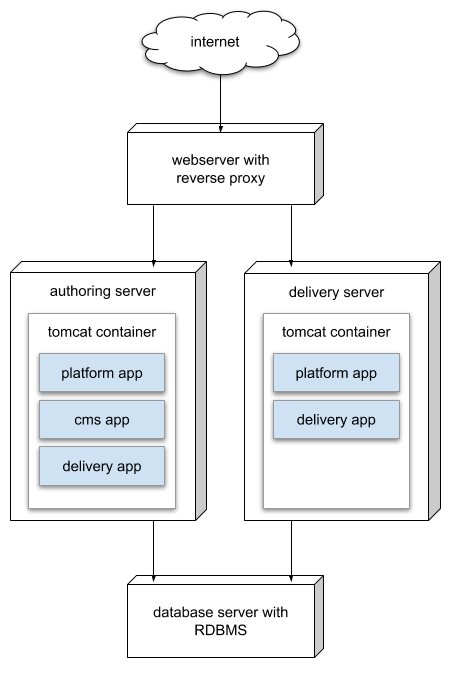
Diagram: This diagram shows a deployment where a webserver with a reverse proxy directs requests to two application servers: one for authoring and one for delivery. The authoring server's Tomcat container runs platform, CMS, and delivery applications. The delivery server's Tomcat container runs platform and delivery applications. Both servers connect to a shared database backend.
Related:
Prerequisites
- A working Bloomreach Content project
- Familiarity with Maven project structure and configuration
Implementation Steps
1. Create the Platform Module
Set up a new Maven module in your project to produce the platform.war. Add this module to the <modules> section of your main project POM.
A typical pom.xml for the platform module:
<?xml version="1.0" encoding="UTF-8"?> <project xmlns="http://maven.apache.org/POM/4.0.0" xmlns:xsi="http://www.w3.org/2001/XMLSchema-instance" xsi:schemaLocation="http://maven.apache.org/POM/4.0.0 http://maven.apache.org/xsd/maven-4.0.0.xsd"> <modelVersion>4.0.0</modelVersion> <parent> <artifactId>myproject</artifactId> <groupId>com.example</groupId> <version>1.0.0-SNAPSHOT</version> </parent> <artifactId>platform</artifactId> <packaging>war</packaging> <dependencies> <dependency> <groupId>org.onehippo.cms7</groupId> <artifactId>hippo-package-platform-dependencies</artifactId> <type>pom</type> </dependency> </dependencies> <build> <finalName>platform</finalName> <resources> <resource> <directory>src/main/webapp</directory> <filtering>false</filtering> <includes> <include>WEB-INF/web.xml</include> </includes> </resource> </resources> </build> </project>
Note: Ensure the platform module includes all required dependencies. The example above shows only the default dependencies. If your project uses custom modules (such as workflow, scheduler daemons, or custom derived functions), add those dependencies as well.
Review the dependencies in cms-dependencies/pom.xml. For some features, a *-cms-dependencies artifact is defined. If a *-platform-dependencies artifact exists for a feature, add it to the new platform/pom.xml.
For example, to support the BlogListenerModule, add org.onehippo.cms7:hippo-essentials-components-cms to your platform dependencies. Similarly, add org.onehippo.cms7:hippo-addon-crisp-repository if you use the CrispRegistryModule.
Add a web.xml file under platform/src/main/webapp/WEB-INF with the following content:
<?xml version="1.0" encoding="UTF-8"?> <web-app xmlns="http://java.sun.com/xml/ns/javaee" xmlns:xsi="http://www.w3.org/2001/XMLSchema-instance" xsi:schemaLocation="http://java.sun.com/xml/ns/javaee http://java.sun.com/xml/ns/javaee/web-app_3_0.xsd" version="3.0" id="cms"> <display-name>My Project Platform</display-name> <description>My Project Platform</description> <listener> <listener-class>org.hippoecm.hst.platform.container.HstPlatformContextLoaderListener</listener-class> </listener> <context-param> <description>The address of the repository</description> <param-name>repository-address</param-name> <param-value>vm://</param-value> </context-param> <context-param> <description>The (relative) location where to store files</description> <param-name>repository-directory</param-name> <param-value>WEB-INF/storage</param-value> </context-param> <context-param> <description>The location of the repository configuration file. Unless the location starts with file://, the location is retrieved from within the application package as resource. </description> <param-name>repository-config</param-name> <param-value>repository.xml</param-value> </context-param> <filter> <filter-name>HstFilter</filter-name> <filter-class>org.hippoecm.hst.container.HstFilter</filter-class> </filter> <filter-mapping> <filter-name>HstFilter</filter-name> <url-pattern>/*</url-pattern> </filter-mapping> <servlet> <servlet-name>LoggingServlet</servlet-name> <servlet-class>org.hippoecm.repository.LoggingServlet</servlet-class> <load-on-startup>3</load-on-startup> </servlet> <servlet> <servlet-name>Repository</servlet-name> <servlet-class>org.hippoecm.repository.RepositoryServlet</servlet-class> <load-on-startup>4</load-on-startup> </servlet> <servlet> <servlet-name>PingServlet</servlet-name> <servlet-class>org.hippoecm.repository.PingServlet</servlet-class> <init-param> <param-name>repository-address</param-name> <param-value>vm://</param-value> </init-param> <load-on-startup>5</load-on-startup> </servlet> <servlet-mapping> <servlet-name>LoggingServlet</servlet-name> <url-pattern>/logging/*</url-pattern> </servlet-mapping> <servlet-mapping> <servlet-name>Repository</servlet-name> <url-pattern>/repository/*</url-pattern> </servlet-mapping> <servlet-mapping> <servlet-name>PingServlet</servlet-name> <url-pattern>/ping/</url-pattern> </servlet-mapping> <env-entry> <env-entry-name>logging/contextName</env-entry-name> <env-entry-type>java.lang.String</env-entry-type> <env-entry-value>platform</env-entry-value> </env-entry> </web-app>
This configuration enables logging for the platform application. Update your Log4j configuration to add an Appender and AppenderRef for the platform log:
<!-- platform.log --> <RollingFile name="platform" fileName="${sys:catalina.base}/logs/platform.log" filePattern="${sys:catalina.base}/logs/platform.log.%d{yyyy-MM-dd}"> <LookupFilter key="jndi:logging/contextName" value="platform" onMatch="ACCEPT"/> <PatternLayout pattern="%d{dd.MM.yyyy HH:mm:ss} %-5p %t [%C{1}.%M:%L] %m%n"/> <Policies> <TimeBasedTriggeringPolicy/> </Policies> </RollingFile>
Add the platform appender to the root logger:
<Root level="warn"> <AppenderRef ref="site"/> <AppenderRef ref="cms"/> <AppenderRef ref="platform"/> <AppenderRef ref="console"/> </Root>
2. Create the CMS and Site Distributions
Create two new Maven assembly XML files under src/main/assembly.
distribution-without-cms.xml
<assembly xmlns="http://maven.apache.org/plugins/maven-assembly-plugin/assembly/1.1.2" xmlns:xsi="http://www.w3.org/2001/XMLSchema-instance" xsi:schemaLocation="http://maven.apache.org/plugins/maven-assembly-plugin/assembly/1.1.2 http://maven.apache.org/xsd/assembly-1.1.2.xsd"> <id>distribution-without-cms</id> <formats> <format>tar.gz</format> </formats> <includeBaseDirectory>false</includeBaseDirectory> <componentDescriptors> <componentDescriptor>conf-component.xml</componentDescriptor> <componentDescriptor>webapps-without-cms-component.xml</componentDescriptor> <componentDescriptor>common-lib-component.xml</componentDescriptor> <componentDescriptor>shared-lib-component.xml</componentDescriptor> </componentDescriptors> </assembly>
webapps-without-cms-component.xml
<component xmlns="http://maven.apache.org/plugins/maven-assembly-plugin/component/1.1.2" xmlns:xsi="http://www.w3.org/2001/XMLSchema-instance" xsi:schemaLocation="http://maven.apache.org/plugins/maven-assembly-plugin/component/1.1.2 http://maven.apache.org/xsd/component-1.1.2.xsd"> <files> <file> <source>platform/target/platform.war</source> <outputDirectory>webapps</outputDirectory> <destName>platform.war</destName> </file> <file> <source>site/webapp/target/site.war</source> <outputDirectory>webapps</outputDirectory> <destName>site.war</destName> </file> </files> </component>
Add a new Maven profile in your main project POM to build both the regular and the new distribution:
<profile> <id>separate-dist</id> <dependencies> <dependency> <groupId>org.apache.logging.log4j</groupId> <artifactId>log4j-slf4j-impl</artifactId> <scope>provided</scope> </dependency> <dependency> <groupId>org.slf4j</groupId> <artifactId>jcl-over-slf4j</artifactId> <scope>provided</scope> </dependency> <dependency> <groupId>org.apache.logging.log4j</groupId> <artifactId>log4j-api</artifactId> <scope>provided</scope> </dependency> <dependency> <groupId>org.apache.logging.log4j</groupId> <artifactId>log4j-core</artifactId> <scope>provided</scope> </dependency> </dependencies> <build> <defaultGoal>validate</defaultGoal> <plugins> <plugin> <artifactId>maven-assembly-plugin</artifactId> <executions> <execution> <id>without-cms-assembly</id> <phase>validate</phase> <goals> <goal>single</goal> </goals> <configuration> <descriptors> <descriptor>${project.basedir}/src/main/assembly/distribution-without-cms.xml</descriptor> </descriptors> </configuration> </execution> <execution> <id>cms-included-assembly</id> <phase>validate</phase> <goals> <goal>single</goal> </goals> <configuration> <descriptors> <descriptor>${project.basedir}/src/main/assembly/distribution.xml</descriptor> </descriptors> </configuration> </execution> </executions> </plugin> </plugins> </build> </profile>
3. Build the Distributions
Run the following Maven commands to build the distributions:
mvn clean verify
Then build the separate distributions:
mvn -Pseparate-dist
After the build completes, you will have two .tar.gz files containing the required WAR files.
Verification
- Deploy the
cmsandsiteWARs to the authoring server. - Deploy the
siteandplatformWARs to the delivery server. - Both servers should connect to the same database backend.
- Verify that both authoring and delivery applications start and function as expected.
For deployment details, see Deploy the Authoring and Delivery Applications Separately.