Introduction to Expressional Inference Rule Engine Add-on
Info: Bloomreach provides Enterprise support for this feature to Bloomreach Experience customers. The release cycle for this feature may differ from the core product release cycle.
Overview
Implementing custom collectors for the Relevance Module requires significant effort. Developers must understand and implement components such as Collector, Scorer, CharacteristicPlugin, and CollectorPlugin in Java, Wicket, ExtJS, and related technologies. Errors in any step can increase development time or result in implementations that do not meet business requirements. This complexity can slow down the feedback loop between business and development, limiting the ability to enhance digital relevance and agility.
The Expressional Inference Rule Engine addresses this challenge. It enables business analysts to define inference rules as expressions within standard CMS documents. When an inference rules document is published, the corresponding targeting collector for the Relevance Module is activated immediately—no server rebuild or restart is required. Depublishing the document deactivates the collector just as quickly.
This add-on implements a simple inference engine that supports forward-chaining inference rules. It accepts input variables, including built-in request data (such as HTTP headers, URLs, and datetime) and custom POJO extensions (such as CRM data, weather data, or visitor analytics). The engine evaluates rule expressions defined in the document to deduce a goal value, which is stored in a goal variable.
By using the Expressional Inference Rule Engine, organizations can accelerate the feedback loop between business and development, supporting ongoing improvements in digital relevance and agility.
Problem
The feedback loop with the Relevance Module typically follows a four-phase lifecycle:
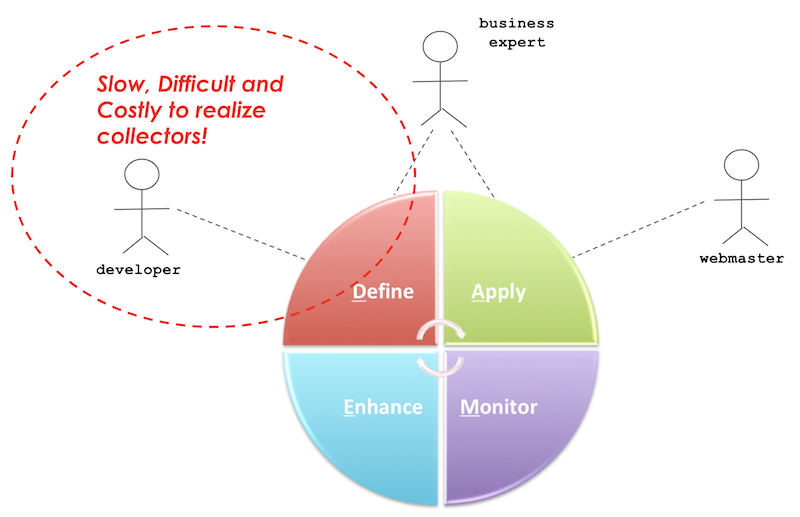
Diagram: The diagram illustrates a circular lifecycle with four phases: Define, Apply, Monitor, and Enhance. Roles include a developer, business expert, and webmaster. The Define phase is highlighted to indicate that implementing collectors is slow, difficult, and costly.
- Define: The business analyst specifies goal variables (for example, the content type a visitor is most interested in). The development team implements and deploys collectors for these variables.
- Apply: The business analyst configures targeting characteristics and personas, and creates targeting variants in components to personalize pages.
- Monitor: The business analyst reviews the effectiveness of targeting applications.
- Enhance: The business analyst refines goal values, introduces new goal variables, or improves data collection.
The primary bottleneck occurs in the Define phase. When a new goal variable is required, developers must implement at least four Java classes and two ExtJS scripts (see Develop a Custom Collector and Develop a Collector Plugin for details):
MostInterestCategoryCollector.java: Collector component for the delivery tier.MostInterestCategoryScorer.java: Scorer component for the delivery tier.MostInterestCategoryCharacteristicPlugin.java: UI component for characteristic selection in the authoring tier.MostInterestCategoryCharacteristicPlugin.js: Script for characteristic selection UI in the authoring tier.MostInterestCategoryCollectorPlugin.java: UI component for collector selection in the authoring tier.MostInterestCategoryCollectorPlugin.js: Script for collector selection UI in the authoring tier.
Developing and deploying these components requires significant time. Business stakeholders must wait for the next deployment before they can test, validate, and use new collectors.
To support business agility, the Define phase must be faster and must not require new deployments.
Solution
The Expressional Inference Rule Engine provides an Inference Engine that reads CMS documents of type inferenceengine:rulesdocument. These documents contain business rule expressions. The engine executes these rules to deduce a goal value from available input variables.
The following diagram outlines the architecture:
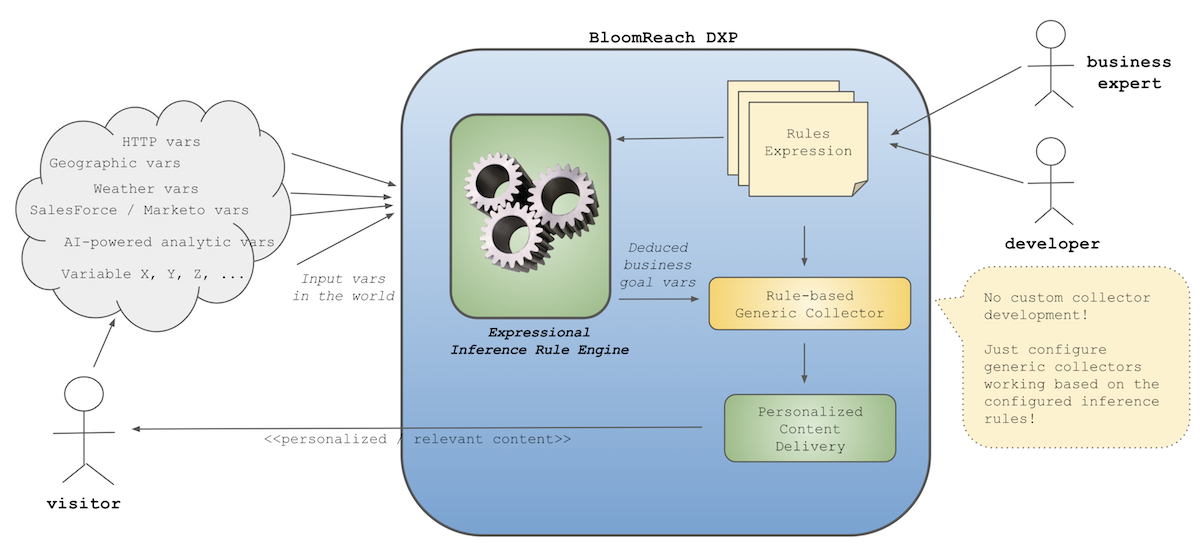
Diagram: The diagram shows how input variables (such as HTTP data, geographic data, weather, CRM, and analytics) are processed by the Expressional Inference Rule Engine within Bloomreach DXP. Rules expressions are defined by business and development roles and passed to the inference engine and a generic collector. The engine outputs deduced business goal variables, which are used for personalized content delivery. No custom collector development is required—only configuration of generic collectors based on inference rules.
Visitors generate input data, such as cookies or IP addresses, directly through requests. Additional data, such as weather or CRM information, may be linked indirectly. Typically, this raw input is not meaningful for business purposes and must be processed into goal variables.
For example, to deduce a visitor's most interested content category, you might use the "Referer" HTTP header or the URL structure (e.g., ".../news/..." indicates interest in "news"). The Expressional Inference Rule Engine allows you to define rules that process these input variables and deduce goal variables. Because you define inference rules as expressions in a CMS document (inferenceengine:rulesdocument), you can activate or deactivate data collection immediately by publishing or depublishing the document—no redeployment required. This approach accelerates the Define phase and supports business agility.
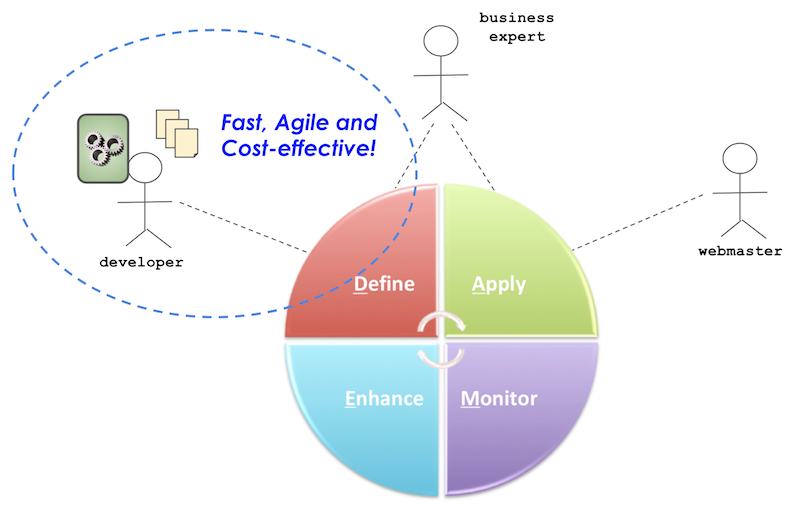
Diagram: The diagram shows the four-phase lifecycle (Define, Apply, Monitor, Enhance) with roles for developer, business expert, and webmaster. The Define phase is highlighted to indicate a faster, more cost-effective process.
With this approach, business analysts can focus on identifying valuable goal variables, targeting visitors effectively, and improving data collection and personalization—without waiting for deployment cycles.
Demo Project
Download the Demo Project
You can download a demo project package ZIP file from the following location (Bloomreach Experience Developer account required):
Select the appropriate version and download the ZIP artifact.
Build and Run the Demo Project
After extracting the ZIP file, build and run the demo project with the following commands:
$ cd hippo-addon-inference-engine-demopkg-x.x.x $ mvn clean package && mvn -Pcargo.run
Demo Scenario
After starting the project, go to http://localhost:8080/cms/ and open the "administration / Inference Rules / Determine Visitor Interest Type" document. This document provides an example of an inference rules definition.
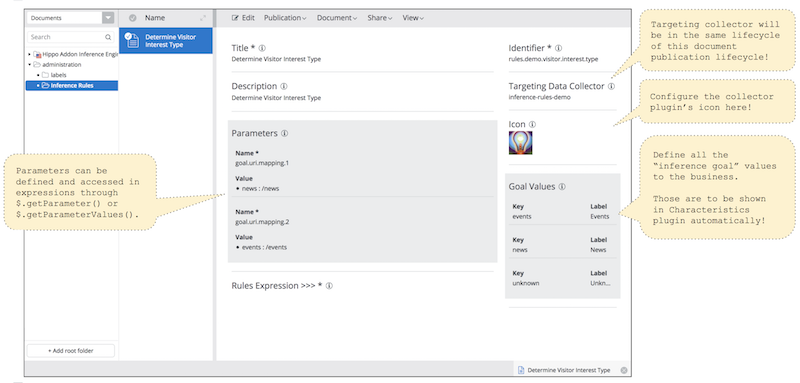
- The
Titlefield is used in targeting collector plugins and in the UI. - The
Descriptionfield provides additional context. - The
Identifierfield is used to execute specific inference rules at runtime. This value must be unique. - The
Targeting Data Collectorfield specifies the collector name for the Relevance Module. In the example, the collector is named "inference-rules-demo". - The
Iconfield sets the icon for the collector in the UI. - The
Goal Valuesfield defines all available goal values for the goal variable in the business context. In the example, the values are "events", "news", and "unknown". Each value includes a label for display in the Targeting Characteristic Plugin. - The
Parametersfield allows you to define parameter names and values, which can be accessed by expressions in theRules Expressionfield. - The
Rules Expressionfield contains JEXL script expressions used to deduce a goal value from input variables. By default, this field is collapsed. Click the caption to expand the script editor.
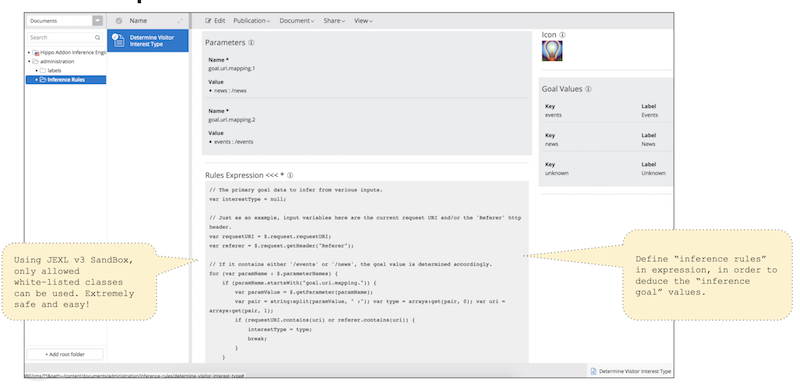
- When expanded, the
Rules Expressionfield displays the script editor for rule expressions. - Depublishing the inference rules document immediately deactivates the collector (for example, "inference-rules-demo").
- Publishing the document activates the collector.
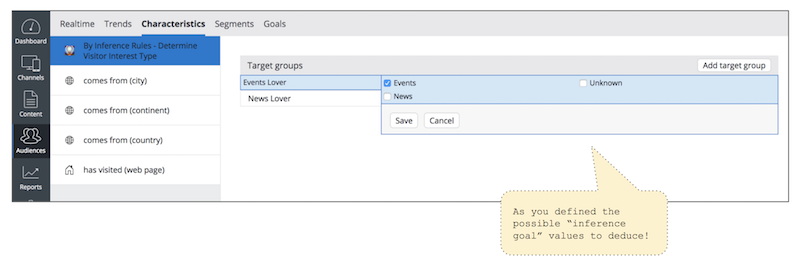
The Targeting Characteristic Plugin lists each goal value defined in the inference rules document as a checkbox. Business analysts can select one or more values to create a target group.
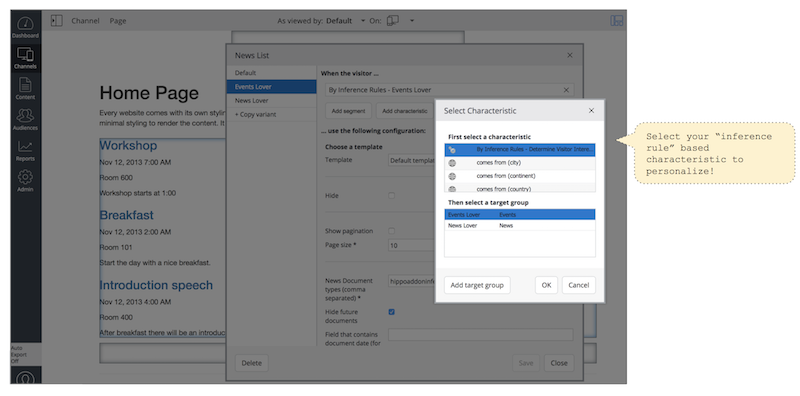
In the Experience Manager UI, business analysts can create targeting variants by selecting target groups defined by the inference rules document. This allows for the configuration of personalized content delivery based on the deduced goal variables.