Robots.txt Plugin
Overview
The Robots.txt plugin provides a dedicated document type in Bloomreach Content for managing the contents of the robots.txt file. This file instructs web crawlers on how to interact with your website. For details on the robots.txt format and its role, refer to the Robots.txt Specifications.
The plugin includes Java Beans and Components to retrieve robots.txt data from the content repository. It also supplies a sample Freemarker template to render this data as a valid robots.txt file.
The following screenshot shows the CMS document editor where you can enter or update the contents of the robots.txt file:
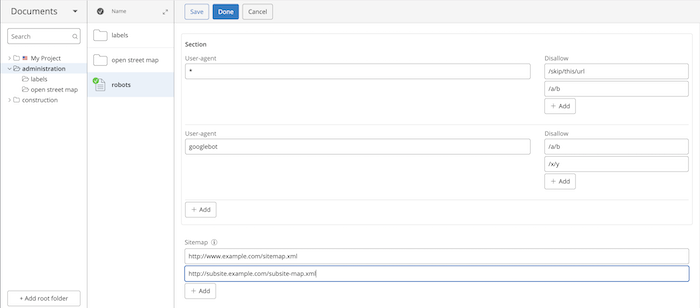
The configuration in the screenshot above produces the following robots.txt output on the website:
User-agent: *
Disallow: /skip/this/url
Disallow: /a/b

User-agent: googlebot
Disallow: /a/b
Disallow: /x/y

Sitemap: http://www.example.com/sitemap.xml
Sitemap: http://subsite.example.com/subsite-map.xml
By default, the Robots.txt plugin disallows all URLs for preview sites if they are publicly accessible. This prevents search engines from indexing preview environments.
Source Code
The source code for the Robots.txt plugin is available at:
https://github.com/bloomreach/brxm/tree/brxm-14.7.3/robotstxt