Installing the Discovery Plugin
ON THIS PAGE
- Prerequisites
- Step 1 - Add the Maven repositories
- Step 2 - Add the plugin dependencies
- What each artifact provides
- What bootstraps automatically
- Headful setups - bean scanning
- Verifying the installation
Prerequisites
| Requirement | Version |
|---|---|
| Bloomreach Content / Bloomreach Content | 17.0.0 |
| Java | 17 (LTS) |
| Maven | 3.8+ |
| Runtime model | Separate CMS and site webapps (standard two-runtime deployment for Bloomreach Content) |
You need a Bloomreach Discovery account with an Account ID, Domain Key, and API Key. For instructions on generating or retrieving these values, see API Key Management.
Step 1 - Add the Maven repositories
If your project does not already include these repositories, add them:
<repository> <id>bloomreach</id> <url>https://maven.bloomreach.com/maven2/</url> </repository> <repository> <id>bloomreach-enterprise</id> <url>https://maven.bloomreach.com/maven2-enterprise/</url> </repository>
Step 2 - Add the plugin dependencies
Bloomreach Content uses separate runtimes for CMS and site code. Each runtime requires a specific dependency.
In your root POM's <dependencyManagement> section, add:
<dependency> <groupId>org.bloomreach.forge.discovery</groupId> <artifactId>brxm-discovery-cms</artifactId> <version>0.1.0</version> </dependency> <dependency> <groupId>org.bloomreach.forge.discovery</groupId> <artifactId>brxm-discovery-site</artifactId> <version>0.1.0</version> </dependency>
Then, add each artifact to the appropriate module:
| Artifact | Add to |
|---|---|
| brxm-discovery-cms | The CMS dependencies POM (the module that builds cms.war) |
| brxm-discovery-site | The site webapp |
| brxm-discovery-site | The site/components module, if you compile custom Java code against plugin classes |
You do not need to add brxm-discovery-hcm-site directly. It is included automatically as a transitive dependency of brxm-discovery-site.
What each artifact provides
brxm-discovery-cms
- Defines the
brxdis:discoveryConfigJCR node type and its CMS editor template - Registers the picker daemon, which exposes a REST endpoint at
{cms}/ws/discovery/picker - Provides Open UI picker and wizard extensions for document editors
- Serves static picker UI assets at
{cms}/discovery-picker/
brxm-discovery-site
- Supplies the runtime entry point: Spring beans, the add-on module assembly, and bundled Freemarker templates
- Registers all HST components (see Component Parameters for details)
- Includes the
brxm-discovery-hcm-sitebootstrap as a transitive dependency
What bootstraps automatically
On first startup, the following resources are created automatically:
| Resource | JCR path |
|---|---|
| brxdis namespace and node types | /hippo:namespaces/brxdis |
| Picker daemon module | /hippo:configuration/hippo:modules/brxm-discovery |
| Open UI picker/wizard extensions | /hippo:configuration/hippo:frontend/cms/ui-extensions/ |
| Bundled HST templates | /hst:hst/hst:configurations/hst:default/hst:templates/brxdis-* |
Because the templates register under hst:default, any site configuration that inherits from it receives them automatically. You do not need to add a templates.yaml entry unless you want to override a bundled template.
You must still complete the following steps:
- Provide Discovery credentials. See Configuration.
- Add the required HST components to your page configuration. See Component Parameters.
- If you use visual search, add an HST mount for the visual search pipeline. See Recommendations & Visual Search.
Headful setups - bean scanning
Headful projects use a traditional site webapp with a WEB-INF/web.xml file that specifies which Java packages the HST ObjectConverterFactoryBean scans for @Node-annotated content beans. The plugin's beans are located under org.bloomreach.forge.discovery.site.beans, which is not included in the default Bloomreach Content archetype scan list.
If you do not add this package, components that resolve a JCR document picker into a typed bean—such as DiscoveryCategoryHighlightComponent, DiscoveryCategoryGridComponent, DiscoveryProductDetailComponent, DiscoveryProductHighlightComponent, and the recommendation components—will return null beans and render empty output.
To include the plugin's beans, add classpath*:org/bloomreach/forge/**/*.class to the hst-beans-annotated-classes context parameter in site/webapp/src/main/webapp/WEB-INF/web.xml:
<context-param> <param-name>hst-beans-annotated-classes</param-name> <param-value> classpath*:org/example/**/*.class, classpath*:org/onehippo/**/*.class, classpath*:com/onehippo/**/*.class, classpath*:org/onehippo/forge/**/*.class, classpath*:org/bloomreach/forge/**/*.class </param-value> </context-param>
This scan runs once at startup. Restart the application after changing this value.
Verifying the installation
After startup, review the CMS log for the following entries:
brxm-discovery: registered picker endpoint at /discovery/picker
brxm-discovery: Registered JCR observation listener on '/hippo:configuration'
The following checks assume you have already configured Discovery credentials. If you access the endpoint before adding credentials, it returns a 404 with a response body similar to {"message":"Discovery accountId is required at ..."}. This is expected and does not indicate a failed installation. Add credentials as described in the Configuration guide, then retry.
To verify the picker endpoint, send a request and confirm you receive a JSON response (not a 404):
GET http://localhost:8080/cms/ws/discovery/picker/search
Alternatively, start the server, create a Discovery component, and verify that it returns your catalog:
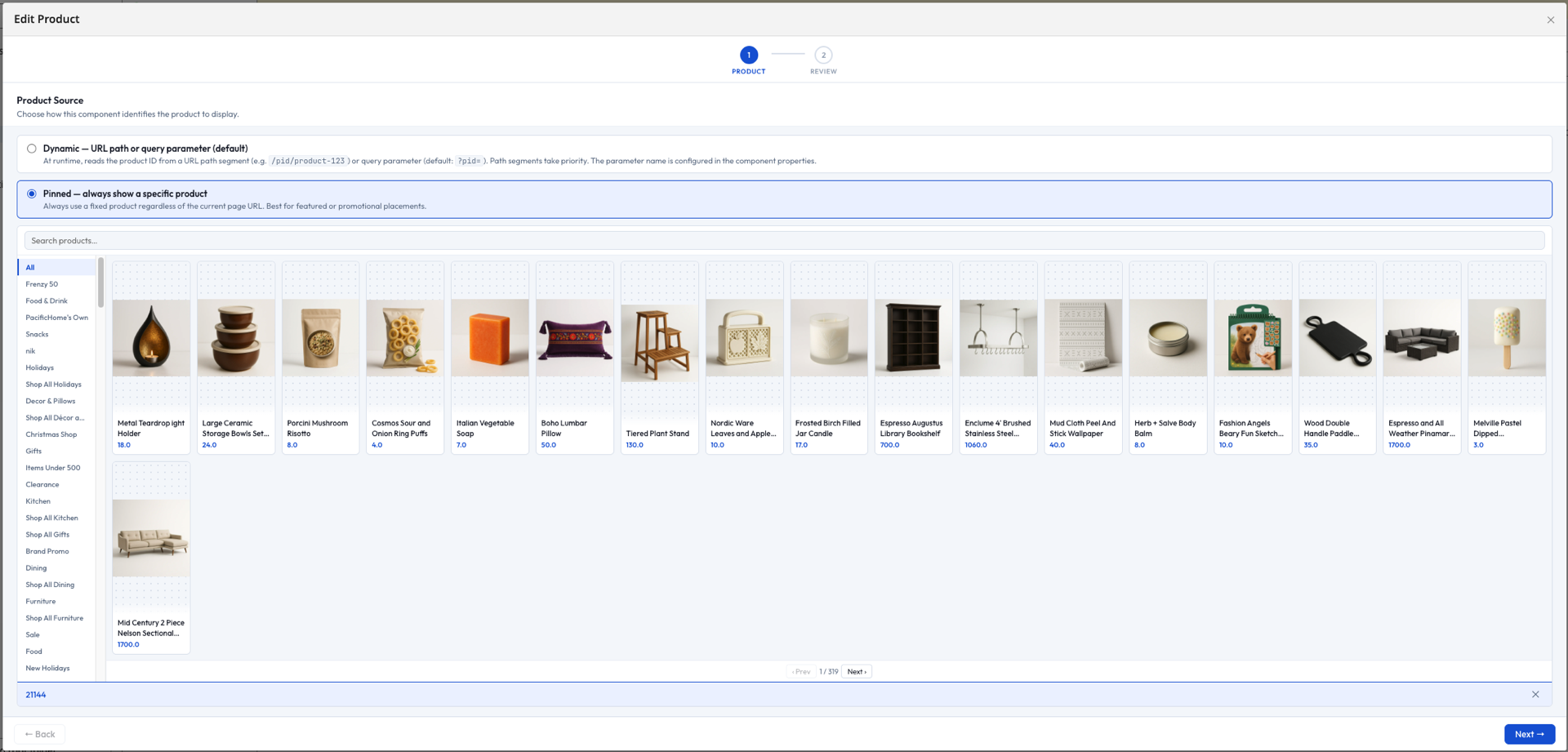
If you see the error Required HST service is not available: org.bloomreach.forge.discovery.site.platform.HstDiscoveryService, the site webapp is running an older plugin build than the CMS. Rebuild and redeploy the site webapp to resolve the version mismatch.
For additional installation issues, see Troubleshooting.