Add a Translated Channel
Overview
This guide explains how to add a translated channel in Bloomreach Content. You will translate an existing channel's content into a new language and configure a new channel that reuses the original channel's pages and templates to render the translated content.
When to Use
Use this procedure when you need to provide a localized version of an existing channel, reusing the same page structure and templates, but serving content in a different language.
Prerequisites
- A Bloomreach Content project created with the Maven archetype.
- The News feature added.
- An English channel named "My Project" available at:
http://localhost:8080/site/
- English content stored at:
/content/documents/myproject
Implementation Steps
1. Translate the Content
1.1 Create the French Root Folder
-
Log in to the CMS as
admin. -
Open the Content application.
-
Add a new root folder named Mon Projet.
- Set the folder type to translated folder.
- Set the language to French.
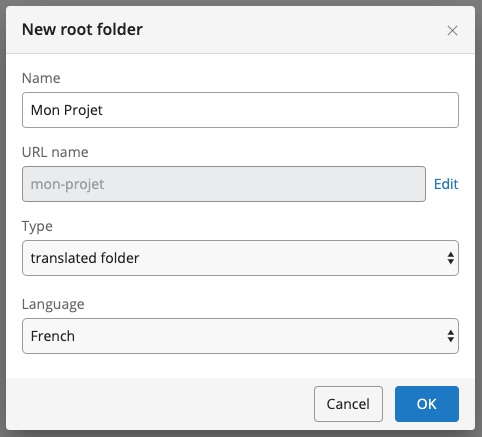
Note: To add more language options to the dropdown, see Add a Translatable Language.
-
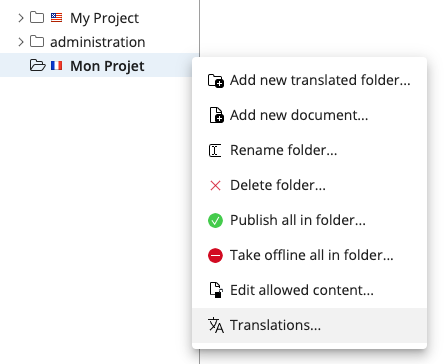
Open the context menu for the new Mon Projet folder and select Translations....
-
In the Translations dialog, link the Mon Projet folder to the My Project folder by selecting
myprojectin the Translation folders section.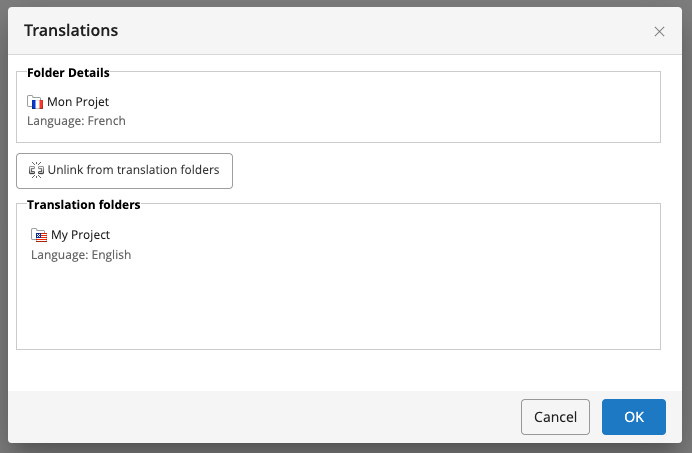
After linking, you can translate documents between the two folders.
1.2 Translate News Documents
-
Navigate to an English news document, for example:
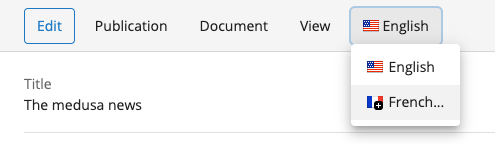
My Project > news > 2018 > 12 > The medusa news. -
In the top menu, select English, then choose French... from the dropdown.
-
In the Translate document dialog:
- Translate the document's name.
- Translate the folder names in the hierarchy.
The system duplicates the hierarchy in the French folder and links each folder as a translation to its English counterpart.
Translating folder and document names ensures that URLs and menu items are localized for French users.
-
Enter French names for the folders and document, for example:
Actualités > 2018 > 12 > Actualités medusa.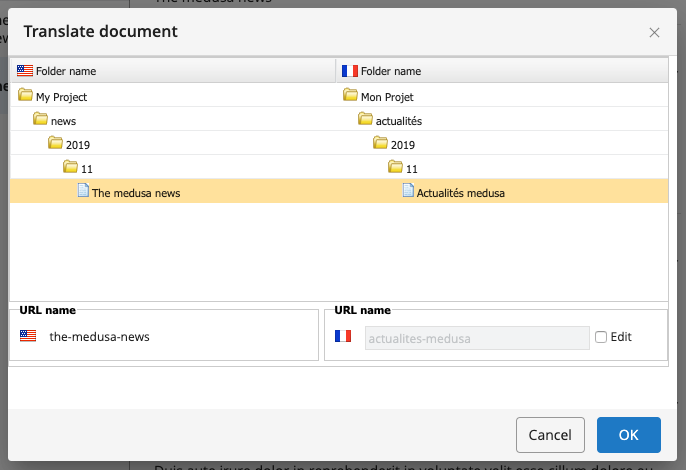
-
Click OK. Bloomreach Content creates the translated folders, copies and renames the English document, and opens the translated document in the editor.
-
Translate the content as needed (for this example, change the title to "Actualités medusa").
-
Save, close, and publish the document.
-
Repeat this process for any additional news documents you want to translate.
2. Configure the Delivery Tier
2.1 Add Configuration for the French Channel
Configure the delivery tier so that both English and French channels share pages, components, and templates. Only the sitemaps and workspaces (including sitemenus) are unique per channel.
The default configuration uses a common configuration, with myproject (English) inheriting from common:
/hst:myproject/hst:configurations: /common: /hst:default: /myproject: hst:inheritsfrom: [../common] /hst:abstractpages: /hst:catalog: /hst:components: /hst:pages: /hst:prototypepages: /hst:sitemap: /hst:sitemenus: /hst:templates: /hst:workspace: /hst:containers: /hst:sitemap: /hst:pages: /hst:sitemenus: /hst:channel: /hst:channelinfo:
Currently, all configuration settings are in myproject. The common configuration is empty.
- Move all shared configuration nodes from
myprojecttocommon:hst:abstractpageshst:cataloghst:componentshst:pageshst:prototypepageshst:templates
- Copy the
myprojectconfiguration and name itmon-projet.
After these changes, the structure should look like:
/hst:myproject/hst:configurations: /common: /hst:abstractpages: /hst:catalog: /hst:components: /hst:pages: /hst:prototypepages: /hst:sitemap: /hst:sitemapitemhandlers: /hst:sitemenus: /hst:templates: /hst:default: /mon-projet: hst:inheritsfrom: [../common] /hst:workspace: /hst:containers: /hst:sitemap: /hst:pages: /hst:sitemenus: /hst:channel: /hst:channelinfo: /myproject: hst:inheritsfrom: [../common] /hst:workspace: /hst:containers: /hst:sitemap: /hst:pages: /hst:sitemenus: /hst:channel: /hst:channelinfo:
- In the French channel's sitemap, rename the
newssitemap item toactualitesand set its relative content path to the French folder:
/hst:myproject/hst:configurations/mon-projet/hst:sitemap: /actualites: jcr:primaryType: hst:sitemapitem hst:componentconfigurationid: hst:pages/newslist hst:relativecontentpath: actualites
- Translate the menu items for the French channel. Ensure the
actualitésmenu item points to the correct sitemap item (actualites):
/hst:myproject/hst:configurations/mon-projet/hst:workspace/hst:sitemenus: /main: jcr:primaryType: hst:sitemenu /accueil: jcr:primaryType: hst:sitemenuitem hst:referencesitemapitem: root /actualités: jcr:primaryType: hst:sitemenuitem hst:referencesitemapitem: actualites
Note: Use accents in menu item labels (e.g.,
actualités) for display text, but avoid accents in sitemap item names (e.g.,actualites) as they are used in URLs.
2.2 Link the French Channel to the French Content Root
- Copy
/hst:myproject/hst:sites/myprojectand name the copymon-projet. - Set the
hst:contentproperty formon-projetto/content/documents/mon-projet:
/hst:myproject/hst:sites: /mon-project: jcr:primaryType: hst:site hst:content: /content/documents/mon-projet /myproject: jcr:primaryType: hst:site hst:content: /content/documents/myproject
2.3 Configure the French Channel
- At
/hst:myproject/hst:configurations/mon-projet/hst:workspace/hst:channel, set thehst:nameproperty toMon Projet:
/hst:myproject/hst:configurations/mon-projet/hst:workspace/hst:channel: hst:name: Mon Projet
2.4 Create a Mount for the French Channel
To make the French channel available at http://localhost:8080/site/fr, configure a mount:
- Add a child
hst:mountnode namedfrunder/hst:myproject/hst:hosts/dev-localhost/localhost/hst:root:
/hst:myproject/hst:hosts: /dev-localhost: jcr:primaryType: hst:virtualhostgroup /localhost: jcr:primaryType: hst:virtualhost /hst:root: jcr:primaryType: hst:mount /fr: jcr:primaryType: hst:mount hst:mountpoint: /hst:myproject/hst:sites/mon-projet
Note: For production environment configuration, see Configure Virtual Hosts in an Environment.
Verification
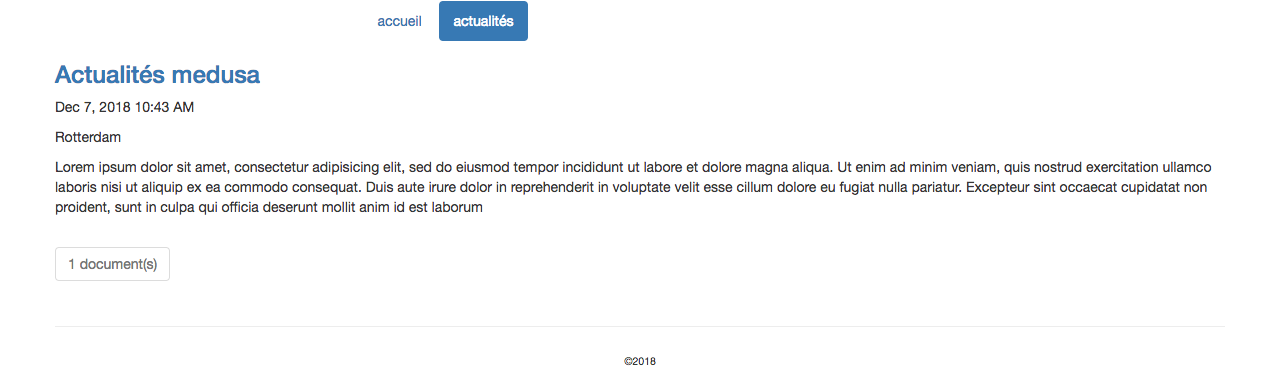
- Open your browser and go to
http://localhost:8080/site/fr. - Click on actualités in the menu.
- Confirm that the French news content is displayed.
Troubleshooting
- If the French channel does not appear at the expected URL, verify the mount configuration.
- If menu items or content are not translated, check the translation links and folder names in the CMS.
- Ensure that all configuration changes are published and that the repository is refreshed.