Site Menus
Site menus define the navigation structure for a site. Configure site menus in the HST Workspace under the hst:sitemenus node. You can create multiple site menus, each represented as a child node of hst:sitemenus with the node type hst:sitemenu. Menu items are defined as descendants of an hst:sitemenu node using the node type hst:sitemenuitem.
The following example shows a simple site menu named main with two menu items, home and news:
/hst:hst/hst:configurations/myproject/hst:workspace: /hst:sitemenus: jcr:primaryType: hst:sitemenus /main: jcr:primaryType: hst:sitemenu /home: jcr:primaryType: hst:sitemenuitem /news: jcr:primaryType: hst:sitemenuitem
Menu items can be nested to create hierarchical menus. For example:
/hst:hst/hst:configurations/myproject/hst:workspace: /hst:sitemenus: jcr:primaryType: hst:sitemenus /main: jcr:primaryType: hst:sitemenu /home: jcr:primaryType: hst:sitemenuitem /news: jcr:primaryType: hst:sitemenuitem /archive: jcr:primaryType: hst:sitemenuitem /2014: jcr:primaryType: hst:sitemenuitem /2013: jcr:primaryType: hst:sitemenuitem
A site menu item can link to a sitemap item (a URL mapping) using the hst:referencesitemapitem property. This property accepts either the sitemap item's name or its hst:refId.
Given the following sitemap item configuration:
/hst:hst/hst:configurations/myproject/hst:sitemap: /news: jcr:primaryType: hst:sitemapitem hst:componentconfigurationid: hst:pages/newslist hst:relativecontentpath: news hst:refId: newslist
Both of the following site menu items link to the news sitemap item:
/hst:hst/hst:configurations/myproject/hst:workspace/hst:sitemenus/main: /news: jcr:primaryType: hst:sitemenuitem hst:referencesitemapitem: news
/hst:hst/hst:configurations/myproject/hst:workspace/hst:sitemenus/main: /news: jcr:primaryType: hst:sitemenuitem hst:referencesitemapitem: newslist
The first example references the sitemap item's name (news), while the second references its hst:refId (newslist).
You can also link a site menu item to an external URL using the hst:externallink property:
/hst:hst/hst:configurations/myproject/hst:workspace/hst:sitemenus/main: /news: jcr:primaryType: hst:sitemenuitem hst:externallink: https://www.onehippo.com/
If both hst:referencesitemapitem and hst:externallink are defined, the menu item will use the external URL and ignore hst:referencesitemapitem.
Starting from brXM 12.0.4 and 12.1.1, the system automatically removes javascript: and data: protocols from the hst:externallink property by default. You can disable this security feature in your project's hst-config.properties file:
sitemenu.externallink.omitJavascriptProtocol = false
Note: Webmasters can modify site menus using the Menu Editor in Experience Manager.
Note: The delivery tier includes a standard Menu Component that exposes an
org.hippoecm.hst.core.sitemenu.HstSiteMenuobject to the rendering engine.
Configuration Parameters
You can define configuration parameters on an hst:sitemenuitem node using the multi-valued hst:parameternames and hst:parametervalues properties. Both properties must have the same number of values, and their order determines which parameter name corresponds to which value.
For example, to configure the following parameters:
- subtitle = 'breaking news'
- color = 'blue'
Use the following configuration:
/news: jcr:primaryType: hst:sitemenuitem hst:referencesitemapitem: news hst:parameternames: [subtitle, color] hst:parametervalues: [breaking news, blue]
Managing Configuration Parameters in the UI
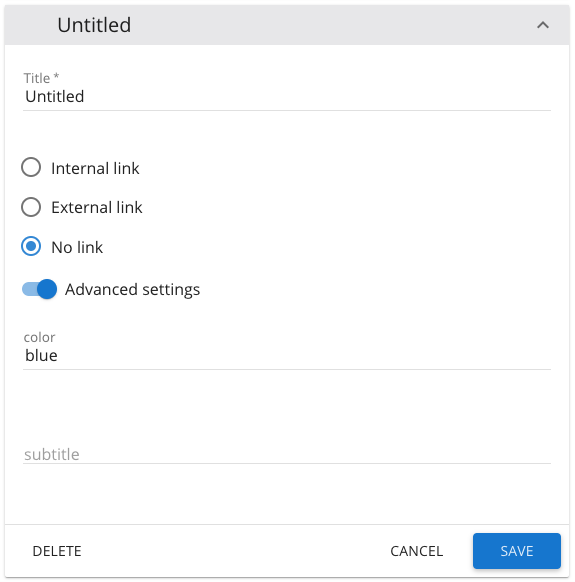
You can manage configuration parameters through the Advanced settings section of the Experience Manager's Menu Editor. To define which parameters and default values new menu items should have, create a special, hidden root-level menu item named hst:prototypeitem. When you add a new item to a menu with a prototype item, the system copies all hst:parameternames and hst:parametervalues from the prototype. You can then edit these values in the Menu Editor's Advanced settings section.
- The UI does not support validation for these fields.
- You cannot add or remove parameters or change parameter names through the UI.
- Existing menu items do not automatically inherit parameters from a newly added prototype item; you must add them manually if needed.
Example hst:prototypeitem configuration:
/hst:hst/hst:configurations/myproject/hst:workspace: /hst:sitemenus: jcr:primaryType: hst:sitemenus /main: jcr:primaryType: hst:sitemenu /hst:prototypeitem: jcr:primaryType: hst:sitemenuitem hst:parameternames: [subtitle, color] hst:parametervalues: ['',blue] /home: jcr:primaryType: hst:sitemenuitem /news: jcr:primaryType: hst:sitemenuitem /breaking: jcr:primaryType: hst:sitemenuitem
Repository-Based Menus
You can programmatically extend a site menu in a delivery tier component by adding menu items based on folder structures in the content repository. This approach is called a repository-based menu.
To indicate where a menu should include repository-based items, set the boolean property hst:repobased to true on an hst:sitemenuitem node. Optionally, use the hst:depth property to specify how many levels of the repository folder structure to include as menu items.
/news: jcr:primaryType: hst:sitemenuitem hst:referencesitemapitem: news hst:repobased: true hst:depth: 3
To modify the site menu in code:
- Call
org.hippoecm.hst.core.sitemenu.HstSiteMenu#getEditableMenu()to get anorg.hippoecm.hst.core.sitemenu.EditableMenuobject. - Retrieve the deepest expanded menu item with
EditableMenu#getDeepestExpandedItem(). - Check if the item is repository-based using
CommonMenuItem#isRepositoryBased(). - Get the depth with
CommonMenuItem#getDepth(). - Resolve the corresponding sitemap item using
CommonMenuItem#resolveToSiteMapItem(HstRequest)and obtain theHippoBeanfor the folder withBaseHstComponent#getBeanForResolvedSiteMapItem(HstRequest, ResolvedSiteMapItem). - Iterate through the folder's subfolders using the JCR API.
- Add menu items programmatically with
EditableMenuItem#addChildMenuItem(EditableMenuItem).
For a reference implementation, see the Hippo testsuite:
Important: Recursively expanding repository-based menu items can impact performance. The testsuite example is optimized for efficiency and can be used as a reference. Always consider performance when implementing repository-based menus.