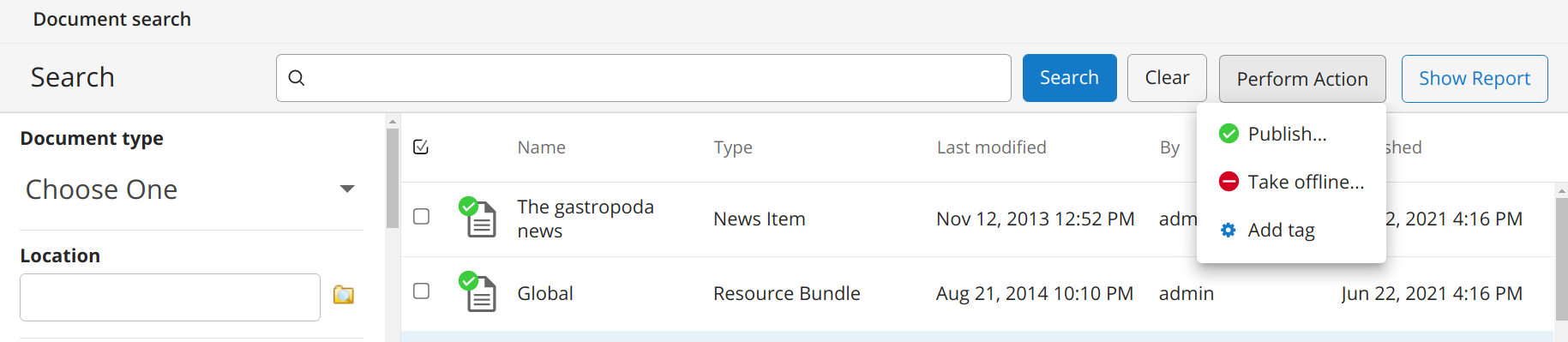
Use a Custom Bulk Workflow
Info: This feature in Bloomreach Content requires a standard or premium license. Contact Bloomreach for licensing details.
Configuration Options
By default, bulk operations process up to 1,000 documents for performance reasons. To increase this limit, update the following configuration:
/hippo:configuration/hippo:frontend/cms/cms-static/advancedSearchController
Set the property query.limit (type: long) to your desired maximum value.
Add a Custom Bulk Workflow
Info: Bloomreach supports the bulk workflow extension mechanism described here. However, Bloomreach does not support custom code that uses this extension. Any issues related to custom code are the responsibility of your implementation project.
You can add a custom bulk workflow operation to the workflow menu. This requires the following components:
- A workflow Java interface
- A workflow implementation
- A workflow frontend plugin
- A workflow category
Workflow Interface
The following example interface adds a tag to all documents in a collection.
public interface CollectionTaggingWorkflow extends Workflow { void addTag(String tag) throws WorkflowException, RepositoryException, RemoteException; }
Workflow Implementation
The implementation manages the logic for tagging documents in bulk.
import static com.onehippo.cms7.search.workflow.CollectionWorkflowReasons.DOCUMENT_NOT_FOUND; import static com.onehippo.cms7.search.workflow.CollectionWorkflowReasons.INVALID_WORKFLOW; import static com.onehippo.cms7.search.workflow.CollectionWorkflowReasons.WORKFLOW_FAILED; import com.onehippo.cms7.search.frontend.workflow.PublicationWorkflowPlugin; public class CollectionTaggingWorkflowImpl extends WorkflowImpl implements CollectionTaggingWorkflow, InternalWorkflow { static final Logger log = LoggerFactory.getLogger(CollectionTaggingWorkflowImpl.class); private final Session session; private final Node subject; private final CollectionState state; public CollectionTaggingWorkflowImpl( Session userSession, Session rootSession, Node subject) throws RemoteException, RepositoryException { this.session = rootSession; this.subject = rootSession.getNodeByIdentifier(subject.getIdentifier()); this.state = new CollectionState(this.subject); } @Override public String getSubMenu() { return PublicationWorkflowPlugin.SUB_MENU; } @Override public void addTag(final String tag) throws WorkflowException, RepositoryException, RemoteException { final WorkflowContext context = getWorkflowContext(); ReportWorkflow reportWorkflow = (ReportWorkflow) context.getWorkflow("collection-reports"); if (state.isReady()) { if (state.getReport().hasFailures()) { throw new WorkflowException( "Cannot start workflow when existing failures have not been acknowledged"); } reportWorkflow.cleanupReport(); } reportWorkflow.createReport("addTag"); Report report = state.getReport(); Collection collection = state.getCollection(); int succeeded = 0; int executed = 0; try { for (String handleId : collection.getDocumentIdentifiers()) { executed++; try { Node handle = session.getNodeByIdentifier(handleId); Workflow workflow = context.getWorkflow("default", new Document(handle)); if (workflow instanceof DocumentWorkflow) { DocumentWorkflow documentWorkflow = (DocumentWorkflow) workflow; if (addtagToDocument(documentWorkflow, tag, handle.getPath())) { succeeded++; } else { report.addFailure(new Failure(handle, WORKFLOW_FAILED)); } } else { report.addFailure(new Failure(handle, INVALID_WORKFLOW)); } } catch (ItemNotFoundException e) { report.addFailure(new Failure(null, DOCUMENT_NOT_FOUND)); } finally { report.setNumberOfProcessedDocuments(executed); session.save(); session.refresh(false); } } } finally { reportWorkflow.finishReport(succeeded); session.save(); session.refresh(false); } } private boolean addtagToDocument( DocumentWorkflow workflow, String tag, String handlePath) throws RepositoryException, WorkflowException, RemoteException { try { final Document document = workflow.obtainEditableInstance(); final Node editableNode = document.getNode(session); Value[] values; if (editableNode.hasProperty("hippogogreen:tags")) { values = editableNode.getProperty("hippogogreen:tags").getValues(); } else { values = new Value[0]; } Value[] newValues = new Value[values.length + 1]; System.arraycopy(values, 0, newValues, 0, values.length); newValues[values.length] = session.getValueFactory().createValue(tag); editableNode.setProperty("hippogogreen:tags", newValues); session.save(); workflow.commitEditableInstance(); return true; } catch (Exception e) { log.error("Failed to execute workflow on document at {}", handlePath, e); return false; } } @Override public Map<String, Serializable> hints() throws WorkflowException { Map<String, Serializable> hints = super.hints(); hints.put("addTags", canStart()); return hints; } private boolean canStart() { if (state.getWorkflowPhase() == CollectionState.Phase.INITIALIZED) { return true; } if (state.getWorkflowPhase() == CollectionState.Phase.COMPLETE) { Report report = state.getReport(); return !report.hasFailures(); } return false; } }
This implementation uses several utility classes recommended for customizations:
ReportWorkflow: Manages the lifecycle of the collection report.CollectionState: Provides access to the collection and report objects, abstracting JCR operations.Collection: Represents the collection of documents.Report: Contains information about failures. CallfinishReportwhen the action completes.
Workflow Plugin
The workflow plugin makes the custom workflow available in the CMS.
public class CollectionTaggingWorkflowPlugin extends RenderPlugin { public CollectionTaggingWorkflowPlugin(final IPluginContext context, final IPluginConfig config) { super(context, config); WorkflowDescriptorModel model = (WorkflowDescriptorModel) getModel(); final ISearchContext searcher = context.getService( ISearchContext.class.getName(), ISearchContext.class); add(new StdWorkflow<CollectionTaggingWorkflow> ("addTag", Model.of("Add Tag"), context, model) { @Override protected String execute(CollectionTaggingWorkflow workflow) throws Exception { if (searcher != null) { searcher.saveCollection(); } workflow.addTag("tag"); return null; } }); } }
The plugin uses ISearchContext#saveCollection to populate the collection with search results.
Building wizards similar to PublicationWorkflowPlugin is complex due to plugin lifecycle constraints. Reusable components are available in the advanced search frontend-api module. Refer to BulkWorkflowWizard and its related classes for guidance.
Workflow Configuration
To register the workflow, create a workflow category named collection-tags:
/hippo:configuration/hippo:workflows: /collection-tags: jcr:primaryType: hipposys:workflowcategory /collections: jcr:primaryType: frontend:workflow hipposys:classname: com.onehippo.hgge.search.workflow.CollectionTaggingWorkflowImpl hipposys:display: Collections workflow hipposys:nodetype: hippocollection:collection hipposys:privileges: [ 'hippo:editor' ] /hipposys:types jcr:primaryType: hipposys:types /frontend:renderer: jcr:primaryType: frontend:plugin plugin.class: com.onehippo.hgge.search.workflow.CollectionTaggingWorkflowPlugin
To make the category available in the Document search application, add collection-tags to the /hippo:configuration/hippo:frontend/cms/cms-advanced-search/workflowPlugin configuration.
To set the menu label, add a property collection-tags with the value Tags to /hippo:configuration/hippo:translations/hippo:workflows/en. You can edit this directly in the console or bootstrap it as described in repository resource bundles.
The result is a new menu option in the workflow bar: