4. Add a Document Type Widget to the Visitor Analysis Screen
Info: This feature in Bloomreach Content requires a standard or premium license. Contact Bloomreach for licensing details.
Previous
Add a Document Type Characteristic UI Plugin
Warning: The example below applies to version 17.1 and earlier. Starting with version 17.2, the ExtJS UI framework is replaced by Angular rendering. For more information, see Characteristics.
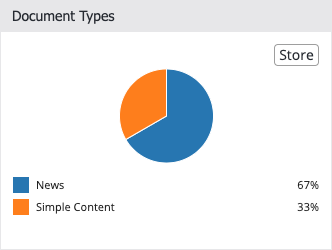
By default, the Visitor Analysis screen displays collected document types as a comma-separated list in the 'Visitor Characteristics' panel. However, the collector tracks the frequency of each document type. To visualize this data, you can create a custom visitor details panel. This panel appears on the right side of the screen and shows details for the selected visitor. In this example, you will add a custom widget that displays the collected document types as a pie chart.
The final widget will appear as follows:
Follow these steps to implement the widget:
1. Update the Plugin Class Property
Change the plugin.class property of the visitor-details-panel node in the hippo-targeting cluster:
/hippo:configuration/hippo:frontend/cms/hippo-targeting/visitor-details-panel: plugin.class: com.example.VisitorDetailsPanel
2. Create the VisitorDetailsPanel Java Class
Add a new Java class com.example.VisitorDetailsPanel to the cms module of your project:
cms/src/main/java/com/example/VisitorDetailsPanel.java:
package com.example; import org.apache.wicket.Component; import org.apache.wicket.markup.head.IHeaderResponse; import org.apache.wicket.markup.head.JavaScriptHeaderItem; import org.apache.wicket.request.resource.JavaScriptResourceReference; import org.hippoecm.frontend.plugin.IPluginContext; import org.hippoecm.frontend.plugin.config.IPluginConfig; import org.wicketstuff.js.ext.util.ExtClass; import com.onehippo.cms7.targeting.frontend.BaseVisitorDetailsPanel; @ExtClass("Example.VisitorDetailsPanel") public class VisitorDetailsPanel extends BaseVisitorDetailsPanel { private static final JavaScriptResourceReference VISITORDETAILSPANEL_JS = new JavaScriptResourceReference(VisitorDetailsPanel.class, "VisitorDetailsPanel.js"); public VisitorDetailsPanel(IPluginContext context, IPluginConfig config) { super(context, config); } @Override public void renderHead(Component component, IHeaderResponse response) { super.renderHead(component, response); response.render(JavaScriptHeaderItem.forReference(VISITORDETAILSPANEL_JS)); } }
This class extends com.onehippo.cms7.targeting.frontend.BaseVisitorDetailsPanel, which integrates your code into the Content Audiences application. The constructor includes the VisitorDetailsPanel.js JavaScript file, which defines the Example.VisitorDetailsPanel JavaScript class referenced in the @ExtClass annotation.
3. Add Internationalization Properties
Create a VisitorDetailsPanel.properties file in the cms module. This file provides i18n keys for the widget:
cms/src/main/resources/com/example/VisitorDetailsPanel.properties:
documenttypes-title=Document Types
documenttypes-no-data=No document types
4. Implement the VisitorDetailsPanel JavaScript
Add a VisitorDetailsPanel.js file to the cms module:
cms/src/main/java/com/example/VisitorDetailsPanel.js:
Ext.namespace('Example'); Example.VisitorDetailsPanel = Ext.extend(Hippo.Targeting.BaseVisitorDetailsPanel, { constructor: function(config) { Ext.apply(config, { items: [ { xtype: 'Hippo.Targeting.Journey' }, { xtype: 'Hippo.Targeting.Spacer' }, { xtype: 'Hippo.Targeting.VisitorDetailsRightColumn', items: [ { xtype: 'Hippo.Targeting.MatchingSegments' }, { xtype: 'Hippo.Targeting.VisitorDetailsRightColumnPanel', title: config.resources['documenttypes-title'], height: 250, layout: 'fit', items: [ { xtype: 'Hippo.Targeting.TermsFrequencyChart', characteristic: 'documenttype', noDataText: config.resources['documenttypes-no-data'] } ] }, { xtype: 'Hippo.Targeting.VisitorCharacteristics' } ] } ] }); Example.VisitorDetailsPanel.superclass.constructor.call(this, config); } });
The visitor details panel uses an hbox layout with three panels: the visitor's journey (click path), a spacer (39 pixels wide by default), and the right column.
The right column uses an anchor layout, stretching panels to the full width (default 332 pixels). This column contains the 'Matching Segments' panel, your custom panel, and the list of visitor characteristics. The custom panel (lines 20–32) extends Hippo.Targeting.VisitorDetailsRightColumnPanel, a base class for panels in the right column. The panel includes a single TermsFrequencyChart (lines 26–30), which reads the visitor data for the documenttype characteristic and displays it as a pie chart.
The i18n labels from VisitorDetailsPanel.properties are available through the config.resources object, as shown in lines 22 and 29.
Info: For more details about ExtJS components, refer to the ExtJS 3.4.0 reference documentation and ExtJS code examples on the Sencha website.